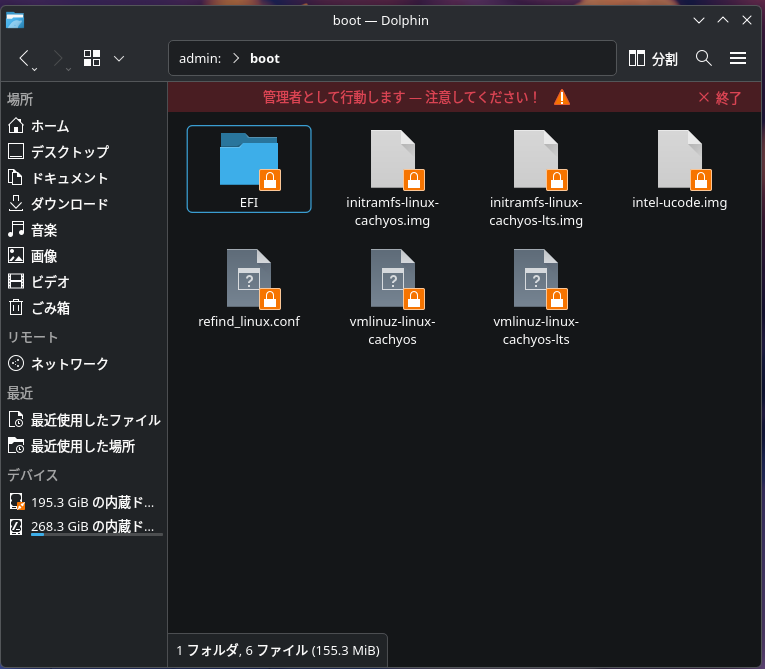
Actually, I have two old Macs set up as dual boot machines with CachyOS installed, and I’ve set rEFInd as the boot system.
My iMac (21.5 inch/2011mid) requires an LTS kernel for the screen to become distorted, so I’d like to boot the LTS kernel by default, but the explanations about rEFInd on Google and the Arch wiki are too detailed and I don’t really understand them.
I’m confused because I don’t know what to set in which file and how.
If anyone knows, please let me know.
The easiest and safest way would be to just press TAB in refind after you select what to boot (this screen). This opens a sub-menu where you can tell refind to boot the LTS kernel.
The more advanced but - in the long run - also more comfortable way would to configure /boot/EFI/refind/refind.confaccordingly. To find your PARTUUID, use lsblk -f Scratch that, do what YoYo says and don’t forget to backup the file first!
I believe there is also another way, but that method fails as soon as some or all of your kernels are upgraded next time. Also, it’s dangerous when done wrong so I’d rather not talk about it
PS: of course you could also uninstall the Cachy kernel with the Cachy Kernel Manager or pacman
Thank you.
I’ve seen that explanation before, but mine isn’t actually written that way.
It’s “Boot with standard Options” “quiet nowatchdog splash rw root=UUID=…”
The other lines are written the same way, just with different options and UUIDs. There are only three lines.
[hokuda@cachyos-imac ~]$ paste-cachyos /boot/refind_linux.conf
curl: Failed to open /boot/refind_linux.conf
curl: option --data-binary: error encountered when reading a file
curl: try ‘curl --help’ for more information
[hokuda@cachyos-imac ~]$
so I opened it in a file manager and copied it.
“Boot with standard options” “quiet nowatchdog splash rw root=UUID=740abb4a-735e-43ed-bed4-3b731216c973”
“Boot to single-user mode” “quiet nowatchdog splash rw root=UUID=740abb4a-735e-43ed-bed4-3b731216c973” single
“Boot with minimal options” “ro root=UUID=740abb4a-735e-43ed-bed4-3b731216c973”
I just thought about it, but honestly, isn’t it abnormal in some sense that an error occurs when using the ls command?
If it also occurs when using sudo, then I think it’s a problem, so what should I do?
add by /boot/refind_linux.conf on top this line “Boot with LTS kernel” “quiet nowatchdog splash rw root=UUID=740abb4a-735e-43ed-bed4-3b731216c973 initrd=initramfs-linux-cachyos-lts.img”


 Aah, the possibilities