Let me start by saying that I normally hate “spamming” Topic/post or such for trying to get attention to my problem but this time I feel like I needed to repost/update my problem/issues because it feel different from when I originally posted my problems wondering if there was an issues with just a minor bugs or something like that since I don’t know much about how things work in the background.
but now my problems feel more worrying than then, I have add freeze/crash happen like this like a few time before both on my current pc and my previous once like maybe like 2~3 total before those one, here a link to my first post that I decided to ask if it was something concerning around in this year February ( Computer freeze ) not the first time the problems happen but the first time I decided to ask people about it from the response it was an amdgpu crash, I don’t know and understand if it grave or not so I just let it be but I made a second post when it happen again last week ( Pc/GPU freeze/crash ) but it happen again today… twice I original just updated my last post from last week with my log from my crash earlier today and thought maybe someone would take it a little more seriously now that it happen again, but it just happen again a few hours later(around 7 hours) on the same game, now I am seriously worrying is a kernel or driver issues? or is my GPU the problem and I need to get a new one…
here are all the journalctl logs so far:
February (just found out it now unavailable sadly)
May 1 19:31 ( cafefe5 )
May 8 16:17 ( 875e406 )
May 8 23:14 ( fbf87a2 )
I am seriously asking please to look into this, I really don’t know much about those things/issues… if you can’t help me or don’t think this is the place to look for help for my problem can you kindly please tell me where to look/ask for it?
hello i just want to share my experince as well with amdgpu
since i don’t know what your gpu is, maybe you can start by giving the output of
inxi -G
also if it was (by chance) 9000 series, you might check this thread, because i already post my experience and how to tackle it in there (tldr, it in case it was quite same problem, too high freq speed reading from my experiences) also as bonus, you might want to tune down the undervolting (mine was unstable with -110 in latest driver, now i change it to -90)
I also did a quick read at the post you link and I don’t understand much about underclocking? and overclocking. I don’t overclock my gpu because I fear to break it by accident.
to be a little bit more specific on my problem compare to the one I linked before and your, my sound does stop on my current crash.
also I am going to hit the bed I need to sleep so, if you answer I will answer you first thing when I woke up in the morning later on. also if you need any other information about my system here they are:
Motherboard - B650 EAGLE AX
CPU - AMD Ryzen 7 7800X3D (16) @ 5.05 GHz
Ram - 32gb
I should have maybe have around 750watt? or something like that for my power supply.
DE: KDE Plasma 6.6.4
Kernel: Linux 7.0.5-1-cachyos
and I use 2 monitors 1920x1080 1 60H and 1 over 120H but capped at 120H
if you need anything else for information just ask! thank you for taking time to looking into this problem!
hmmm, the thing is (let me make a simple terms)
from my experiences with 9000 card atleast
in linux, it’s somehow reach beyond the designed clock
let say my gpu clock based on factory is like this
normal : 2500mhz
OC : 2650mhz - 2900mhz
now in linux (do note this is from my experiences)
even in normal state, it can even reach 3200mhz
this is the main cause that the gpu crash on my side, because it’s totally over normal limit
so how do i fix it?
i use lact it’s not for overclocking, but more to tame the abnormal clock speed, so it’s prevent the crash
then the rest is what i post in that thread
tl;dr:
install lact
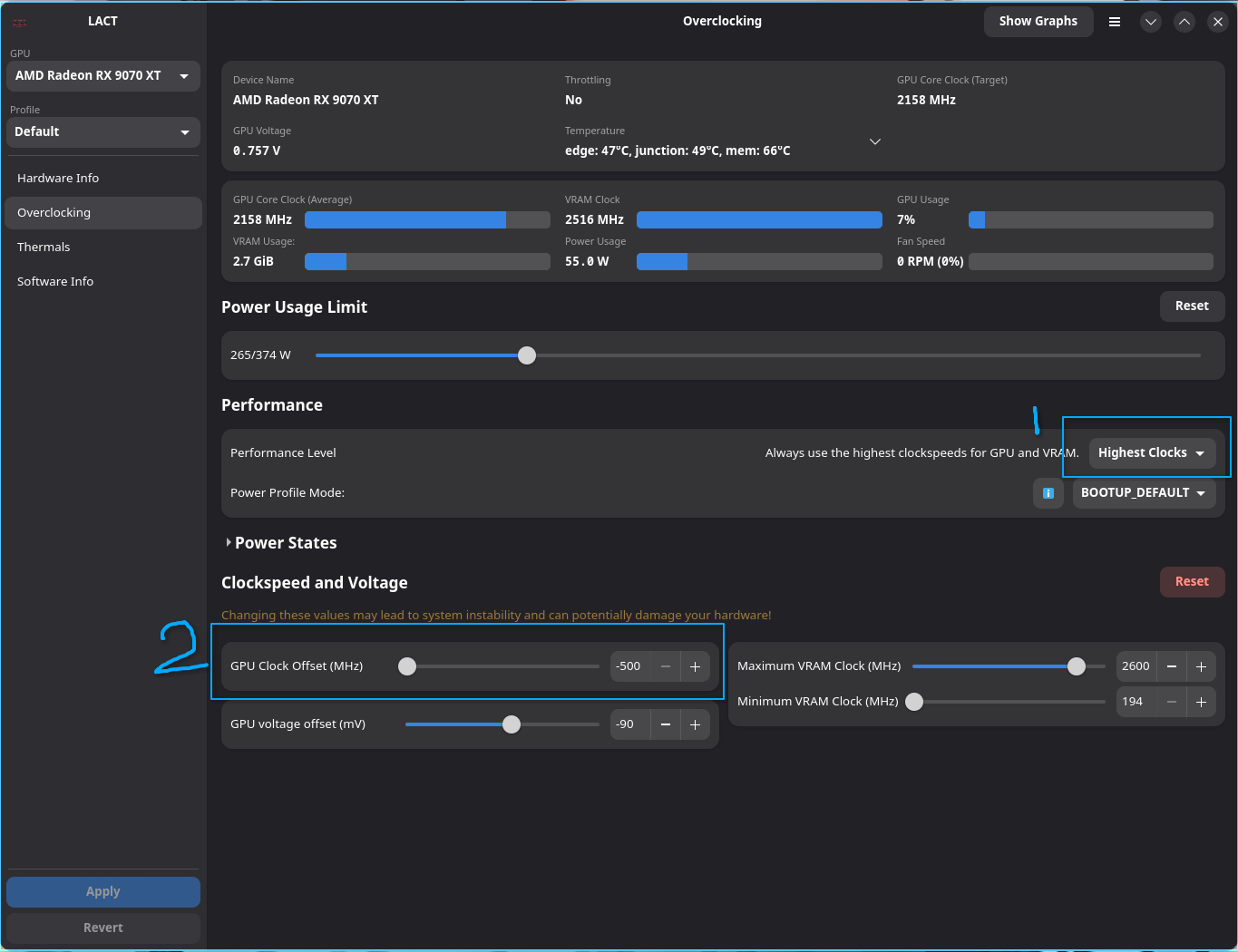
enable overclocking (lact should have a pop up for that i believe, and it will write to /etc/modprobe.d/99-amdgpu-overdrive.conf )
set the performance level to Highest Clocks (don’t use Auto)
set the GPU clock offset to -500 (basically downclock) for safety measure
check in game, monitor with lact the max gpu core clock to match your factory value, if it’s lower reduce the offset bit by bit until you got your desire clock / factory clock speed
that’s what i did to tame may 9070xt to prevent the abnormal clock speed, if i want to OC, i just set the performance level to manual, and adjust the rest (exclude the power states)
also a bonus, do limit your fps to save power usage as well, via mangohud for example.
Have a nice rest ~
So about the OC, I think that it would be weird to be it(could be that too not denying it)
First - is that dead as disco demo is not as demanding as some game I played just fine like Stellar Blade, FF16, Hunt showdown and The Finals which would be weird (or I just don’t know how OC work).
Second - I always limit my fps to 120fps if I feel like I can run the game at 120fps if it stable otherwise I run it at maybe 90fps if I have the option otherwise 60fps, I don’t want to overwork my GPU after all
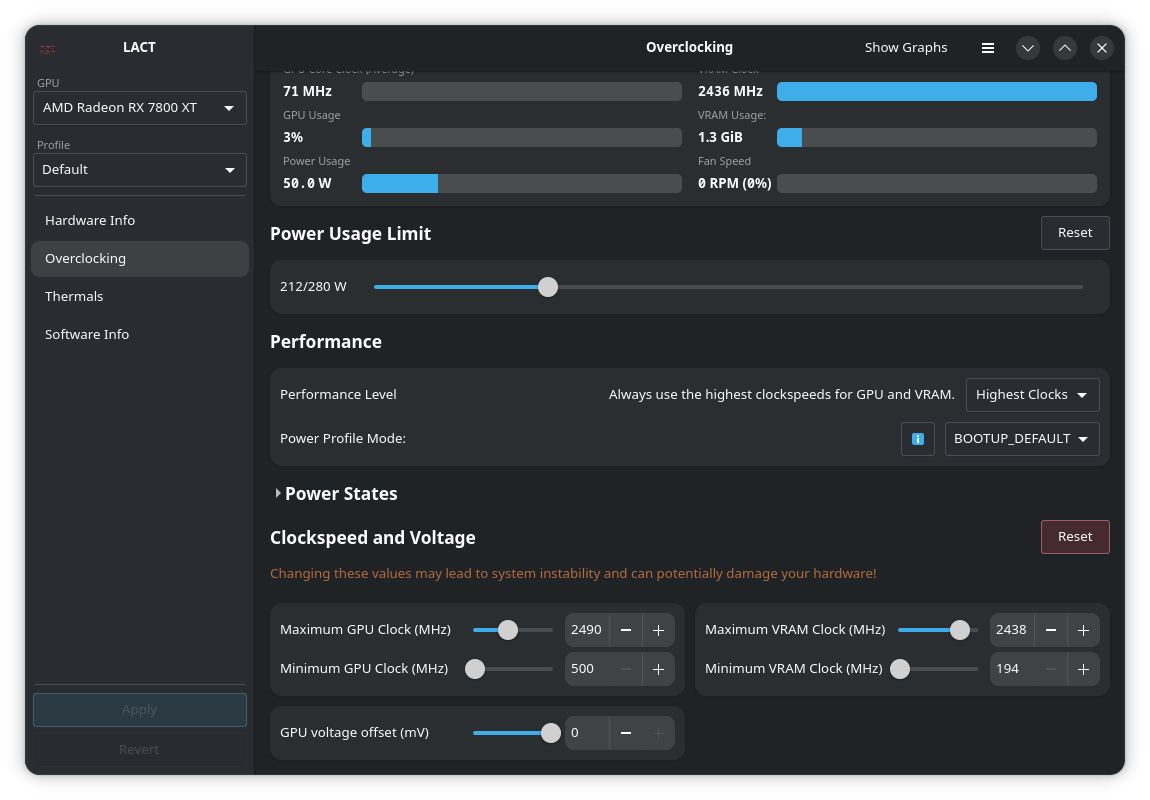
Third - I installed Tact and played a game/run of Dead as Disco demo (the game that crashed my amdgpu twice… if that my amdgpu that crashed at all) and from Tact the game seem to over around 1300~MHz and from the specific of my card I should be fine around 2250~2500-ish, which is why I think that would be weird in my cases to be the problems.
honestly I wish I could give you more information but I don’t know what else to say…
edit: I should specifies I didn’t crash during the test, also between the 7 hours between the crash yesterday I played Dead as Disco demo just fine once for like maybe an hour or two before closing the game and coming back to it to get it crash after a few minute.
yeah i know, it was my experiences too in early 2026 (i think back then in Jan)
it was fine in december, no lact at all
but since (i forgot the version number) mesa driver update, it’s start going haywire, and yes it is intermittent , i mean even numerous test, same games, same settings (without lact) i do sometimes got crash around 4/20+ testing, and it’s super random
then after that i use any kind of tools and do some digging via reddit etc, that sometimes we can get incorrect number of speed clock, even it’s only occur in 1 ~ 3s, it would crash (hence the intermittent) also when using lact and auto profile, i also noticed this kind of weirdness,
even though i limit the power to 265w via lact, there is lot of power spike to even 350w, and during that power spike, the speed clock is boosted too, to 3k mhz+ (this still happens even i limit my fps to 120)
then i digging again, how to proper OC via lact in linux (the hard way, after so many crash, even with some kernel boot parameter didn’t help much), and found the stable way to limit the core clock speed + wattage usage is by use highest clock profile, then after that it’s smooth sailing for me until now
the things that most people troubled is debugging the intermittent crash / bug (kinda same as development cycle tbh), so that’s why i suggest try one by one any method you can think of, then do intense testing for it
the life of QA is so hard, especially finding intermittent bug LMAO
oh perhaps because of the different card architecture (mine was 9000 series, while you 7000 series)
ok then, i guess you can try the highest clock only
try several test, if it’s stable then you’re fine
if you still got crash, try reducing your maximum gpu clock bit by bit, maybe start -100 at a time
then repeat, test again
also you can start monitoring via Show Graphs button on your 2nd monitor, so you can track it, and maybe glance few times if there is abnormal on the gpu clock / gpu power
I’m sure there is no need to be seriously worried.
Both the games you mentioned in your last post - Way Way West and Dead as Disco are Windows games which were only released on Steam in the last couple of weeks. Both are in Early Access - so they are not finished yet. It is not surprising that they can cause problems.
Can you play other, older, games OK? Does the computer work OK aside from playing games?
If so, i seems to me you have two choices. You can accept that these two particular games don’t work on your system at the moment and wait until their full release next year. Or you can read about people having similar problems to yours on ProtonDB, Steam, the games’ websites/Discord channels and so on. and try some of the solutions they suggest.
my computers have only crash so far from playing game, I don’t remember all my crash but I do remember one being The Finals which is not really recent but since it an online game that getting regular update I guess that may have been an issues? also I bought Dead As Disco cause I am a psycho welling to take risk for my amusement I guess? and I played like 6 hours today and I didn’t get any problem… maybe the demo was the problem? I did play those 6 hours in three session but that pretty much similar to when I played the demo… which is more confusing… or maybe the demo was the problem somewhere?
the only other difference is that I added game-performance as a launch option but that all, I wanted to play normally and see if it crash my gpu before trying to “debug” with anything related to Lact