That analogy only works if you immediately give remote root access to your PC to whoever answers 
No, that’s exactly how it works, you explore AUR, and when you decide to install something you must also read the pkgbuild and be confident in your sources before you invite disaster by supplying your credentials.
AUR is just the list of instructions to install.
Keep in mind that there are two attack vectors here: the project being built, and the pkgbuild file itself. “…the list of instructions to install”. Remember, it’s “just” a Bash script that you’ll be running as root.
But let’s say you have done due-diligence and checked all of the source projects. Cool. Now you just have to check the pkgbuild files every time an upgrade comes along. However, the more packages you have from the AUR, the less likely you are to pick up if something fishy is going on, particularly if a bunch get updated at the same time (security fatigue). And, that’s assuming that you’re technically able to notice the fishy stuff. Hell, I’m not sure I’d notice something fishy going on with a cursory look at a pkgbuild file.
On a slight tangent, I think this also leans into the other thread about newbies and how much hand-holding people should provide. A newbie isn’t going to have a clue about supply-chain attacks or vetting open-source projects, but…. They do know that Arch based distros are cool because of the AUR, and that people keep telling them to use it.
Personally I trust the big packages there, but try to keep AUR usage down as much as possible.
(And yes I know that the standard Arch repos are vulnerable to the same type of attacks, but they’re lot more scrutinized than the AUR.)
Yes, obviously there is a certain amount of risk; this would be my assessment also - and sometimes it’s just a judgement call whether you trust your source or not.
I’m happy with what I have, but I come across many that make me highly suspicious… and who can forget the recent ‘google-chrome-bin’ when Google already supply a binary install via AUR.
So I guess whilst we’re feeling smug about our existing choices, there’s always a risk.
Proceeding blindly always carries risks.
But with your eyes open there are still potential risks… but then we get into a theoretical discussion, whilst in practice there’s a common ‘continuity’ paradigm, I’ve never had an issue - so I assume that I’ll be okay going forward (obviously not a valid assumption…).
Something that occurred to me as I was writing the above post, was that we should have a forum for grumpy senior developers/sys-admins called “Get off my Lawn” 
I’ve given shelly a try over the last few days and personally, I don’t think it’s ready to be the default package manager ui. I say this because I’ve experienced a number of issues, all minor, but when you add them up, I think more polish is needed. Not sure I can remember all issues I’ve seen but, off the top of my head:
- Process hiatus. There seem to be long pauses at various points where the user is not aware of any actions being taken. When I first encountered this I killed the shelly process and this left my system in an unbootable state. Snapshots to the rescue.
- Progress bars during package download, etc. either at 0% or 100%, nothing in between (this might be related to 1)
- The text above the progress bar on the pop-up model window when installing a package always at 100%, the progress bar works ok though.
- The log messages showing [err] for normal info messages.
- After removing aur packages, the “Remove aur packages” button remains enabled.
- shelly-notifications does not have a .desktop file. Annoying because if you want kde to autostart shelly-notifications you need to create one.
I think shelly is much better looking and seems more modern than octopi so I’ve kept it just to see how it develops, but it’s not for me just yet. I do question the use of a GTK app as a default for cachyos when kde is the default desktop (I believe), but that’s just me.
i’ll have u know i had to take a screenshot of that cute text > image.
i saved it as a PNG… LOL
With AUR you can view exactly where packages are coming from, verify legitimacy with certificates and signatures, etc. You can see that things are coming directly from the developer and what commands it runs as root. You can contain things with e.g. apparmor. you have options.
It really depends on the pkgbuild. Many/most? are quite simple and clearly not doing anything nefarious. Others are much less clear (and thus harder to trust)
Supply-chain attacks are here for all of us, and are going to get worse. Honestly run as little as possible (AUR or otherwise). The traditional Linux security model isn’t really built to handle this well.
Just installed Shelly, updated packages and kernel 7.0.2, updated my flatpaks and appimage. No issues. Pretty slick. Uninstalled Octopi since I didn’t use it anyway and most likely not shelly but its nice to keep 1 Manager. I’ll use it for the next month and see if I find issues. Great Job Dev’s
I just installed it on my other computer…
The ‘build noise’ from .NET is deafening
.NET build noise
AUR Explicit (1): shelly-2.2.1-1
:: (1/1) Downloaded PKGBUILD: shelly
  1 shelly                           (Build Files Exist)
==> Packages to cleanBuild?
==> [N]one [A]ll [Ab]ort [I]nstalled [No]tInstalled or (1 2 3, 1-3, ^4)
==> yes
  1 shelly                           (Build Files Exist)
==> PKGBUILDs to edit?
==> [N]one [A]ll [Ab]ort [I]nstalled [No]tInstalled or (1 2 3, 1-3, ^4)
==> a

:: Proceed with install? [Y/n]
==> Making package: shelly 2.2.1-1 (Sat 02 May 2026 08:21:43 +07)
==> Retrieving sources...
  -> Downloading shelly-2.2.1.tar.gz...
  % Total    % Received % Xferd  Average Speed  Time    Time    Time   Current
                                 Dload  Upload  Total   Spent   Left   Speed
  0      0   0      0   0      0      0      0           00:05              0
100  5.54M   0  5.54M   0      0 504.4k      0           00:11         980.0k
==> WARNING: Skipping verification of source file PGP signatures.
==> Validating source files with sha256sums...
    shelly-2.2.1.tar.gz ... Passed
:: (1/1) Parsing SRCINFO: shelly
==> Making package: shelly 2.2.1-1 (Sat 02 May 2026 08:21:55 +07)
==> Checking runtime dependencies...
==> Checking buildtime dependencies...
==> Retrieving sources...
  -> Found shelly-2.2.1.tar.gz
==> Validating source files with sha256sums...
    shelly-2.2.1.tar.gz ... Passed
==> Removing existing $srcdir/ directory...
==> Extracting sources...
  -> Extracting shelly-2.2.1.tar.gz with bsdtar
==> Sources are ready.
==> Making package: shelly 2.2.1-1 (Sat 02 May 2026 08:21:56 +07)
==> Checking runtime dependencies...
==> Checking buildtime dependencies...
==> WARNING: Using existing $srcdir/ tree
==> Starting build()...
Restore complete (7.1s)
  PackageManager net10.0 linux-x64 succeeded with 12 warning(s) (5.0s) → PackageManager/bin/Release/net10.0/linux-x64/PackageManager.dll
    /home/ben/.cache/yay/shelly/src/Shelly-ALPM-2.2.1/PackageManager/Alpm/Utilities/PackageListBuilder.cs(19,38): warning CS8600: Converting null literal or possible null value to non-nullable type.
    /home/ben/.cache/yay/shelly/src/Shelly-ALPM-2.2.1/PackageManager/Aur/AurPackageManager.cs(648,21): warning CS4014: Because this call is not awaited, execution of the current method continues before the call is completed. Consider applying the 'await' operator to the result of the call.
    /home/ben/.cache/yay/shelly/src/Shelly-ALPM-2.2.1/PackageManager/Aur/AurPackageManager.cs(676,9): warning CS4014: Because this call is not awaited, execution of the current method continues before the call is completed. Consider applying the 'await' operator to the result of the call.
    /home/ben/.cache/yay/shelly/src/Shelly-ALPM-2.2.1/PackageManager/Aur/AurPackageManager.cs(912,17): warning CS4014: Because this call is not awaited, execution of the current method continues before the call is completed. Consider applying the 'await' operator to the result of the call.
    /home/ben/.cache/yay/shelly/src/Shelly-ALPM-2.2.1/PackageManager/Alpm/AlpmManager.cs(628,72): warning CS8629: Nullable value type may be null.
    /home/ben/.cache/yay/shelly/src/Shelly-ALPM-2.2.1/PackageManager/Alpm/AlpmManager.cs(1063,38): warning CS8600: Converting null literal or possible null value to non-nullable type.
    /home/ben/.cache/yay/shelly/src/Shelly-ALPM-2.2.1/PackageManager/Alpm/AlpmManager.cs(1291,38): warning CS8600: Converting null literal or possible null value to non-nullable type.
    /home/ben/.cache/yay/shelly/src/Shelly-ALPM-2.2.1/PackageManager/Alpm/AlpmManager.cs(1874,35): warning CS8625: Cannot convert null literal to non-nullable reference type.
    /home/ben/.cache/yay/shelly/src/Shelly-ALPM-2.2.1/PackageManager/Alpm/AlpmManager.cs(1875,35): warning CS8625: Cannot convert null literal to non-nullable reference type.
    /home/ben/.cache/yay/shelly/src/Shelly-ALPM-2.2.1/PackageManager/Alpm/AlpmManager.cs(1876,38): warning CS8625: Cannot convert null literal to non-nullable reference type.
    /home/ben/.cache/yay/shelly/src/Shelly-ALPM-2.2.1/PackageManager/Alpm/AlpmManager.cs(1877,38): warning CS8625: Cannot convert null literal to non-nullable reference type.
    /home/ben/.cache/yay/shelly/src/Shelly-ALPM-2.2.1/PackageManager/Alpm/AlpmManager.cs(1892,55): warning CS8604: Possible null reference argument for parameter 'pkgName' in 'void AlpmManager.PercentLoggerHandler(string type, string pkgName, int percent, long bytes = 0, long totalBytes = 0)'.
  Shelly-CLI net10.0 linux-x64 succeeded with 11 warning(s) (22.1s) → out-cli/
    /home/ben/.cache/yay/shelly/src/Shelly-ALPM-2.2.1/Shelly-CLI/Commands/Standard/UpgradeCommand.cs(61,18): warning CS0219: The variable 'totalInstalledSize' is assigned but its value is never used
    /home/ben/.cache/yay/shelly/src/Shelly-ALPM-2.2.1/Shelly-CLI/Commands/Standard/RemoveCommand.cs(81,30): warning CS0168: The variable 'e' is declared but never used
    /home/ben/.cache/yay/shelly/src/Shelly-ALPM-2.2.1/Shelly-CLI/Commands/Utility/CheckPackageUpdatesNonRootCommand.cs(87,21): warning CS4014: Because this call is not awaited, execution of the current method continues before the call is completed. Consider applying the 'await' operator to the result of the call.
    /home/ben/.cache/yay/shelly/src/Shelly-ALPM-2.2.1/Shelly-CLI/Commands/Utility/CheckPackageUpdatesNonRootCommand.cs(84,13): warning CS4014: Because this call is not awaited, execution of the current method continues before the call is completed. Consider applying the 'await' operator to the result of the call.
    /home/ben/.cache/yay/shelly/src/Shelly-ALPM-2.2.1/Shelly-CLI/Commands/Utility/CheckPackageUpdatesNonRootCommand.cs(168,17): warning CS4014: Because this call is not awaited, execution of the current method continues before the call is completed. Consider applying the 'await' operator to the result of the call.
    /home/ben/.nuget/packages/spectre.console/0.49.1/lib/net8.0/Spectre.Console.dll : warning IL2104: Assembly 'Spectre.Console' produced trim warnings. For more information see https://aka.ms/il2104
    /_/src/Spectre.Console/Widgets/Exceptions/TypeNameHelper.cs(78): warning IL3002: Spectre.Console.TypeNameHelper.ProcessType(StringBuilder,Type,TypeNameHelper.DisplayNameOptions): Using member 'System.Reflection.Module.Name.get' which has 'RequiresAssemblyFilesAttribute' can break functionality when embedded in a single-file app. Returns <Unknown> for modules with no file path.
    /_/src/Spectre.Console/Widgets/Exceptions/TypeNameHelper.cs(153): warning IL3002: Spectre.Console.TypeNameHelper.ProcessGenericType(StringBuilder,Type,Type[],Int32,TypeNameHelper.DisplayNameOptions): Using member 'System.Reflection.Module.Name.get' which has 'RequiresAssemblyFilesAttribute' can break functionality when embedded in a single-file app. Returns <Unknown> for modules with no file path.
    /home/ben/.nuget/packages/spectre.console.cli/0.49.1/lib/net8.0/Spectre.Console.Cli.dll : warning IL2104: Assembly 'Spectre.Console.Cli' produced trim warnings. For more information see https://aka.ms/il2104
    /home/ben/.nuget/packages/spectre.console.cli/0.49.1/lib/net8.0/Spectre.Console.Cli.dll : warning IL3053: Assembly 'Spectre.Console.Cli' produced AOT analysis warnings.
    /_/src/Spectre.Console.Cli/Internal/Modelling/CommandModel.cs(50): warning IL3000: Spectre.Console.Cli.CommandModel.GetApplicationFile(): 'System.Reflection.Assembly.Location.get' always returns an empty string for assemblies embedded in a single-file app. If the path to the app directory is needed, consider calling 'System.AppContext.BaseDirectory'.

Build succeeded with 23 warning(s) in 34.7s
And now we’re faced with a confusing and noisy non-interactive graphic, which appears completely useless noise to the interface as it comes right underneath an actual list of dependencies…
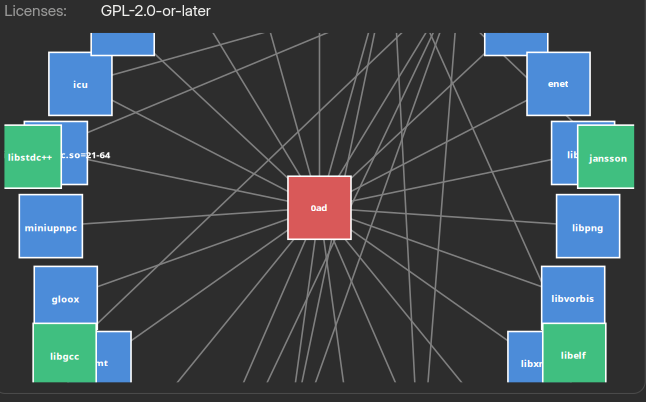
But most interestingly, typing a single character in the Search window now causes it to crash out of existence.
So my stance remains - terminal still rules the roost here, and Octopi is the most reliable GUI option, though it won’t include snaps or flatpaks.
Ohmagawd. That sounds… complicated 
That was my reaction like -woah, new interface then… WTF is that really complicated graphic? then I realised that it was a kind of map of the dependencies of the initially selected ‘0ad’ app and also completely non-interactive.
Then I decided to test my favourite search (available via flatpak and AUR) ‘plex’ to find Plex-HTPC… and hitting the P, the whole shebang just crashes out.
we should have fixed that and could you open an issue so I can track what happened. Also our cli slaps give it a shot
There is one thing that I find annoying with Shelly.
When you install an application, there is no listing of where the associated files are located.
This is a problem when the application does not create a menu entry, and you have to create it manually.
You then have to search for where the executable is located. Octopi has this function.
A ‘nice to have’ would be support for the Chaotic AUR repository.
Shelly supports it just fine.
If you don’t see anything from Chaotic AUR, then it means you don’t have the proper entries for it in your /etc/pacman.conf.
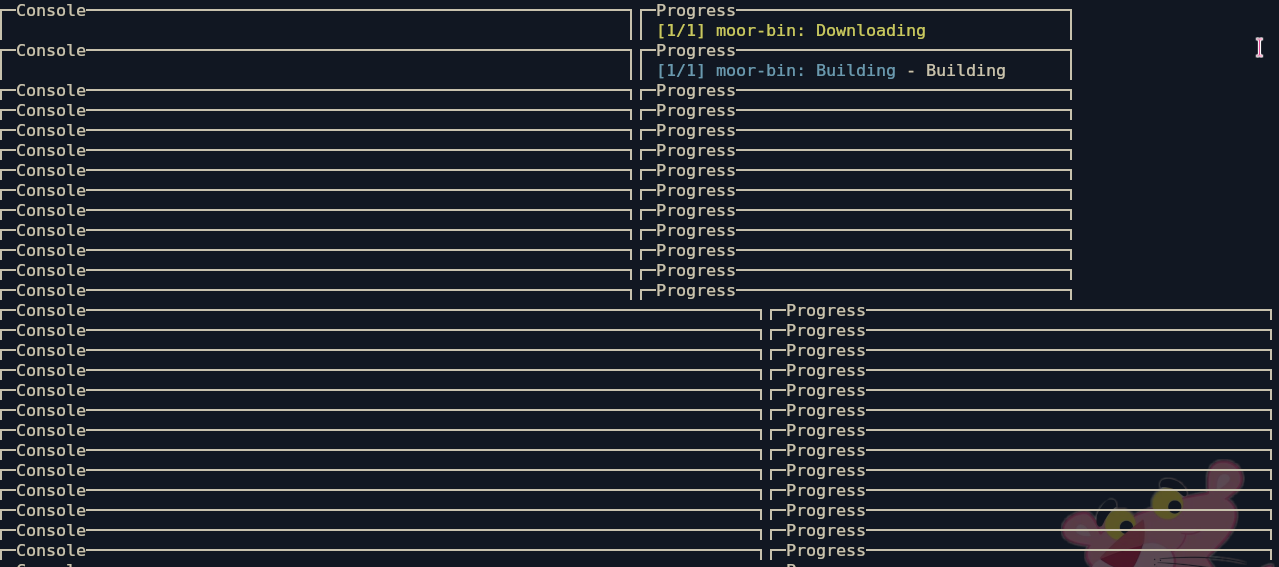
Are you on basic bash?
I don’t understand what ‘basic bash’ means, but I use fish, zsh and bash.
Strangely, when finally succeeding to install moor-bin - it completely skips the package build review… that’s pretty concerning as this project is supposedly beyond 1.0 and should have such basic features and safeguards in place.