Noita recent sudden onset of poor performance

The game has ran fine for months with no issues on this system.

Starting this past week, it started getting severe slowdown. This happens semi-regularly, a few seconds at a time. Frame rate, normally pegged pretty close to 60 unless there is a lot of on screen things happening, is dropping below 30 even when just standing at the mountain entrance with a new game and not pressing any inputs.

Things I have tried:

  1. Full system update, both pacman and paru
  2. Various flavors of Proton, including several of the GloriousEggroll builds
  3. Adjusting settings including vsync in game
  4. Adjusting settings including vsync in the Display Configuration (including turning off 2nd monitor)
  5. Adjusting settings in the Nvidia X Server Settings, including disabling dynamic clocks temporarily
  6. Verifying game file integrity
  7. Reinstalling anyways, despite 100% integrity
  8. Using the LTS build
  9. Monitoring system resources while playing (more on this)
  10. Using MangoHUD while playing (more on this)
  11. Installed Noita on a similar spec system with a CachyOS that is rarely updated… ran great. Updated everything, still ran great.

Regarding 8, the only thing I see besides a steady 30% GPU usage is right around 30% CPU usage that spikes to around 40% CPU usage, roughly around the time I am seeing the slow downs.

Regarding 9, the only additional info is just seeing the time frame graphs form a brief plateau of high frame times and then just as suddenly go back to ~16ms. It does also say the GPU is eating 3 million watts of power, but since I am not currently on fire, I assume this is an error.

I have even tried just leaving the game running for 10 minutes, to see if the frametimes would settle down… they do not.

Truly I am out of ideas, any suggestions would be greatly appreciated.

System specs:

  • Up to date CachyOS
  • Intel 7700k (4 core, hyperthreading, 4.2Ghz)
  • 16GB RAM
  • MSI RTX 3060Ti
  • DELL 1080p 165Hz monitor

EDIT: Forgot to mention, no other games tried seemed to be affected, just Noita. Noita itself hasn’t had an update in 18 months, probably wont see any more. No mods installed.
I know this won’t really help you, but on my machine Noita still runs as smooth as ever, so it must be somehow related to your rig/setup.

I would rule the GPU out, because Noita mainly runs on CPU power. I use a Ryzen 7 8700G here, so that would be comparing apples and oranges.

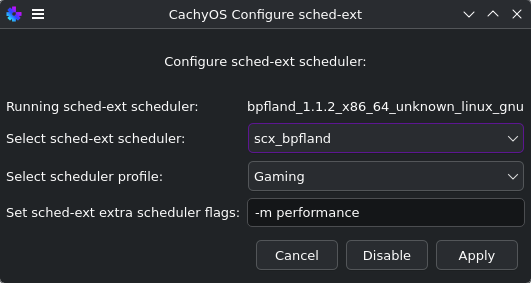
You say it happens sporadically. Maybe it has to do with the scheduler? This is my setup (and I believe haven’t touched that since I installed Cachy a year ago) :

But this is just a shot in the dark. Are you doing other things in the background that might affect the performance?

Also, which Desktop Environment are you on? And which version of Noita do you use? Steam? I use the GOG one, added to Steam manually, using proton-cachyos-11.0 (steam linux runtime), but that should normally not make much of a difference, I’d guess.

A snippet of my specs:

╰─> inxi -SG 
System:
  Host: HAL9001 Kernel: 7.1.3-2-cachyos arch: x86_64 bits: 64
  Desktop: KDE Plasma v: 6.7.2 Distro: CachyOS
Graphics:
  Device-1: NVIDIA GA106 [GeForce RTX 3060 Lite Hash Rate] driver: nvidia
    v: 610.43.03
  Device-2: Advanced Micro Devices [AMD/ATI] Phoenix1 driver: amdgpu
    v: kernel
  Display: wayland server: X.org v: 1.21.1.24 with: Xwayland v: 24.1.13
    compositor: kwin_wayland driver: gpu: nv_platform,nvidia,nvidia-nvswitch
    resolution: 1: 1920x1080~60Hz 2: 1920x1080~60Hz
  API: EGL v: 1.5 drivers: nvidia,radeonsi,swrast
    platforms: gbm,wayland,x11,surfaceless,device
  API: OpenGL v: 4.6.0 compat-v: 4.6 vendor: nvidia mesa v: 610.43.03
    renderer: NVIDIA GeForce RTX 3060/PCIe/SSE2
  API: Vulkan v: 1.4.350 drivers: nvidia,radv surfaces: N/A
  Info: Tools: api: clinfo, eglinfo, glxinfo, vulkaninfo
    de: kscreen-console,kscreen-doctor gpu: nvidia-settings,nvidia-smi
    wl: wayland-info x11: xdpyinfo, xprop, xrandr

PS: it might help to also ask in the Noita forum on Steam, I guess the chances to find help there are not too bad…

Thanks for the info. I have not touched schedulers before, so I am reading up on the tutorial at sched-ext Tutorial | CachyOS before I change anything. Current setting is scx_beerland though.

DE is Plasma, latest version of Noita, on Steam. Nothing running in background other than Steam.

I’m afraid I can’t be of much help here, sorry…

Could be that I got the scheduler idea from this video.

I think the Scheduler GUI in Cachy makes it pretty easy to “just” try another scheduler, but of course studying the Wiki first is always the best approach :+1:

I was using the same scheduler without the performance flag set, and setting it did massively improve stability for me. It’s worth a try.

Tried a couple of different schedulers, no effect. Worth noting that the slowdown does not occur in the ESC menu. It really seems to be game logic that is only choking on this particular machine, and wasn’t a week ago. Truly odd.

Then I am out of ideas here. Maybe someone else with a little deeper understanding of these things joins in…

I tried bpfland with the Gaming profile, and Cake with the gaming profile, LavD with gaming profile. Performance was unaffected.

Did you set the flags for it though? -m performance -w is low latency mode.

I had not, but I just did, still getting the intermittent periods of lag.

EDIT: Tried Proton Experimental and HotFix, no dice. I’ve also just let the system set idle with nothing but System Manager running, and the CPU usage doesn’t spike.

So, everything seems fine with the system under every test (even used OCCT to test the CPU, runs cool, and checked the SMART status of the nvme that the game is installed on, no errors).

The software runs fine on two other computers with near identical version of CachyOS installed (different hardware though).

But this game and only this game won’t run in a stable way on this specific machine.

There’s two more options I can think of before it’s guaranteed to be a game issue. Try the LTS kernel and if that doesn’t work, try the nvidia-580xx-open-dkms package. If the nvidia driver fixes it, that means its an Nvidia issue and you can just test as new patches come out.

Your GPU is supported by it and it’s the current stable build.

Already tried the LTS build, as detailed in my first post. No worries though, I listed a lot of things I tried. I’m pretty sure we are already on that nvidia package, as I saw it during the system update I did to try and address the issues. How can I check which driver I am currently using?

Yeah I missed the LTS build thing.

If you didn’t select it on purpose, you’ll be on the latest 610 drivers. You can always check by opening your package manager and searching nvidia.

You can also run a pacman -Qs nvidia in the terminal.

In the case of Cachy it’s installed alongside its kernel modules through linux-cachyos-nvidia-open or similar.

But for the 580 drivers you will have to replace that with nvidia-580xx-open-dkms

Although looking at the specs HardCode gave you do have the same GPU so that might just be a massive dead end waste of time.

As I wrote earlier, I’d rule the GPU out. Noita does not care about the GPU much, being a mere 320x200 (or something the like) with no 3D execandy at all. It’s pure CPU calculated physics that sometimes slows even the best machines to a grinding halt, but just standing near the entrance to the mountain should never be a problem…

I’m really interested if someone has a solution here.

Oh yea, I am on 610. Tried reverting… now only the LTS kernal will boot, but unfortunately it did nothing to the weird slowdowns. I made sure not to put any of the downgraded packages on the ignore list, so I will just do a system update to get back up to most recent.

Have you disabled Steam Game Recording and the Overlay? Try LD_PRELOAD="" %COMMAND% in the launch options. If that doesn’t work I don’t know man, somebody might show up.

I have disabled overlay before, and dont use recording.

I loaded up the hardly ever used Win10 install on that system, loaded into steam, and played Noita… the behavior does not persist there. Definitely not hardware related. I’ll try the preload suggestion next chance I get.

EDIT: Nope LD_PRELOAD="" does not resolve issue sadly.

So, one more thing we can try is disabling steam cloud, flushing the proton prefix and generating a fresh one by running/reinstalling the game again to see if its config or save related.

Right Click the game on Steam, Properties, General, Steam Cloud

/steamapps/compatdata/881100/pfx/is the prefix, just delete or back it up.

Also use Proton 5 for this as it might work better.

Hmm, I have already tried uninstalling/reinstalling, but I did not delete the prefix. I’ll give that a shot.

EDIT: The prefix folder is automatically deleted when uninstalling the game, so essentially I have already tried this.

No, it reinstalls your configs and saves when you leave Steam Cloud on, that’s what I was attempting to get you to try.