I have an update for kernels 7.0.12-1 and 6.18.35 lts from AUR… I guess there is somewhere a mistake…
No, they have not.
Where are you seeing this 7.0.12-1 update?
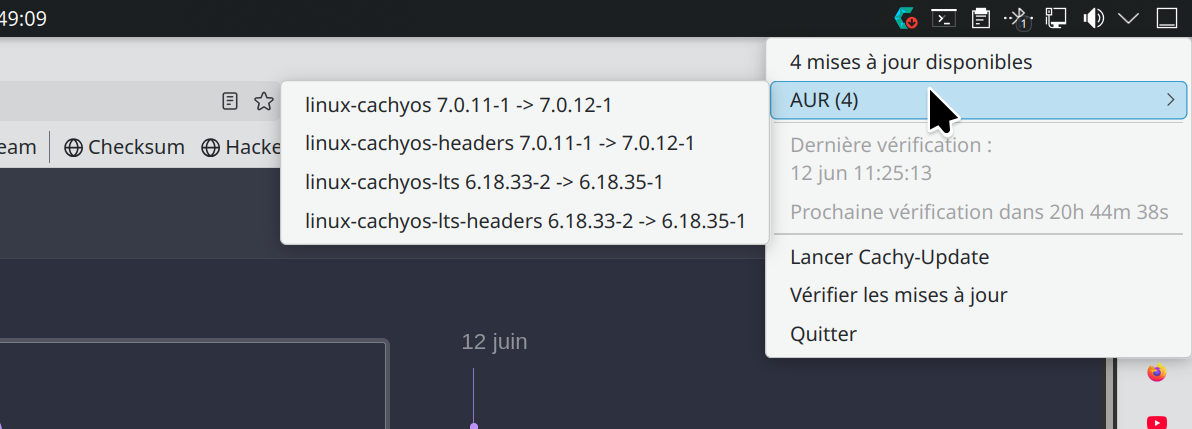
In Cachy-Update Tray. I right-clic and it shows a line:
AUR (4). The detail shows the kernels
Could you please post the output so that we can verify what packages are being updated?

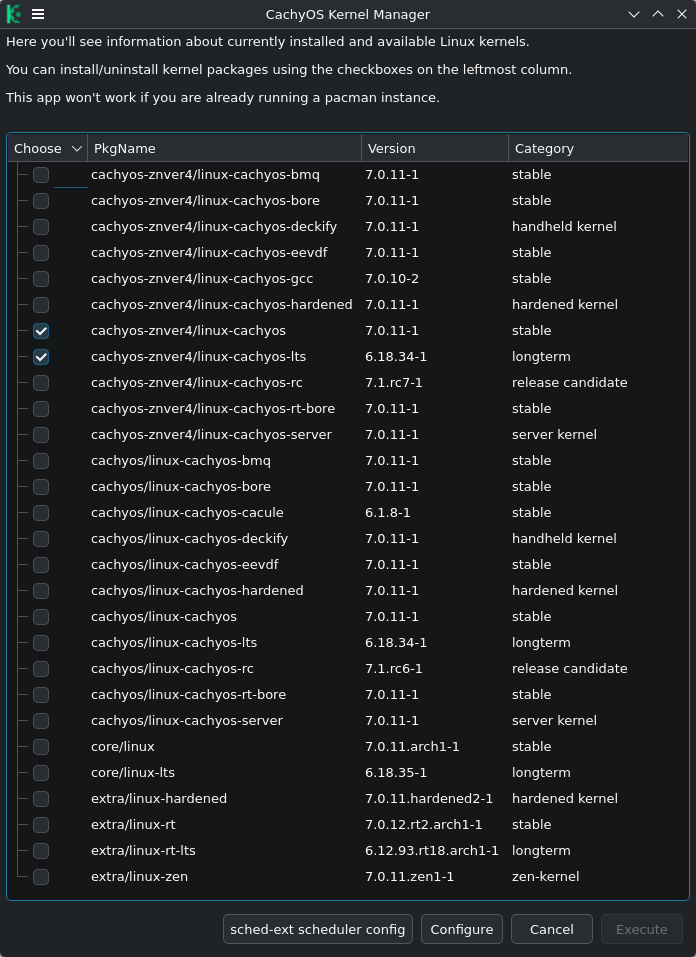
Did you manually add new kernels (unknowingly from the AUR) ?
Check:
This might be a result of the malware?
I’m going to remove everything from AUR, I don’t have more than 5 packages anyway, and read about maclean
Tp be fair here it is:
No, not at all.
This is an official package, maintained by one of the founders of CachyOS. And, yeah, it’s reading as being 7.0.12-1, which is a higher version number than the one in the native repositories.
But it still shouldn’t be called upon in an update. I just ran a test on a computer I only update once a month. I used arch-update, which is the same utility @technopat0971 is using to update. I do have the AUR enabled, but it still only updated to the native repo linux-cachyos 7.0.11-1.
Which likely means you would’ve had to switch over to using the AUR kernels at some point instead of the native ones and it’s now on that trac.
You can get off of it by manually changing (back) to the official repo kernels:
sudo pacman -Syu linux-cachyos linux-cachyos-headers linux-cachyos-lts linux-cachyos-lts-headers
thing is that if you get it from AUR it will be tricky to compile it properly. if chaotic just compiles it in 1 shot it’s not equal to proper (3 steps at least compilation) that should be present in cachyos repos.
Sorry, I forgot that the chaotic AUR isn’t actually part of CachyOS. I just use it on all my distros.
Do you have Chaotic higher up in pacman.conf than the official repos?
it answers :
:: Synchronisation des bases de données de paquets…
core est à jour
extra est à jour
erreur : impossible de trouver la cible : linux-cachyos
erreur : impossible de trouver la cible : linux-cachyos-headers
erreur : impossible de trouver la cible : linux-cachyos-lts
erreur : impossible de trouver la cible : linux-cachyos-lts-headers
means, can’t find the target. Very strange but interesting. And there is no kernel available in the official repos. Another mystery
Cachy’s kernel has always been in the AUR (in addition to cachy repos).
That actually sounds like a similar problem I’ve seen in the past and would explain why you’re getting served AUR packages instead of native.
Your output suggests that you’re only reaching the core and extra repos. Which is definitely not proper.
For example, this is my output from sudo pacman -Syu
❯ sudo pacman -Syu
[sudo] password for dirge:
:: Synchronizing package databases...
 cachyos-znver4 is up to date
 cachyos-core-znver4 is up to date
 cachyos-extra-znver4                                                                                                                          4.3 MiB  5.88 MiB/s 00:01 [---------------------------------------------------------------------------------------------------------] 100%
 cachyos                                                                                                                                     511.7 KiB   846 KiB/s 00:01 [---------------------------------------------------------------------------------------------------------] 100%
 core is up to date
 extra                                                                                                                                         8.2 MiB  3.03 MiB/s 00:03 [---------------------------------------------------------------------------------------------------------] 100%
 multilib is up to date
:: Starting full system upgrade...
All proper repositories listed.
Can you post the contents of your /etc/pacman.conf?
It should be the last entry.
The following paths are commented out with their default values listed.
If you wish to use different paths, uncomment and update the paths.
#RootDir = /
#DBPath = /var/lib/pacman/
#CacheDir = /var/cache/pacman/pkg/
#LogFile = /var/log/pacman.log
#GPGDir = /etc/pacman.d/gnupg/
#HookDir = /etc/pacman.d/hooks/
HoldPkg = pacman glibc
#XferCommand = /usr/bin/curl -L -C - -f -o %o %u
#XferCommand = /usr/bin/wget --passive-ftp -c -O %o %u
#CleanMethod = KeepInstalled
Architecture = autoPacman won’t upgrade packages listed in IgnorePkg and members of
IgnoreGroup
#IgnorePkg =
#IgnoreGroup =
#NoUpgrade =
#NoExtract =Misc options
#UseSyslog
#Color#NoProgressBar
#PrettyProgressBar
#ILoveCandy
CheckSpace
#VerbosePkgLists
ParallelDownloads = 5
DownloadUser = alpm
#DisableSandbox
#DisableSandboxFilesystem
#DisableSandboxSyscallsBy default, pacman accepts packages signed by keys that its local
keyring
trusts (see pacman-key and its man page), as well as unsigned packages.
SigLevel = Required DatabaseOptional
LocalFileSigLevel = Optional
#RemoteFileSigLevel = RequiredNOTE: You must run
pacman-key --initbefore first using pacman; thelocal
keyring can then be populated with the keys of all official Arch Linux
packagers with
pacman-key --populate archlinux.REPOSITORIES
- can be defined here or included from another file
- pacman will search repositories in the order defined here
- local/custom mirrors can be added here or in separate files
- repositories listed first will take precedence when packages
have identical names, regardless of version number
- URLs will have $repo replaced by the name of the current repo
- URLs will have $arch replaced by the name of the architecture
Repository entries are of the format:# [repo-name]
Server = ServerName
Include = IncludePath
The header [repo-name] is crucial - it must be present and
uncommented to enable the repo.
The testing repositories are disabled by default. To enable, uncomment
the
repo name header and Include lines. You can add preferred servers
immediately
after the header, and they will be used before the default mirrors.
#[core-testing]
#Include = /etc/pacman.d/mirrorlist
[core]
Include = /etc/pacman.d/mirrorlist
#[extra-testing]
#Include = /etc/pacman.d/mirrorlist
[extra]
Include = /etc/pacman.d/mirrorlistIf you want to run 32 bit applications on your x86_64 system,
enable the multilib repositories as required here.
#[multilib-testing]
#Include = /etc/pacman.d/mirrorlist
#[multilib]
#Include = /etc/pacman.d/mirrorlist # An example of a custom package repository. See the pacman manpage
fortips on creating your own repositories.
#[custom]
#SigLevel = Optional TrustAll
#Server = file:///home/custompkgs
Something is missing I see
Yep, that’s definitely not a proper CachyOS pacman.conf.
What processor are you using?