There is no plasmalogin-kcm.
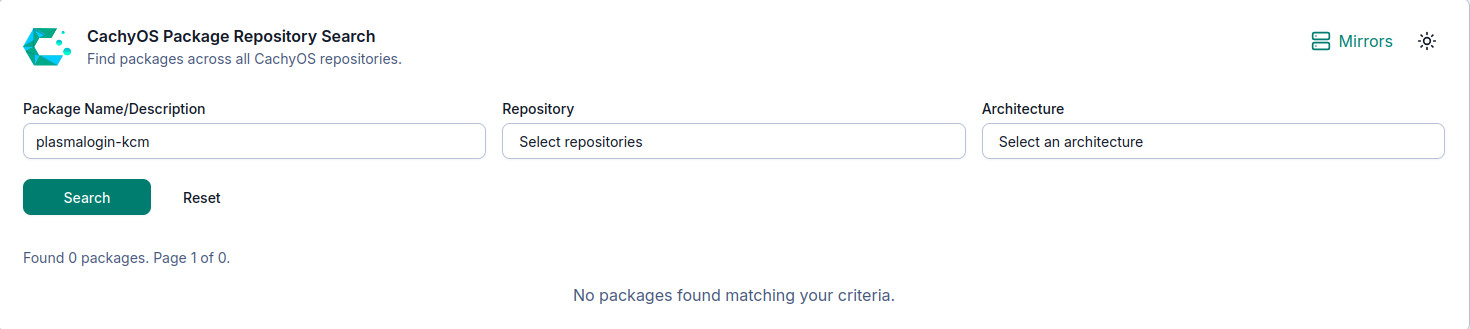
Its bundled in plasma-login-manager
→ sudo pacman -Syu plasma-login-manager
:: Synchronizing package databases…
cachyos-v3 is up to date
cachyos-core-v3 is up to date
cachyos-extra-v3 is up to date
core is up to date
extra is up to date
multilib is up to date
error: target not found: plasma-login-manager
Not in the repos (yet?)
Nope, in fact an update was pushed in the last couple of hours. Well, I’m using V4, so it’s possibly it isn’t in V3 I guess.
You are missing the [cachyos] repo for some reason …
Check your /etc/pacman.conf.
It’s in v3 as well:
paru -Qi plasma-login-manager                                                                                            ─╯
Installed From  : cachyos
Name            : plasma-login-manager
Version         : 6.5.90-1
Description     : Plasma Login Manager
Architecture    : x86_64
URL             : https://kde.org/plasma-desktop/
Licenses        : GPL-2.0-or-later
Groups          : None
Provides        : None
Depends On      : gcc-libs  glibc  kauth  kcmutils  kconfig  kcoreaddons  kdbusaddons  ki18n  kio  kirigami  kpackage
                  kservice  kwindowsystem  layer-shell-qt  libplasma  libxau  pam  plasma-workspace  qt6-5compat  qt6-base
                  qt6-declarative  sh  systemd-libs
Optional Deps   : None
Required By     : None
Optional For    : None
Conflicts With  : None
Replaces        : None
Installed Size  : 1770.98 KiB
Packager        : CachyOS <admin@cachyos.org>
Build Date      : Sat 24 Jan 2026 01:13:12 PM MST
Install Date    : Sat 24 Jan 2026 03:10:16 PM MST
Install Reason  : Explicitly installed
Install Script  : No
Validated By    : Signature
I’ve been using it for a couple of months now.
And Nice catch @cscs 
Its not in any of the architecure-specific repos. Its in [cachyos] (which everyone should have).
But the user commenting above has a malformed conf file.
thanks, i did have some issues prior and i must have missed this. Appreciated
The switch to plasma-login-manager went smoothly on my installation. Thank you for the helpful instructions @ptr1337 and for the new ISO. I Love CachyOS!
Is this enabled by package updates or is this another setting that needs manual update to be consistent with the defaults?
edit:
Checking /etc/fstab it appears all of my mounts have compress=zstd set
Anybody can illuminate for me what is ‘winewayland’? Is this like PROTON_ENABLE_WAYLAND=1 or something different? Searching google and wiki specifically for ‘winewayland’ doesn’t turn up much useful.
I think, and definitely correct me if I’m wrong, that the default compression level of you don’t put anything there in /etc/fstab is 3.
If you want to switch to level 1, you need to add :1 after zstd (compress=zstd:1). Doing that, only makes new files use that compression level. If you want to make existing files use that compression level, you’ll need to take further action.
Just looking things up right now, makes it seem like you can do that using something like sudo btrfs filesystem defragment -r -czstd -L 1 /
Apparently, this would mess up your existing snapshots.
I’m super new to Linux, in general, so let me know if this is right.
You don’t want to do that.. or at least you don’t want to do that without extra steps .
Since CachyOS uses snapper and there will already be snapshots on the system you need to remove ALL snapshots before running that command or you will use MORE disk space.. Then after you may need to rebalance btrfs for everything to truly free up.
Best not to retroactively do it.
I was merely posting what my current state was, as it appears compression was enabled but as you point out I am not sure the level. Since I didn’t explicitly set it the setting is ether from the initial install or the result of the recent update, but I agree is probably should be compress=zstd:1
so how do i customize plasma login manager - i am unable to find [ plasmalogin.conf & /etc/plasma-login.conf ] should i wait for the update ?
KDE… System Settings> Security & Privacy>Login Screen There are buttons at the top to configure the appearance.
Just here to follow the page and drop my two logs for my issue installing handheld edition on my OG ROG Ally Z1E.
Will just wait for fix when there’s any. Thank you for the hard work.
i had to revert back to sddm. Plasma-login-manager reintroduced trashcan issues. In variety, if i tell it to delete a picture, it gets error saying it cannot send to trash. Reverting to sddm fixes it. I think it must make the existing btrfs trash error that much more unstable.
It is right there under fixes in the release notes.. However to fix it on an existing install you are going to need to boot with something like Gparted and move stuff around.
Yeah sorry I just saw that too. My bad. I deleted my post but you were quicker to answer than I could delete the question 
I had a look at Niri+Noctalia and damn I’m tempted to install it and try it, it looks super smooth