Hello CachyOS Enthusiasts,
This is our first release of the year, bringing a host of improvements to the installer, the new display manager (Plasma Login Manager), and much more!
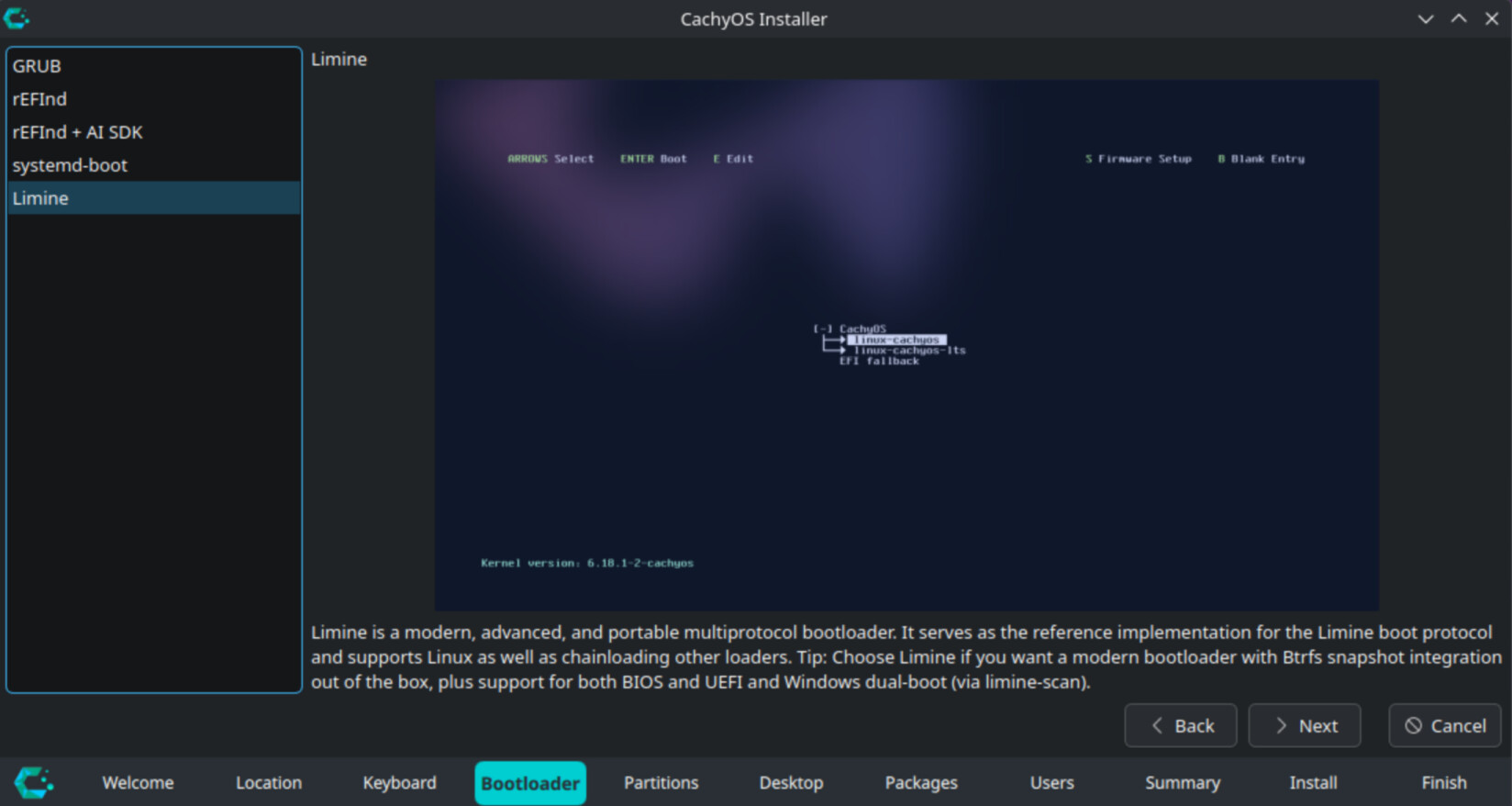
First, we have significantly reworked the installer and added many quality-of-life improvements. The bootloader selection has been moved directly into the installer, featuring a description for each option; Limine is now selected as the default bootloader. Architecture detection now happens at the very beginning of the installation process, which reduces the download size by around 1 Gigabyte. Additionally, we now pass the --needed flag to pacman to avoid reinstalling up-to-date packages. The mount options for NVMes have also been improved when BTRFS is selected, now defaulting to compression level 1.
Next, the ISO has been switched to Plasma Login Manager, and the Live ISO now uses Wayland instead of X11. The ISO now contains a Stable Kernel alongside an LTS Kernel to improve compatibility for newer devices and hardware.
For desktop environments, the Plasma installation now uses Plasma Login Manager instead of SDDM. The Niri settings have been reworked, and we are now using Noctalia. The GNOME installation has been massively cleaned up, and a dedicated subgroup has been added for GNOME applications.
We are also introducing a new service that shows the syncing status of our mirrors. This helps provide visibility into whether the mirror you are using is synchronized. You can check it at: https://packages.cachyos.org/mirrors.
Regarding other key changes, the NVIDIA module now includes the new option EnableAggressiveVblank, which reduces interrupt time for low-latency displays. In terms of hardware detection, CachyOS now installs nouveau-fw for older NVIDIA cards, enabling VA-API support for Kepler-family cards. The “AI-SDK” has received support for newer AMD GPUs, and handheld device detection has switched from “HHD” to steamos-manager with inputplumber. Furthermore, Proton-CachyOS now supports FSR4 ML Frame Generation on RDNA4 and RDNA3 cards. We have added d7vk to proton-cachyos along with DualSense haptic feedback patches. We also removed a patch that was degrading 1% low FPS performance, and protonfixes now better handles DLSS/XeSS/FSR preset selection.
On the bug fixing side, we have resolved installation issues on Framework laptops with Zen 5 CPUs. We also fixed a long-standing issue where users could proceed with the installation even if the EFI partition was too small; this will now be blocked, and the user will be notified. Additionally, support for several controllers has been fixed by updating udev rules to the latest versions. Finally, in CachyOS-Hello, we fixed an issue where it incorrectly showed cachy-update as disabled when it was actually enabled.
Features:
- Installer:
- Moved bootloader selection to Calamares; management is now consolidated into a single package.
- Architecture detection is now performed before the base system installation to reduce download size.
- GRUB now uses LUKS2 for encryption.
- Pass --needed to pacman to avoid installing packages twice.
- Use single-level compression on NVMe for Btrfs
- Removed xorg dependecies on Wayland desktops environments
- ISO:
- Switched to
plasma-login-managerfor the ISO environment. - The ISO now contains both Stable and LTS kernels. The Stable kernel is selected by default.
- Switched the ISO session from X11 to Wayland.
- Switched to
- Netinstall:
- Plasma installations now use
plasma-login-managerinstead of SDDM. - Niri now uses
noctalia-shelland updated dotfiles. - Cleaned up the GNOME installation process.
- Plasma installations now use
- Slides: Fixed typos in the Calamares slides and added a new slide showcasing the Wiki.
- Mirrors: The mirror status page (https://packages.cachyos.org/mirrors) now displays the syncing state of CachyOS mirrors.
- cachyos-settings: Enabled
EnableAggressiveVblankfor the NVIDIA module. This reduces time spent in the interrupt top half for low-latency display interrupts. - chwd:
- Installs
nouveau-fwto enable VA-API support in Nouveau for NVIDIA Kepler-family cards. - Added AI-SDK support for several new AMD GPUs.
- Replaced HHD with
steamos-managerandinputplumber.
- Installs
- Proton-CachyOS:
- Added FSR4 MLFG (Machine Learning Frame Generation) support; automatically enabled when using
PROTON_FSR4_[RDNA3_]UPGRADE - Added
d7vkmodule support. This can be enabled viaPROTON_DXVK_DDRAW=1 - Imported DualSense haptic feedback patches
- Added
WINE_BLOCK_HOSTSto prevent Wine from connecting to specific domains - Automatically enable
ENABLE_HDR_WSI=1when usingwinewaylandon NVIDIA dGPUs - Fixed keyboard layout issues when using
winewayland.drv - Removed a long-standing patch that was causing degraded 1% low FPS
- Patched
protonfixesto better handle DLSS preset selection andlibxess_dx11.dllredirection - proton-cachyos-slr is now used as default in the “gaming-meta”. The native version will be still supported.
- Added FSR4 MLFG (Machine Learning Frame Generation) support; automatically enabled when using
Fixes:
- Limine: Increased boot partition size to 4192MB to accommodate high requirements from
limine-snapper-sync. - Installer:
- The installer now blocks/prevents proceeding if the EFI partition is too small when using “alongside” or “replace partition” options.
- Fixed an issue, when selected a desktop and go a step further, then going back again and selecting a different desktop it would result that both are selected.
- chwd: Removed the environment variable forcing
libva-nvidia-driver, as it caused issues on dual-GPU systems. - cachyos-hello: Fixed an issue that cachy-update shows being disabled, while its enabled.
- Controller: Fixed several controllers input due updating the input rules to the latest.
- Framework 16 (Zen5): Fixed an issue that the session freeze, when writing into calamares
Manual changes for existing users:
KDE Plasma users with SDDM can now migrate to Plasma-Login-Manager. Please run:
sudo pacman -Syu plasma-login-manager
sudo systemctl disable sddm
sudo systemctl enable plasmalogin
sudo pacman -R sddm-kcm cachyos-themes-sddm sddm
outside of this the usual:
sudo pacman -Syu
Download:
Desktop Edition:
Grab your copy of the latest ISO from our mirrors on SourceForge:
- CDN: https://iso.cachyos.org/desktop/260124/cachyos-desktop-linux-260124.iso
- CDN2: https://cdn77.cachyos.org/ISO/desktop/260124/cachyos-desktop-linux-260124.iso
- Germany: https://mirror.cachyos.org/ISO/desktop/260124/cachyos-desktop-linux-260124.iso
- USA: https://us.cachyos.org/ISO/desktop/260124/cachyos-desktop-linux-260124.iso
- China: https://mirrors.tuna.tsinghua.edu.cn/cachyos/desktop/260124/cachyos-desktop-linux-260124.iso
- Russia: https://archlinux.gay/cachy/ISO/desktop/260124/cachyos-desktop-linux-260124.iso
- CachyOS - Browse Files at SourceForge.net
Support Us:
Your contributions help us maintain our servers. Consider supporting CachyOS through:
- Patreon: https://www.patreon.com/CachyOS
Thank you for your continued support!
The CachyOS Team