Thanks for the correction.
Edit: The wiki also has some information:
Thanks for the correction.
Edit: The wiki also has some information:
The wiki is a wee bit gunshy on zfs. It’s not really that complicated. It’s more robust and proven than btrfs, with better commandline tools…but with licensing complexity and a lower level of gui integration.
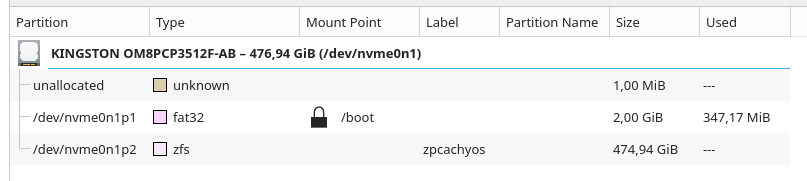
zfsbootmenu is a pain to set up. I just want simple stuff, and as a noob it didn’t work for me and wasted a lot of time. rEFInd worked with ZFS after CachyOS installation. Not having ZFS snapshots on rolling updates isn’t a big deal for me.
I agree.
Anyone who wants detailed information will just have to use a search engine.
It is and it isn’t. There are some steps, and if uou don’t already know what you’re doing, it isn’t aleays clear that the documentation is clear (i.e. it can be difficult to know where to look.
I should probably post this somewhere not buried in a thread. It’s long, but only because it’s keystroke by keystroke in detail AND centered on fully encrypting everything except the EFS. You can also install the zbm package (rather than just manually grabbing as I did here).
It’s roughly in “relatively easy once you know how to do it” territory. Not scary, but not just plug and play either.
BTRFS for my system, because of the rollback possibilities
EXT4 for my second drive, on which I install my games, because it’s very reliable and (apparently) a bit quicker than BTRFS (but I’ve read it’s not really the case anymore)
As the previous poster said, BCACHEFS is available via DKMS, and I’ve found the CachyOS installer put it on my Samsung Evo 980 NVME drive without a problem. The only pedantic worry is that it’s an “experimental” filesystem, but I am running CachyOS on my main desktop / gaming rig for that reason: I want blazingly fast and solid, not just safe, storage.
BCACHEFS is intended to be a modern filesystem with all of the behind-the-scenes improvements that any MacOS or Windows NTFS machine has had for over a decade. (If I understand correctly, it is quite a bit better than NTFS though.) See first few bullet points here: https://bcachefs.org/
And I have to say that in my transition from Windows 10 on my gaming desktop to CachyOS + BCACHEFS… holy crap it’s fast! 1hr to read/write game data folders between NTFS drives installed on this machine… minutes to do the same in CachyOS: read from NTFS drive, write to BCACHEFS. Also, I’m excited to eventually convert my spinning HDDs to BCACHEFS for backups which I never fully dud in Windows cuz of slowness.