A lil’post because I noticed something a little odd. I’ve been using Cachy for a couple weeks now and it’s been an absolute delight I barely ever pop Windows on anymore.
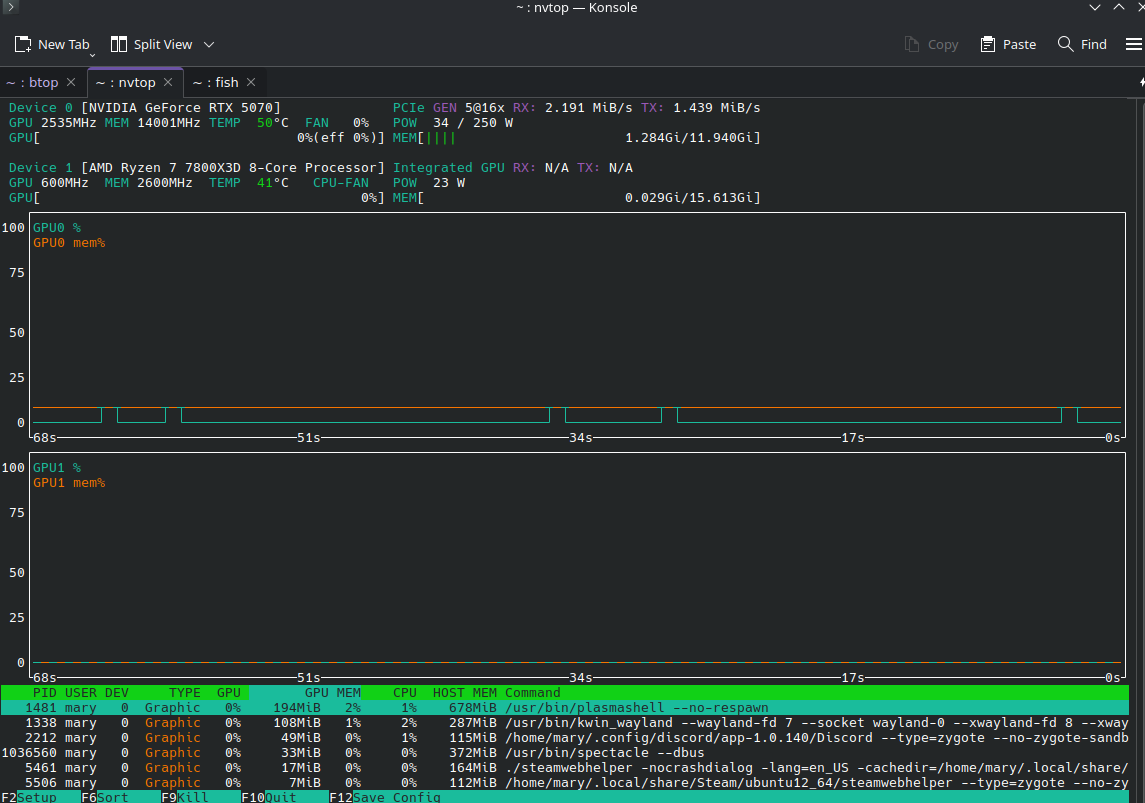
But there IS one thing I noticed: on Nvtop I keep an eye on my vram usage, and most times, I’m well above 10-11 Gb when a game is running. I already installed the Cachy gaming packages, as a note ^^
The oddity is that whenever I run the same games, same settings, same areas on Windows? My Vram rarely goes above 8 Gb of usage (at most). Sometimes 9 when in a huge city in a very vast game with a ton of ultra-level textures.
I’m not sure if it comes from the games (tho I tried with multiple), if the paging is more aggressive on Windows 10, if it depends on how the driver is handled, if it’s a question of Proton being more demanding on vram for understandable reasons, …
The question thus is: are there ways, that aren’t included in the base Cachy packages, that’d help optimize vram usage/clearing/paging/something else?
I have run out once! It was a VERY specific case though-- I had Conan Exiles in the background (running on Ultra) with 3 tons of stuff being crafted. Since this takes a while, I typically pop a WoW delve meanwhile. On Windows it works fine, ~10 Gb of vram taken.
On Cachy though… Firefox started crashing repeatedly until I restarted the entire computer :')
The error message mentioned vram, but said error message disappeared after .5 seconds so I could not even copy/paste it.
Now, granted: running two games at the same time is a VEEEERY specific use case. It’s pushing the system a little bit hard, so I acknowledge it’s NOT an emergency issue that should be fixed or disqualifies the distro
Though regarding the link you sent… ironically: Cachy uses a LOT less system memory/normal ram than Windows does. By such a long shot
Again: I know this is a very specific case, not at all standard. I just wondered if there was something I could do as a user, or if it’s a “deal with it” case (which is perfectly fine).
The FF example sounds a bit like it could have been regular memory being maxed out.
Maybe combined with certain SWAP/OOM configuration?
Back to the VRAM;
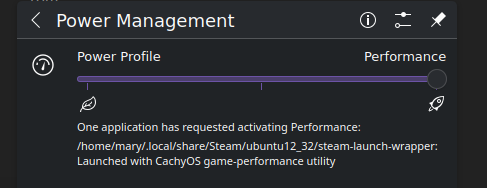
There are potentially some places to look like PStates and/or your power settings .. such as if using power-profiles-daemon and if that is set to anything like “performance”.
Maybe some other things too depending on the gpu.
( We could get system info from sudo cachyos-bugreport.sh )
The FF crash happened weeks ago-- ever since, I’ve just started lowering graphics to low on any game that isn’t in the foreground, no issues since. It’s why I’m really insisting this is not a big deal, just a curiosity on my part I noticed a weird discrepancy and I wonder if it can be addressed or not.
I’m currently on the windows boot (My Cyberpunk 2077 has 300+ mods, it’s the only game I play in Winslop xD). I’ll check all this once I’m back on Cachy! Thanks a ton
If I am not mistaken, what cannot fit into VRAM goes to system RAM as GTT or SMEM. Lack of VRAM doesn’t cause crashes it causes stutter and low FPS. Low system RAM causes crashes. Maybe turn off ZRAM and add a swap partition? Sounds like you don’t have enough system RAM.
If you must have ZRAM, make sure systemd-oomd is enabled. It is required for ZRAM to work correctly. Otherwise your computer will simply hang in the event of a memory leak or when under high memory pressure. You can enable this via CachyOS Hello’s “Apps/Tweaks” tab.
Is it actually the game using all that, or is that the total VRAM used?
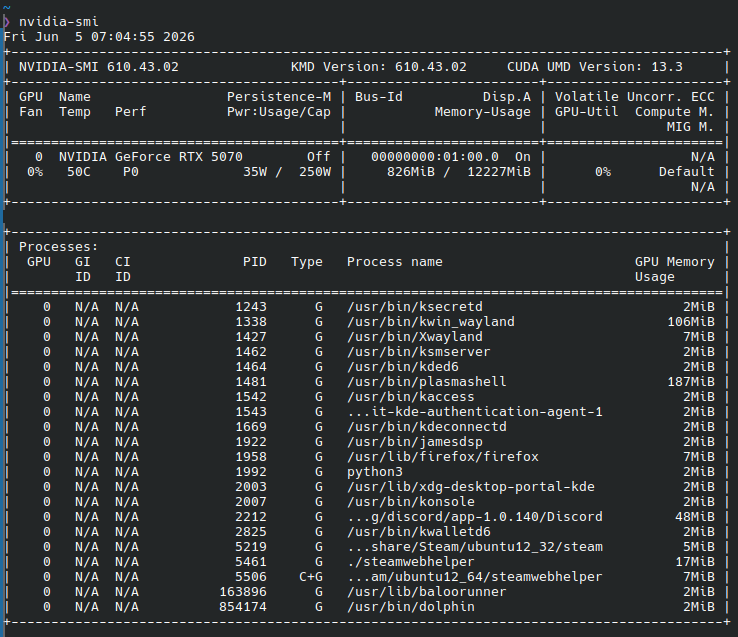
KDE is a bit frivolous with VRAM usage. plasmashell in particular has a tendency to leak VRAM slowly, and can end up using hundreds of MB after a few days of uptime. Browsers also tend to use it by default.
Running nvidia-smi will give you a breakdown of VRAM usage by process. Although, not all VRAM usage is assigned to a process there. Often, you’ll see the total exceed the sum of listed processes.
It’s not uncommon to see 2+ GB of VRAM usage in KDE, without any games running, which would account for the difference you’re seeing if you’re comparing just the game on Windows with total system VRAM usage on Linux.
On laptops, much of this is often offloaded to the integrated GPU (and therefore RAM instead of VRAM). But, on a typical desktop PC, all of it ends up in VRAM.
Some things you could do to mitigate this:
Turn off GPU acceleration in browser settings. It’s not needed for most things.
Since a few answers mentioned my use case is a little over the top-- I agree. This is why I didn’t put it in “assistance” I’m only curious as to why the Vram usage is so different between the two OS’es and if it can be bettered ^^
Done on removing hardware accel’ from Steam and Firefox, will test and see! Thanks
The amount of vram used I mentioned was the total, not the individual games.

 I barely ever pop Windows on anymore.
 I’m only curious as to why the Vram usage is so different between the two OS’es and if it can be bettered ^^