Visual Studio 2022 IDE Clone for Linux (unofficial) [with video]

Hello there everyone, how is everyone doing?

One of my missions is to save as many lost souls from Microsoft Windows as I can. I want to increase our overal Linux user base, because that will always bring greatness and appeal to software developers so we can have more robust available software in the future.

Coding in C and C++ on Linux has always felt a bit more complicated than it needs to be, at least for me.

After spending years developing applications with Visual Studio 2005 IDE + etc on Windows, moving to Linux can be a frustrating experience. Instead of focusing on writing code, you often end up dealing with build systems, Makefiles, IDE plugins, JSON configuration files, compiler flags, and debugger setup.

I understand why these tools exist, and I know many developers enjoy having complete control over every part of the process. There is a lot of value in understanding how everything works under the hood.

But sometimes, you just want to create a project, press F5, and start debugging / building, specially when you will have a large 100 + cpp / header files. manualy handling the makelist, pathing, flags… OMG it is very very time consuming, and I personaly dont find that to be fun at all. I will have more fun if I can add a PATH with a click of a button to the desired include or lib dir, and suddently all of those files are automatically handled.

One of the things I appreciate most about the Windows workflow is how simple it is to share and manage a large amount of projects. You send someone the source code, they open the solution file, and they’re ready to build. You never had to remember or keep track of that specific project’s build setup, the .sln file or the vcproj file did it all for you. You double clicked it, you pick the previously saved build config /debug/release, thats it ! You got yourself a 2 second .exe, .dll or .sys.

On Linux, it’s common to spend time reading documentation just to figure out how a project is supposed to be built. That flexibility is powerful, but it can also slow things down.

Because of that, I decided to start building my own IDE for Linux, inspired by the workflow of Visual Studio IDE. It runs on IMGUI with Vulkan, because since I like the appeal of linux’s beautiful desktop, I wanted it to match that. But if you like it plain and simple you can disable all animations and visual transitions. I plan to add openGL support too in the future.

The goal isn’t to replace existing tools or tell people they’re doing things wrong. I simply want an environment that works the way I like to work, and to make it easyer for people to grow big projects easier.

Pick a template, specific entrypoint ready, press F5, executable ready on disk!

Whether you’re creating an executable, a kernel module, or an injectable module, the setup should already be there. As build settings change (compiler / linker flags, binary / stack manupulation etc), the IDE should automatically generate the appropriate build commands behind the scenes.

I mainly care about C, C++, x64 inline assembly, and custom Clang toolchains, but the project will be open source so anyone can add support for other languages, templates, or workflows. I will add support for c# too with a form builder just like windows, because I know that .net framework now works on linux pretty easy, and I do like a little c# for a quick little app somethings.

I also plan to create a project converter, so that you can pick an existing cmake project, click on the convert button, and it will parse all relevant files, and generate a working .slx (thats the extention I am currently using for the project files).

Developers shouldn’t need to memorize compiler flags they’ve used for years unless the user chooses to. The tools should handle the repetitive parts so we can focus on writing software instead.

Anyways!
The current app state:
-templates
-open project .slx file
-.slx file assosiation button (so you can doubleclick them and open the project automatically)
-tool chain downloader page (kind of like vs2022 installer so you can download different versions of compilers, sdks, etc,etc)
-gitbub desktop clone built in
-debug and stepping over / through etc
-intellisence and auto complete
-code indexing for autocomplete etc
-modified clangd plugin (I need to give them credit, but I will get rid of it soon)
-optional visual themes, custom themes animations (can all be toggled)

I need to spend a bit more time so I can set the main project structure in stone.
I am corrently using AI to speed up the main bulk, but once I achieve the bulk, I need to re-write it most of it (except for the UI) because the cheap $20 composer AI code I am using is very very very bad. It will take me about a week ~ 2 weeks to transform the ai slop away, but at that point, this is going to go on github in case anyone else is interested.

But yeah, maybe you guys can give me some ideas, maybe we should have something like nuget (I hate nuget I dont use nuget) but I am affraid to have fully user maintained plugins because in this day and age there is a lot of people with bad intentions.

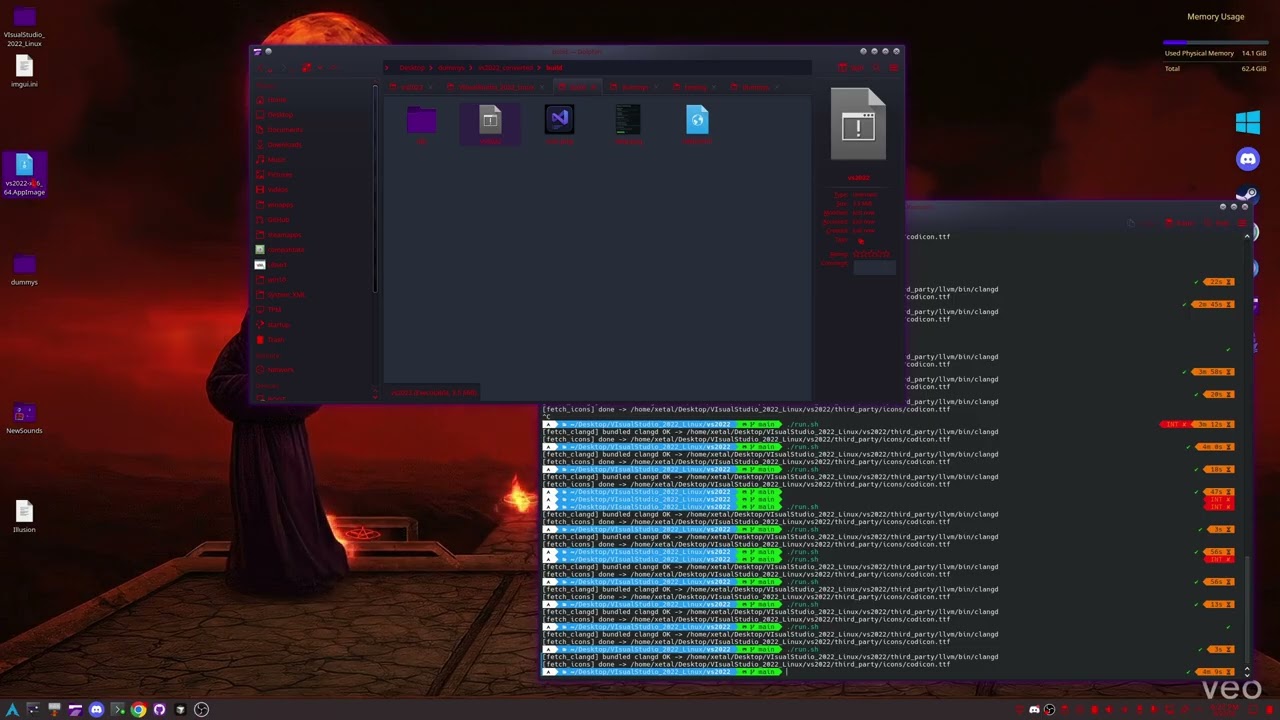
Anyways, here is a quick preview of the last 20 hours worth of work with massive ai use.

----Edit 06 23 26 - Deleted old videos and replaced with the current version
Sorry, but absolute cringe.

Because it’s not windows. Did you think it’s supposed to be exactly the same? Learn your OS, not try to dumb it down to Windows. Linux != Windows, and so you don’t have to read loads of documentation, that means ā€œnot equalā€.

Another no thanks. You talk about how difficult it is to code on Linux compared to Windows, yet you don’t even know how to code. common man

I dont really care what you think to be honest. Unconstructive and useless comment that doesnt help anybody.

I am making this to serve me, and I will welcome anybody else that wants to use to use it.
If you want to be stuck in the 80’s, thats fine with me lol. You do you man !
You sound like a arch user wanna be that makes fun of people that use ubunto.

Anyways. If you disagree that saving time is a good thing, I don’t think I have any comments to that.

[quote]

Another no thanks. You talk about how difficult it is to code on Linux compared to Windows, yet you don’t even know how to code. common man

Lol. could you achive what I have achieved in a weekend with no ai all by yourself? If your answer is Yes, you are a big liar. Also, I will rewrite the ai slop away after the app is considered alpha by me

I didn’t say any of that. But if you want it like that, go back to Windows. Stuck in the 80’s? What does lInux have to do with the 80’s?

Bro, that’s not a flex. LOL I didn’t say I could code it in a weekend. But you can’t even code, so…

I understand Linux and Windows have different philosophies, and I’m not trying to turn Linux into Windows.

My point is simply that reducing friction for developers is a good thing, regardless of platform. A lot of people, especially those coming from Visual Studio, like workflows where project setup, toolchains, debugging, and build configs are handled automatically so they can spend more time writing code.

Linux already has amazing compilers, debuggers, and build systems. My project isn’t trying to replace any of that. It’s just another option for people who prefer a different workflow.

If this approach doesn’t appeal to you, that’s totally fine. That’s one of the best things about Linux: choice. People who prefer command-line tools, Makefiles, CMake, or configuring everything manually can keep doing exactly that.

As for the comments about my coding ability, personal attacks don’t really add anything useful to the discussion. If you have specific feedback about the architecture, build system, or features I’m working on, I’m happy to hear it.

Otherwise, I’m going to keep building this because I think there’s value in making Linux development more approachable for more people.

@kindofabuzz


I was curious about your perspective, so I looked through some of your previous posts and found this.

You mentioned that developers should ā€œlearn their OSā€ instead of wanting tools that simplify the workflow, but you’re also a JetBrains user.

Isn’t that exactly what IDEs do? They abstract away repetitive setup and configuration so developers can focus on writing code.

That’s the same problem I’m trying to solve—just with a workflow that feels more familiar to people coming from Visual Studio.

You’re free to prefer JetBrains, CMake, Makefiles, or the command line. I’m simply building another option for developers who want it.

lol… unbelieavable… I guess this is the internet in 2026!


You took the ā€œmassive AI useā€ comment out of context.

I’m using AI to speed up prototyping and validate ideas faster. I already said the generated code will be rewritten and cleaned up before release. (except for the UI).

It’s 2026. AI is part of the toolbox for developers who choose to use it, just like IDEs, debuggers, and code generators, and JetBrains.

My last comment for mister @kindofabuzz

You’re a total hypocrite lol. Busted. Or maybe your just a 10 year old. You are a Jetbrains and AI user, and still… talking mad shit. wow. just wow.

Building things is a lot of fun, so enjoy the process!
I just wonder, which IDEs did you try out on Linux?

I agree. Building things is indeed very fun. Specially when you poor your soul into it. The end result is always a good feeling.

I have tried a few coding tools in the past on Linux. Jetbrains, vscode, qt creator, eclipse. It has been a while maybe those tool got improved from the last time I tried them.

They were good tools, but nothing truly felt seemless like the Visual Studio IDE series, so I did things the old school way, jst any text editor + makefiles.

I finaly got some free time and decided to build this, i’m old and much slower than I used to be, so if I can shave and hour here, another hour there, it ads up really quick for me.

Jetbrains IDEs usually have good UX but are a bit slow. (I use DataGrip at work daily)
VSCode is being choked to death by microslop by making important proprietary plugins not work with vscodium. It’s also slow.
I haven’t heard of Eclipse in the past 20 years, so I assumed it’s dead :grinning_face_with_smiling_eyes:.

The young kidsā„¢ are using Neovim, Helix, Zed etc.
Kate is surprisingly good.
Maybe you’ll find ideas for features which you like to implement in these.

Go wth your idea. I like it and agree with many of your thoughts why you should. It’s missing

I’m a fellow C++/Vulkan coder and use ImGUI a lot, recently in tandem with ImPlot, which I can also recommend. Ignore the skill topic. Stay focused on your goal :slight_smile:

- An ā€˜old grognard’ who works in HPC

Yeah I kind of dont like vscode neither. I uninstalled it last time when I was typing the plugin’s exact name and it was finding everything BUT the plugin I was looking for

I see this is your first post lol. Welcome to the forums!

I love Imgui. On Windows I made my own NoCrt directx Imgui variant that I use for my 20KB dlls projects, im gonna look at ImPlit later I have never seen it.

Yeah some people should be ignored completely :smiley:. Where I come from, you give respect you keep your teeth lol.

Thanks for the welcome :smiley: I saw your other projects including the CachyOsTools, nice. Will check them out

Could you give me some info on the NoCRT directx Imgui variant? Any Link available?

My pleasure!

I am not an App Creator by heart… ever since I came to Linux I made a couple of apps to help myself transition from windows and stuff. After windows 11 came to existance I just cant stand it. I ported my cheating framework up to windows 11 24h2, and no more. I am not supporting anything newer. I hate windows 11.

I been strictly developing game cheats for 20+ years lol, it is literaly all I did for the past 2 decades. I am transitioning away from the dark side though im a bit tired of it. I focuses mainly on windows exploits, driver mappers, dll injectors, bypasses, and cheats. The No Crt dll’s is only good for maknig cheats I havent open sourced it. Ez to hide, no imports, no unwinding, no seh, etc. Just bare bones size and performance focused.

I dont wish that type of nighmeter on anybody lol.

-—edit:

If you are interested in the No Crt stuff, let me know, I will give you 1 one the variations. It includes a good enough framework to draw most things like animations, ESP boxes, it supports overlay hijacks so you dont create your own window etc.

Here is my no CRT framework in action: Please dont judge. No Crt, 20 KB, 0 imports, no createwindow, just hijack any over overlay, zero hooks.

I have a whole bunch of variations 1 for each use case and specific injection type, but I can give you one if you want

Another usecase for it too.

:rofl::rofl::rofl::rofl::rofl:

This is a trick question because you haven’t actually achieved anything. You have a proof of concept demo that’s not really useful to anyone and doesn’t really have a path to viability beyond ā€œfull rewriteā€.

The most likely outcomes are either you get bored and the thing dies or you just kinda nurture it along as your personal tool with its own set of peculiarities. The work to make it more than that is all undone.

Ai slop is very easy to spot. You have to use AI wisely, and you HAVE to verify everything that was done. You cant just forget about it and let it do what it wants. The conventional way you could spend a couple of hours on a specific complex logic (for example, how you cache / index the project - Ram? Disk? Both with togglable options?) etc… You test it. Suddently you think of another way you could have done it and you regret and you go … Shoot I should have done it this way instead because it would work better with this new thing I just thought about. This happens with every developer, if you ever built anything, at some point when you are far far into the project, you realized 1 or more things you could have done differently.

With AI, you can test everything unplanned in minutes. You just throw tokens in the air. When working with complex projects with a lot of moving parts (I am not a app developer), sometimes it will take weeks just in properly planing.

And to be honest with you (I put another 10 hours if ai into it yesterday), at it’s current state, it is already very very usable.

Another thing is, I am making this for myself lol. I always build little tools to help myself, like sdk dumpers, etc. The only difference is that this app, I am willing to share (you dont have to use it no one will ever force you to).

I will give you a couple of recent examples:
I decided to stop usa IDA to reverse games because its too slow, ghidra is too slow, binary ninja is too slow.

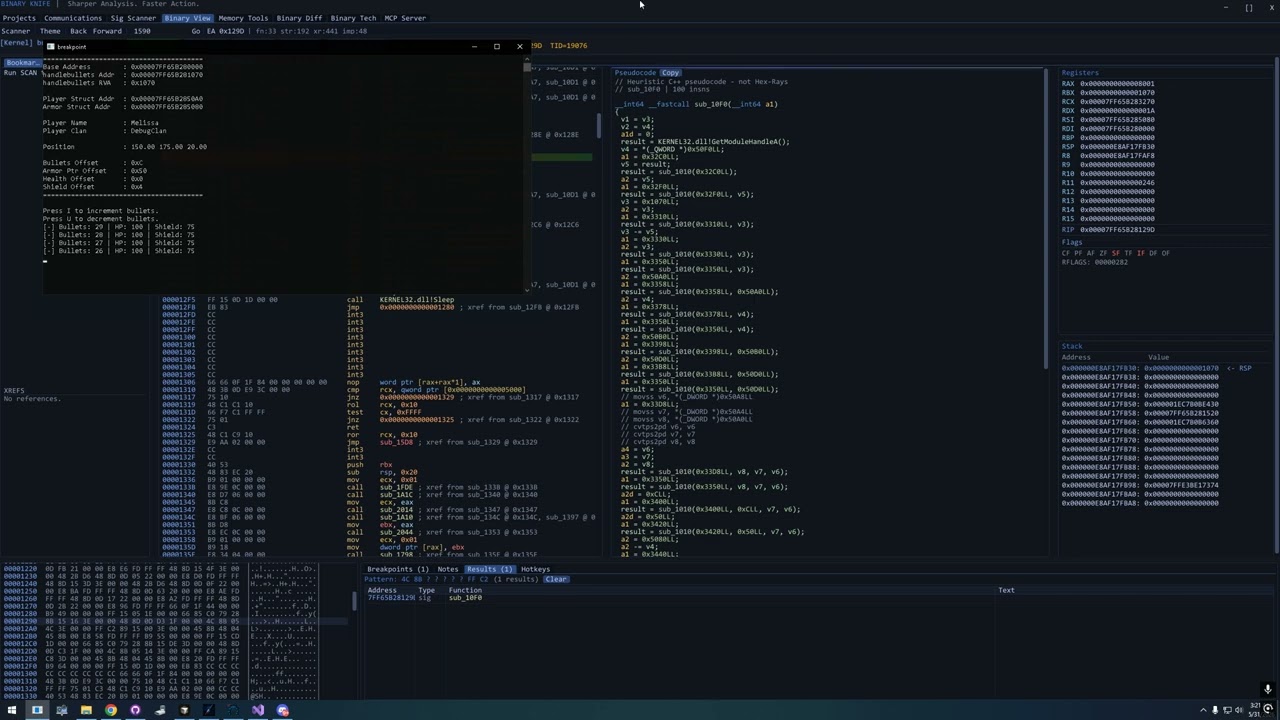
I made a fully working (windows) Disassembler that has usermode, kernelmode, hybrid, KVM (modded qemu for single vcpu breakpoint capability ro breakpoint kernelmode anticheat modules etc)

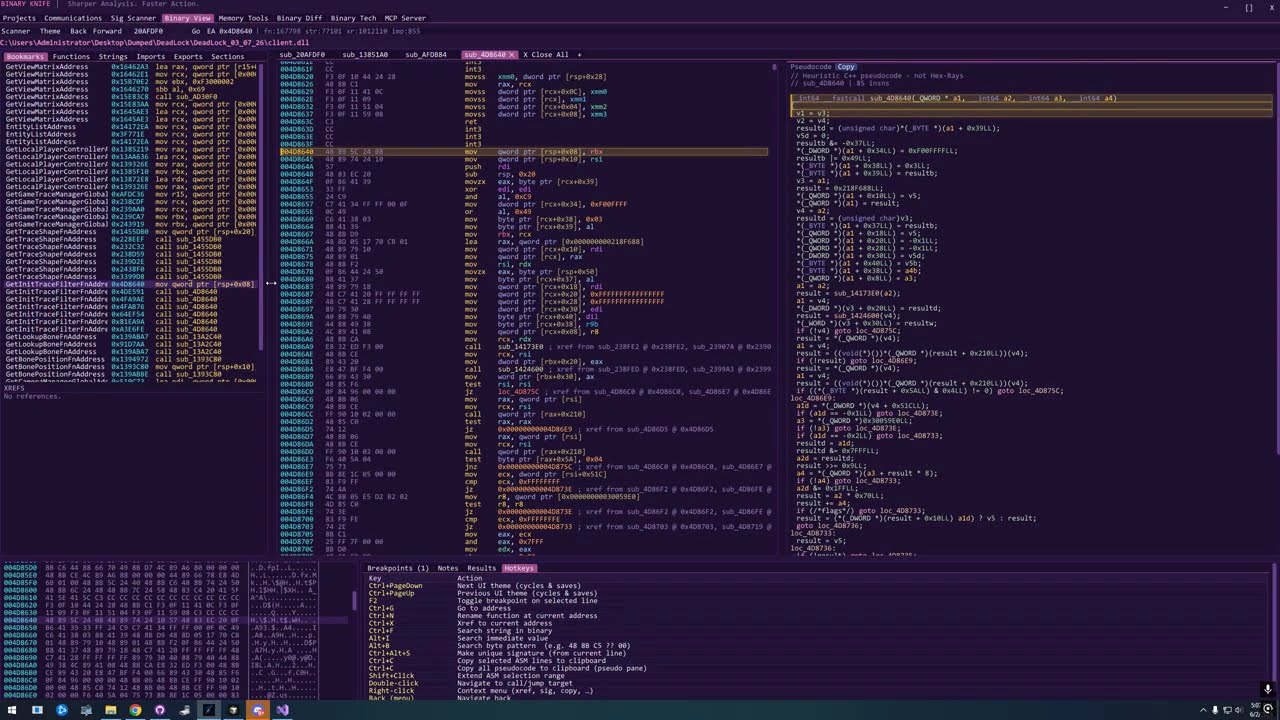
This app has a built in disassembler for both Static and Dynamic analysis, it has a builtin reclass, cheatengine, MCP … This was a 3 week project working 10 hours a day with heavy use of COMPOSER ai …

You know how zydis, unicorn, and things like that can be very very time consuming.

The app shown below was done by 1 person (me) with ai in 3 weeks.
How many months or eveb years would this have taken do achieve by hand? And when I say achieve, I dont mean a personal achivement, when I say achieve, I mean achieving a good working binary.

Long story short, in 3 weeks I achieved the best cheating tool for my use case. 20 seconds multithread binary indexing vs Ida 30 ~ 45 minutes. Live memory read, right, and FULL debugging capabilities.

What I am kindly trying to say / suggest, is that, AI can be slopy if you dont hold its hand, but it can be very powerful if used wisely.

  1. https://cdn.discordapp.com/attachments/1246431398588448771/1516609238011744388/Desktop_2026.06.16_-_17.00.47.04.mp4?ex=6a3bd5ab&is=6a3a842b&hm=7665cb139a78c16acbdd158b964a01d24fdc82ae310edc2b191c3d9adefecc85&

  1. Beautiful dramatic breakpoint hit animation, cuz why not have a little fun when finding exploits right?

I dont have any new videos RN I havent been to my windows VM in a bit but… The new version is probably 50 + builds ahead of the videos above

So yeah… AMAZING result, good very complex app made in 3 weeks fully working by 1 person with ai. No one with the right mind weather the code is good or SHIT can deny the result was amazing.

Also, I will keep working on that app for many many years to come. That one I aint sharing with noone for sure, never ever

OK. What does that have to do with:

Who really wants an app from

Why would anyone invest time and effort learning to use a project that it’s creator isn’t really invested in?

Fine enough party trick, but is there actual value? Are you going to produce any better code and projects - using this environment than you would if you had invested those 3 weeks into learning, customizing, and maybe contributing to an existing project? Probably not. Are you going to enjoy yourself more? Maybe, and that’s fine…but ā€œspent 3 weeks to make myself slightly happierā€ isn’t really an amazing outcome. It’s…fine? You might enjoy it, but also down the road it might interfere with seamless collaboration, integration with larger infrastructure, learning and incorporating what others are using, etc. because it’s all self-rolled in a ā€œvery complexā€ way that is likely to dissuade adoption beyond you.

Maybe this is reductive but I just see a tool that’s going to be almost impossible for a larger community to trust and rely on that makes its developer happy. We’ve had versions of this for decades. Now we’ll just face an onslaught of spam over more of them that’s also likely to take away from development effort going into good, sustainable projects. Sustainability is what’s actually amazing. Software that lives and improves long enough and is maintained reliably enough to establish meaningful adoption and community trust.

Well many developers come to linux and they miss visual studio 2022 just like me. I am making this so I no longer miss visual studio 2022, and if it works for me, it will work for other visual studio IDE users as well.

I am not an app developer by heart, I am a reverser, and cheat developer by heart, the tools like this I usualy make involving cheats, anticheat bypass, are not the types of app I would share with anyone. This type of tool though, I dont mind.

The value is very high. Nothing will be different from using another editor, except if you are working with c and c++ and custom shellcode and inline assembly, you will need ZERO manual configurations. You open the IDE and you code, you pick rlease or debug, you build, you run, thats it. The only goal of this app is, Robus intelisence and reference traveling, auto complete, and ZERO manualy typed build flags needed. If you have never user Visual Studio IDE you will never know what I am talking about.

You are looking at things from a CASUAL coder’s prospective. From what I can obsere,In your mind you are probably thinking, Ohhh, whats the problem with spending 15 minutes setting up a project config manually?

I am looking at it from the prospective of very high volume several small monthly projects every month.
Every single good game that comes out or new anticheat that comes out specially the encrypted ones, weather I release a cheat for it or make it for myself or myfriends, I will make an SDK dumper, and I will make a cheat for it… It is what I do for fun.

I make several unorthodox injectors, kernel drivers, cheats yearly, I am talking probably 3 ~ 4 big projects monthly and tenths of small projects if not more. I compile more binarys than I change my underwear.

So for a non casual, high volume dev like me, a tool of this kind which will shave MINUTES everytime you start a new project is VITAL. It’s not optional, its Vital. Life is short, and if you like to wast time, the time is yours, no one elses.

When I release this app, people are welcome to use it lol… OR NOT !
The only difference it will make to me, is the more people use it, the more feedback I will have so I can make improvements based on other people’s view.

-–Edit
Yeah its definitely it. I think you are looking from a casual prospective. When me and my dear discord friends findout about a new or cool game, we go at it like theres no tomorrow. Sometimes we will make 2 cheats or more a day lol, 1 internal, 1 external and a bonus dumper. We code alot.

Thats probably why I value every second of the process, because of the high volume and high maintenance nature of the type of projects I get involved with. You have no idea when you have paying customers and a game updates, you have to stop what you are doing to go update it NOW.

And no, auto updating cheats are no good, the DLL’s become too big, my rule of thumb is, 20 ~ 40 KB DLL max for a cheat, unless you have a crapto of exploits then you kind of have no choice. You have no idea how maintenance heavy these projects can be lol.

Yeah, Imagine making cheats from the year 2000, and only getting detected 1 time by Vangard in 2019 ish.
1 time detected, thats it.
I think I have a good track record.
I am pretty good at what I do lol, and I am kind enough to share a couple of unrelated tools with the community.

Did you do anything to help the community? Or do you just live to waste air? lol.
English is my 3rd language I have a hard time expressing myself sometimes, but clearly you are not a high volume developer, weather you do it by hand, or ai, you are definitely not someone that has any valuable time invested in anything of this nature.

If you see no value in this, why waste time hating?
people like you are probably the kind of people that would vote in people like kamala harris, or maduro lol.

let me go back to work, Arc raiders updated.

@mattsteg and @kindofabuzz . I put you 2 in the same category. No constructive comments, hating for no reason, 10 ~ 13 year olds in mommy’s basement with nothing else better to do probably.