Tutorial for having multiple kernels with the Kernel Manager?

I would like to have at least an LTS kernel parallel to the CachyOS kernel as a fallback, but the official documentation of the Kernel Manager is a bit too sparse for my taste.

So I browsed and searched this forum, but all I see is issues like these, involving lots of CLI- and chroot-magic, but no real โ€œidiot-proofโ€ tutorial.

Could someone guide me through the necessary steps to be able to boot into different kernels at startup? Starting with the Kernel Manager and then the steps I need to take in rEFInd to make the new kernel available?

Thank you in advance!

My setup:

> lsblk -f
NAME               FSTYPE FSVER LABEL           UUID                                 FSAVAIL FSUSE% MOUNTPOINTS
sda                                                                                                 
โ”œโ”€sda1                                                                                              
โ”œโ”€sda2             ntfs         STUFF           CE261A8C261A75A5                                    
โ””โ”€sda3                                                                                              
sdb                                                                                                 
โ”œโ”€sdb1                                                                                              
โ”œโ”€sdb2             ntfs         SYSBACKUP_win10 B0188E85188E4A74                                    
โ””โ”€sdb3             ntfs         DATABACKUP_old  EC64A06664A0356C                                    
sdc                                                                                                 
sdd                                                                                                 
sde                                                                                                 
sdf                                                                                                 
sr0                                                                                                 
zram0              swap   1     zram0           9daf66ff-deaf-4902-80dd-4f12dfb9cbab                [SWAP]
nvme0n1                                                                                             
โ”œโ”€nvme0n1p1        btrfs        rootbackup      a75b588d-76cf-42e1-b8eb-d2069050cfcf  436.9G    12% /mnt/rootbackup
โ””โ”€nvme0n1p2        ext4   1.0   databackup      4c288d62-bc3c-428c-a1e9-cd1c3feebb0b    1.1T     8% /mnt/databackup
nvme1n1                                                                                             
โ”œโ”€nvme1n1p1        vfat   FAT32 BOOT            C817-5774                               1.7G    17% /boot
โ”œโ”€nvme1n1p2        swap   1     SWAP            14b5e04a-1c2f-41c2-a2a5-cd9ffe1ec2a0                [SWAP]
โ”œโ”€nvme1n1p3        btrfs        ROOT            0b4778d2-2b54-48a9-a184-b2a951e9335a    450G    10% /var/log
โ”‚                                                                                                   /var/cache
โ”‚                                                                                                   /root
โ”‚                                                                                                   /var/tmp
โ”‚                                                                                                   /srv
โ”‚                                                                                                   /
โ”œโ”€nvme1n1p4        btrfs        HOME            8070f09c-85d9-4420-b00e-a941b3a85f83  501.1G    16% /home
โ””โ”€nvme1n1p5        btrfs        APPS            ae032e5c-f8de-4f79-842b-280801eaa772  609.2G    12% /apps

Forget about the NTFS drives, they are from my old windows PC and currently play no role. I guess the most interesting parts would be the is the 2G boot partition (FAT32) and the ROOT partition (btrfs)

PS: Iโ€™d also like to switch from rEFInd to Limine, but that is a different story.

To boot with a different kernel just hit the advanced options in the bootloader of CachyOS. Just hit the desired one and you are done.

Which bootloader are you referring to? Will that really work automatically in rEFInd?

How does your bootloader look like? Does it show the advanced options for CachyOs?
If not, then you have to edit the bootloader files manually, which leads automaticlly to all the cli things, you stated. So there wouldnยดt be a simple tutorial, since those boot adventures are complex and related to te involved hardware and software. That means somebody else with a similiar setup is hard to find.

Hallo all, just tried with Grub, installed for test the Kernel LTS together with my actual Kernel and i confirm that in the grub menu, i can go in advance startup and select both kernel to be started alternatively. Default remain the actual and more new kernel, if donยดt select anythings in grub startup page.

Yeah, well, thanks but Iโ€™m currently on rEFInd

So I took the leap of faith, installed the LTS kernel, was able to find it in rEFInd (thanks @PalynDrumatiX for pointing me in the right direction) et voilรก:

โ•ญ Keys โ”€โ”€โ”€โ”€โ”€โ”€โ•ฎโ•ญ Values โ”€โ”€โ”€โ”€โ”€โ”€โ”€โ”€โ”€โ”€โ”€โ”€โ”€โ”€โ”€โ”€โ”€โ”€โ”€โ”€โ”€โ”€โ”€โ”€โ”€โ”€โ”€โ”€โ”€โ”€โ”€โ”€โ”€โ•ฎ
โ”‚ Host        โ”‚โ”‚ MasterComputer                          โ”‚
โ”‚ Machine     โ”‚โ”‚ MS-7E26  1.0                            โ”‚
โ”‚ OS          โ”‚โ”‚ CachyOS   [vrolling] [x86_64]           โ”‚
โ”‚ Kernel      โ”‚โ”‚ Linux  [v6.12.43-2-cachyos-lts]         โ”‚
โ”‚ Running     โ”‚โ”‚ 83 days                                 โ”‚
โ•ฐโ”€โ”€โ”€โ”€โ”€โ”€โ”€โ”€โ”€โ”€โ”€โ•ฏโ•ฐโ”€โ”€โ”€โ”€โ”€โ”€โ”€โ”€โ”€โ”€โ”€โ”€โ”€โ”€โ”€โ”€โ”€โ”€โ”€โ”€โ”€โ”€โ”€โ”€โ”€โ”€โ”€โ”€โ”€โ”€โ”€โ”€โ”€โ”€โ”€โ”€โ”€โ”€โ”€โ”€โ”€โ•ฏ

That was easier than expected.

Update: An LTS kernel as fallback is now part of the regular CachyOS installation! :clap::clap::clap:

I will keep this tutorial for reference, but it might not be necessary any longer:

  1. Use Cachy Kernel Manager to select another kernel. Keep your current kernel selected, too.

  2. Click โ€œExecuteโ€ and wait until the process is finished

  3. Reboot

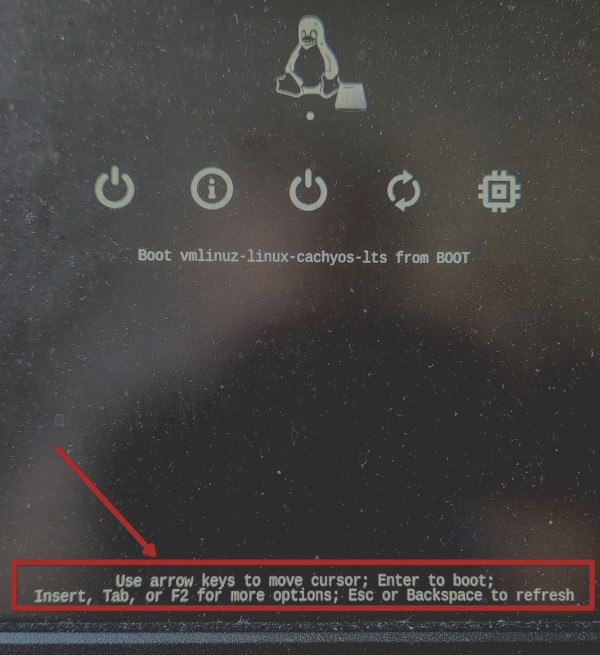
  4. In rEFIND, select the right operating system with arrow keys (please excuse the dusty screen):

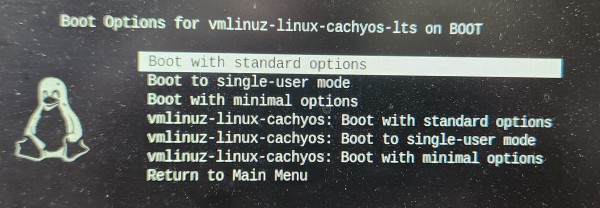
  5. Then press TAB to enter the advanced settings:

Here, you can select the different existing kernels

  1. Press ENTER and boot into the selected kernel
  2. Done.

Refind always boots into the โ€œlatestโ€ kernel by timestamp, so if you want to boot into another kernel you could just update its timestamp with

sudo touch /boot/vmlinuz-name-of-your-kernel

THREAD CAN BE CLOSED. THANKS TO EVERYONE HELPING OUT HERE!

I switched from rEFInd to Limine and it was way easier than expected. Just did a sudo pacman -S limine and it did the rest. Limine added rEFInd as a selection in the boot menu so even though I could remove it, it does seem like an additional level of fallback leaving it there.

Really? That sounds perfect. Gotta try that on the weekend.