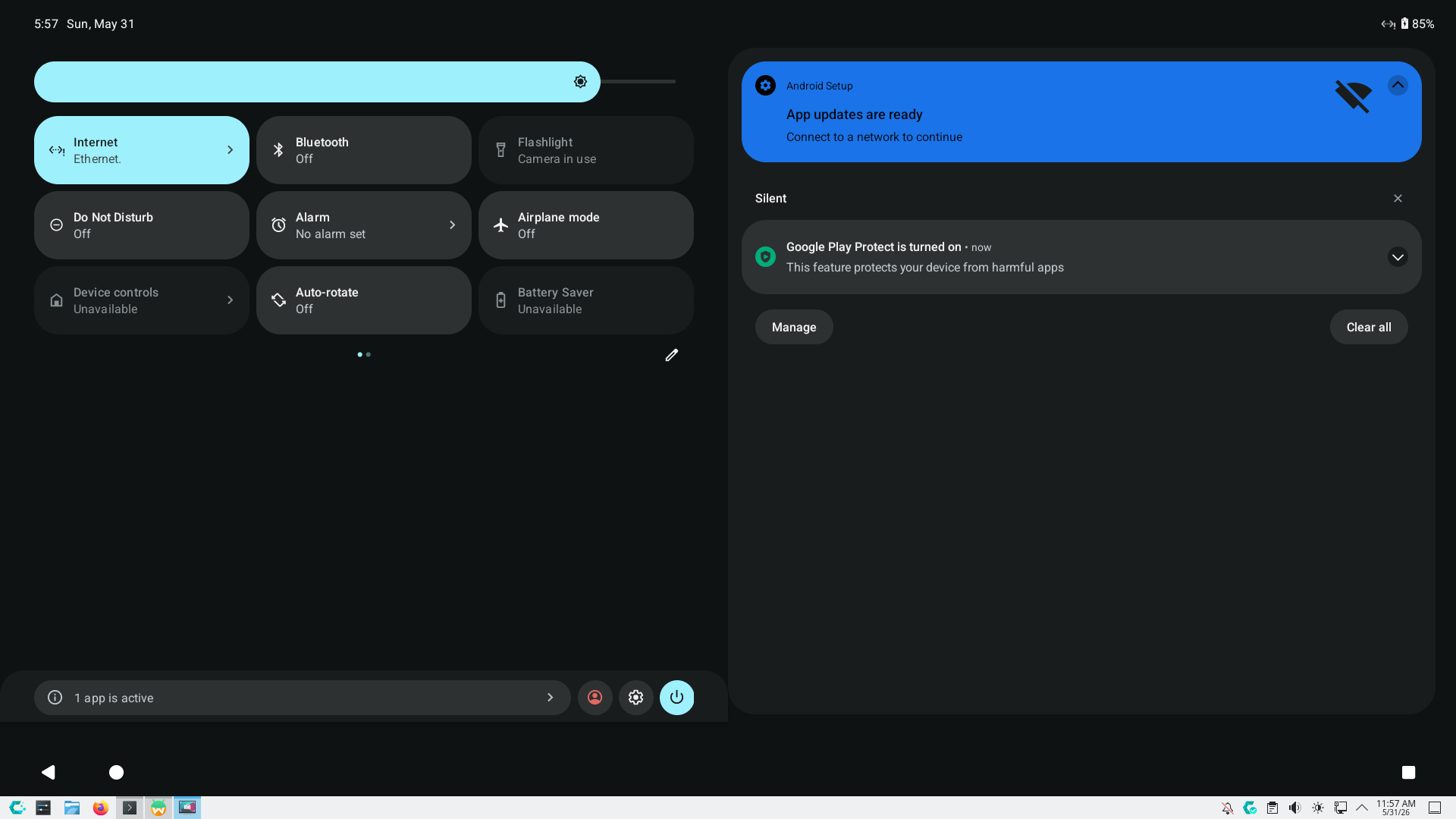
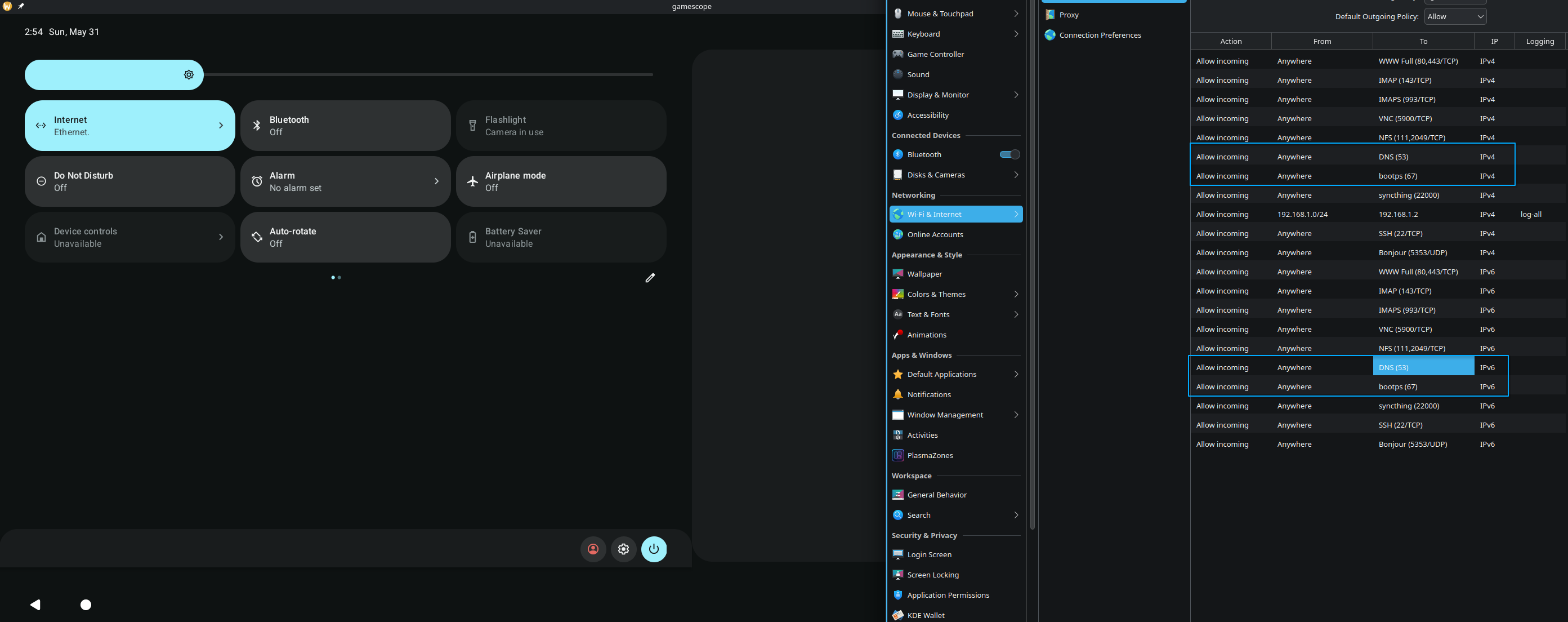
Unfortunately, there are several issues about this topic open since 2022. Not much attention from maintainers, do you know any other alternatives to Waydroid?
for android in wayland, i’m afraid no
but if your gpu is Nvidia, you better avoid waydroid, since it can’t run 3D acceleration… (i switched to AMD due of this LMAO)
but anyway, just checking out, in case my setup will fix the issue
/var/lib/waydroid/waydroid.cfg
❯ pacman -Qs wayd
local/waydroid 1.6.2-1
    A container-based approach to boot a full Android system on a regular Linux system
local/waydroid-helper 0.2.9-1
    A GUI application for Waydroid configuration and extension installation
# Uncomment this to allow this host to route packets between interfaces
#net/ipv4/ip_forward=1
#net/ipv6/conf/default/forwarding=1
#net/ipv6/conf/all/forwarding=1
my network, don’t have any ipv6 (i disabled it on my main router, so my PC only have ipv4)
since it’s network related, and incase ipv6 is the culprit
try disable your ipv6 and restart waydroid, if it’s solved
then you need to find a way to resolve ipv6 routing (just my guess)
hmmmm…
since this is somehow working (ping via shell)
maybe try this options? to fake wifi? (this was from waydroid-helper ui, and i think you can set it up manually via console as well)
but after taking look your output, seems we got 100% packet loss there…
try compare your waydroid-net.sh then (in case long ago i already tweaked this script)
/usr/lib/waydroid/data/scripts/waydroid-net.sh
#!/bin/sh -

varrun="/run/waydroid-lxc"
varlib="/var/lib"
net_link_key="lxc.net.0.link"
case "$(lxc-info --version)" in [012].*) net_link_key="lxc.network.link" ;; esac
vnic=$(awk "\$1 == \"$net_link_key\" {print \$3}" /var/lib/waydroid/lxc/waydroid/config)
: ${vnic:=waydroid0}

if [ "$vnic" != "waydroid0" ]; then
    echo "vnic is $vnic, bailing out"
    exit 0
else
    echo "vnic is waydroid0"
fi

USE_LXC_BRIDGE="true"
LXC_BRIDGE="${vnic}"
LXC_BRIDGE_MAC="00:16:3e:00:00:01"
LXC_ADDR="192.168.240.1"
LXC_NETMASK="255.255.255.0"
LXC_NETWORK="192.168.240.0/24"
LXC_DHCP_RANGE="192.168.240.2,192.168.240.254"
LXC_DHCP_MAX="253"
LXC_DHCP_CONFILE=""
LXC_DHCP_PING="true"
LXC_DOMAIN=""
LXC_USE_NFT="true"

LXC_IPV6_ADDR=""
LXC_IPV6_MASK=""
LXC_IPV6_NETWORK=""
LXC_IPV6_NAT="false"

IPTABLES_BIN="$(command -v iptables-legacy)"
if [ ! -n "$IPTABLES_BIN" ]; then
    IPTABLES_BIN="$(command -v iptables)"
fi
IP6TABLES_BIN="$(command -v ip6tables-legacy)"
if [ ! -n "$IP6TABLES_BIN" ]; then
    IP6TABLES_BIN="$(command -v ip6tables)"
fi

use_nft() {
    [ -n "$NFT" ] && nft list ruleset > /dev/null 2>&1 && [ "$LXC_USE_NFT" = "true" ]
}

NFT="$(command -v nft)"
if ! use_nft; then
    use_iptables_lock="-w"
    $IPTABLES_BIN -w -L -n > /dev/null 2>&1 || use_iptables_lock=""
fi

_netmask2cidr ()
{
    # Assumes there's no "255." after a non-255 byte in the mask
    local x=${1##*255.}
    set -- 0^^^128^192^224^240^248^252^254^ $(( (${#1} - ${#x})*2 )) ${x%%.*}
    x=${1%%$3*}
    echo $(( $2 + (${#x}/4) ))
}

_ifdown() {
    ip addr flush dev ${LXC_BRIDGE}
    ip link set dev ${LXC_BRIDGE} down
}

_ifup() {
    MASK=`_netmask2cidr ${LXC_NETMASK}`
    CIDR_ADDR="${LXC_ADDR}/${MASK}"
    ip addr add ${CIDR_ADDR} broadcast + dev ${LXC_BRIDGE}
    ip link set dev ${LXC_BRIDGE} address $LXC_BRIDGE_MAC
    ip link set dev ${LXC_BRIDGE} up
}

start_ipv6() {
    LXC_IPV6_ARG=""
    if [ -n "$LXC_IPV6_ADDR" ] && [ -n "$LXC_IPV6_MASK" ] && [ -n "$LXC_IPV6_NETWORK" ]; then
        echo 1 > /proc/sys/net/ipv6/conf/all/forwarding
        echo 0 > /proc/sys/net/ipv6/conf/${LXC_BRIDGE}/autoconf
        ip -6 addr add dev ${LXC_BRIDGE} ${LXC_IPV6_ADDR}/${LXC_IPV6_MASK}
        LXC_IPV6_ARG="--dhcp-range=${LXC_IPV6_ADDR},ra-only --listen-address ${LXC_IPV6_ADDR}"
    fi
}

start_iptables() {
    start_ipv6
    if [ -n "$LXC_IPV6_ARG" ] && [ "$LXC_IPV6_NAT" = "true" ]; then
        $IP6TABLES_BIN $use_iptables_lock -t nat -A POSTROUTING -s ${LXC_IPV6_NETWORK} ! -d ${LXC_IPV6_NETWORK} -j MASQUERADE
    fi
    $IPTABLES_BIN $use_iptables_lock -I INPUT -i ${LXC_BRIDGE} -p udp --dport 67 -j ACCEPT
    $IPTABLES_BIN $use_iptables_lock -I INPUT -i ${LXC_BRIDGE} -p tcp --dport 67 -j ACCEPT
    $IPTABLES_BIN $use_iptables_lock -I INPUT -i ${LXC_BRIDGE} -p udp --dport 53 -j ACCEPT
    $IPTABLES_BIN $use_iptables_lock -I INPUT -i ${LXC_BRIDGE} -p tcp --dport 53 -j ACCEPT
    $IPTABLES_BIN $use_iptables_lock -I FORWARD -i ${LXC_BRIDGE} -j ACCEPT
    $IPTABLES_BIN $use_iptables_lock -I FORWARD -o ${LXC_BRIDGE} -j ACCEPT
    $IPTABLES_BIN $use_iptables_lock -t nat -A POSTROUTING -s ${LXC_NETWORK} ! -d ${LXC_NETWORK} -j MASQUERADE
    $IPTABLES_BIN $use_iptables_lock -t mangle -A POSTROUTING -o ${LXC_BRIDGE} -p udp -m udp --dport 68 -j CHECKSUM --checksum-fill
}

start_nftables() {
    start_ipv6
    NFT_RULESET=""
    if [ -n "$LXC_IPV6_ARG" ] && [ "$LXC_IPV6_NAT" = "true" ]; then
        NFT_RULESET="${NFT_RULESET}
add table ip6 lxc;
flush table ip6 lxc;
add chain ip6 lxc postrouting { type nat hook postrouting priority 100; };
add rule ip6 lxc postrouting ip saddr ${LXC_IPV6_NETWORK} ip daddr != ${LXC_IPV6_NETWORK} counter masquerade;
"
    fi
    NFT_RULESET="${NFT_RULESET};
add table inet lxc;
flush table inet lxc;
add chain inet lxc input { type filter hook input priority 0; };
add rule inet lxc input iifname ${LXC_BRIDGE} udp dport { 53, 67 } accept;
add rule inet lxc input iifname ${LXC_BRIDGE} tcp dport { 53, 67 } accept;
add chain inet lxc forward { type filter hook forward priority 0; };
add rule inet lxc forward iifname ${LXC_BRIDGE} accept;
add rule inet lxc forward oifname ${LXC_BRIDGE} accept;
add table ip lxc;
flush table ip lxc;
add chain ip lxc postrouting { type nat hook postrouting priority 100; };
add rule ip lxc postrouting ip saddr ${LXC_NETWORK} ip daddr != ${LXC_NETWORK} counter masquerade"
    nft "${NFT_RULESET}"
}

start() {
    [ "x$USE_LXC_BRIDGE" = "xtrue" ] || { exit 0; }

    [ ! -f "${varrun}/network_up" ] || { echo "waydroid-net is already running"; exit 0; }

    if [ -d /sys/class/net/${LXC_BRIDGE} ]; then
        stop force || true
    fi

    FAILED=1

    cleanup() {
        set +e
        if [ "$FAILED" = "1" ]; then
            echo "Failed to setup waydroid-net." >&2
            stop force
            exit 1
        fi
    }

    trap cleanup EXIT HUP INT TERM
    set -e

    # set up the lxc network
    [ ! -d /sys/class/net/${LXC_BRIDGE} ] && ip link add dev ${LXC_BRIDGE} type bridge
    echo 1 > /proc/sys/net/ipv4/ip_forward
    echo 0 > /proc/sys/net/ipv6/conf/${LXC_BRIDGE}/accept_dad || true

    # if we are run from systemd on a system with selinux enabled,
    # the mkdir will create /run/lxc as init_var_run_t which dnsmasq
    # can't write its pid into, so we restorecon it (to var_run_t)
    if [ ! -d "${varrun}" ]; then
        mkdir -p "${varrun}"
        if command -v restorecon >/dev/null 2>&1; then
            restorecon "${varrun}"
        fi
    fi

    _ifup

    if use_nft; then
        start_nftables
    else
        start_iptables
    fi

    LXC_DOMAIN_ARG=""
    if [ -n "$LXC_DOMAIN" ]; then
        LXC_DOMAIN_ARG="-s $LXC_DOMAIN -S /$LXC_DOMAIN/"
    fi

    # lxc's dnsmasq should be hermetic and not read `/etc/dnsmasq.conf` (which
    # it does by default if `--conf-file` is not present
    LXC_DHCP_CONFILE_ARG="--conf-file=${LXC_DHCP_CONFILE:-/dev/null}"

    # https://lists.linuxcontainers.org/pipermail/lxc-devel/2014-October/010561.html
    for DNSMASQ_USER in lxc-dnsmasq dnsmasq nobody
    do
        if getent passwd ${DNSMASQ_USER} >/dev/null; then
            break
        fi
    done

    LXC_DHCP_PING_ARG=""
    if [ "x$LXC_DHCP_PING" = "xfalse" ]; then
        LXC_DHCP_PING_ARG="--no-ping"
    fi

    if [ ! -d "${varlib}"/misc ]; then
        mkdir "${varlib}"/misc
    fi

    dnsmasq $LXC_DHCP_CONFILE_ARG $LXC_DOMAIN_ARG $LXC_DHCP_PING_ARG -u ${DNSMASQ_USER} \
            --strict-order --bind-interfaces --pid-file="${varrun}"/dnsmasq.pid \
            --listen-address ${LXC_ADDR} --dhcp-range ${LXC_DHCP_RANGE} \
            --dhcp-lease-max=${LXC_DHCP_MAX} --dhcp-no-override \
            --except-interface=lo --interface=${LXC_BRIDGE} \
            --dhcp-leasefile="${varlib}"/misc/dnsmasq.${LXC_BRIDGE}.leases \
            --dhcp-authoritative $LXC_IPV6_ARG || cleanup

    touch "${varrun}"/network_up
    FAILED=0
}

stop_iptables() {
    $IPTABLES_BIN $use_iptables_lock -D INPUT -i ${LXC_BRIDGE} -p udp --dport 67 -j ACCEPT
    $IPTABLES_BIN $use_iptables_lock -D INPUT -i ${LXC_BRIDGE} -p tcp --dport 67 -j ACCEPT
    $IPTABLES_BIN $use_iptables_lock -D INPUT -i ${LXC_BRIDGE} -p udp --dport 53 -j ACCEPT
    $IPTABLES_BIN $use_iptables_lock -D INPUT -i ${LXC_BRIDGE} -p tcp --dport 53 -j ACCEPT
    $IPTABLES_BIN $use_iptables_lock -D FORWARD -i ${LXC_BRIDGE} -j ACCEPT
    $IPTABLES_BIN $use_iptables_lock -D FORWARD -o ${LXC_BRIDGE} -j ACCEPT
    $IPTABLES_BIN $use_iptables_lock -t nat -D POSTROUTING -s ${LXC_NETWORK} ! -d ${LXC_NETWORK} -j MASQUERADE
    $IPTABLES_BIN $use_iptables_lock -t mangle -D POSTROUTING -o ${LXC_BRIDGE} -p udp -m udp --dport 68 -j CHECKSUM --checksum-fill
    if [ "$LXC_IPV6_NAT" = "true" ]; then
        $IP6TABLES_BIN $use_iptables_lock -t nat -D POSTROUTING -s ${LXC_IPV6_NETWORK} ! -d ${LXC_IPV6_NETWORK} -j MASQUERADE
    fi
}

stop_nftables() {
    # Adding table before removing them is just to avoid
    # delete error for non-existent table
    NFT_RULESET="add table inet lxc;
delete table inet lxc;
add table ip lxc;
delete table ip lxc;
"
    if [ "$LXC_IPV6_NAT" = "true" ]; then
        NFT_RULESET="${NFT_RULESET};
add table ip6 lxc;
delete table ip6 lxc;"
    fi
    nft "${NFT_RULESET}"
}

stop() {
    [ "x$USE_LXC_BRIDGE" = "xtrue" ] || { exit 0; }

    [ -f "${varrun}/network_up" ] || [ "$1" = "force" ] || { echo "waydroid-net isn't running"; exit 1; }

    if [ -d /sys/class/net/${LXC_BRIDGE} ]; then
        _ifdown
        if use_nft; then
            stop_nftables
        else
            stop_iptables
        fi

        pid=`cat "${varrun}"/dnsmasq.pid 2>/dev/null` && kill -9 $pid
        rm -f "${varrun}"/dnsmasq.pid
        # if $LXC_BRIDGE has attached interfaces, don't destroy the bridge
        ls /sys/class/net/${LXC_BRIDGE}/brif/* > /dev/null 2>&1 || ip link delete ${LXC_BRIDGE}
    fi

    rm -f "${varrun}"/network_up
}

# See how we were called.
case "$1" in
    start)
        start
    ;;

    stop)
        stop
    ;;

    restart|reload|force-reload)
        $0 stop
        $0 start
    ;;

    *)
        echo "Usage: $0 {start|stop|restart|reload|force-reload}"
        exit 2
esac

exit $?
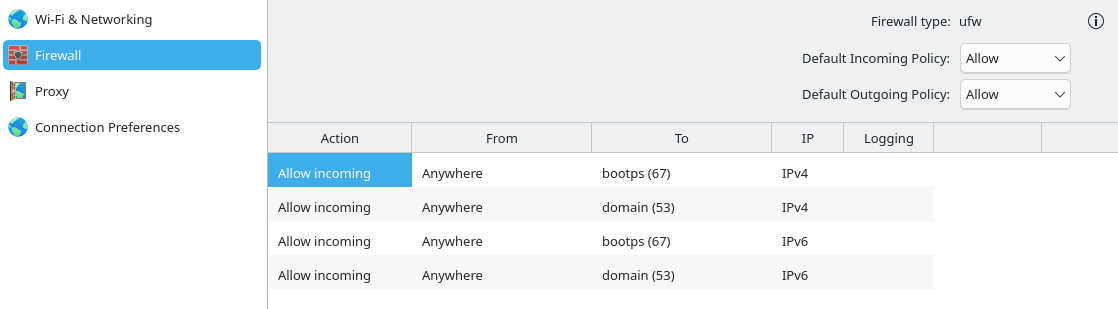
in case the nft-firewall is broken, change LXC_USE_NFT="true" to false
then add the ufw forward port / disable the firewall temporary to test
I did try it a little bit and it didn’t work. I decided not going to tinker with it anymore. I hope it gets fixed someday, if they don’t I might just buy a phone at this point.
Thank you, i appreciate the update. Network access would be absolutely necessary as the primary motivation for even considering Waydroid is to run TiviMate which offers no native Linux (or any other OS) binary
For example the last comment on that github issue has a response detailing how it actually works fine and docker was the blocking problem the whole time.
It also includes some firewall commands in case they are needed so I might expect with that info you should be able to get it working.