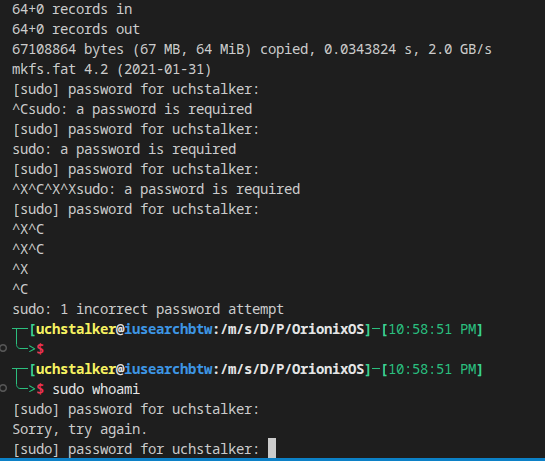
I noticed that, if you run any command with sudo, for example, sudo whoami, and on the password prompt you hit either CTRL+X or CTRL+C, it completely breaks sudo for me.
It starts saying that my password is invalid, and only a hard restart or some other way to reset the auth stack fixes it.
sudo logs:
root ; COMMAND=/usr/bin/cp -r build/esp/EFI build/esp/Orionix /mnt/esp/
May 16 20:21:27 iusearchbtw sudo[173203]: pam_unix(sudo:auth): conversation failed
May 16 20:21:27 iusearchbtw sudo[173203]: pam_unix(sudo:auth): auth could not identify password for [uchstalker]
May 16 20:21:29 iusearchbtw sudo[173203]: uchstalker : 2 incorrect password attempts ; TTY=pts/3 ; PWD=/mnt/storage/Development/Projects/OrionixOS ; USER
=root ; COMMAND=/usr/bin/mkdir -p /mnt/esp
May 16 20:21:31 iusearchbtw sudo[173294]: pam_unix(sudo:auth): authentication failure; logname=uchstalker uid=1000 euid=0 tty=/dev/pts/3 ruser=uchstalker
rhost= user=uchstalker
May 16 20:21:38 iusearchbtw sudo[173294]: uchstalker : 3 incorrect password attempts ; TTY=pts/3 ; PWD=/mnt/storage/Development/Projects/OrionixOS ; USER
=root ; COMMAND=/usr/bin/mount esp.img /mnt/esp
May 16 20:21:38 iusearchbtw sudo[173347]: pam_unix(sudo:auth): conversation failed
May 16 20:21:38 iusearchbtw sudo[173347]: pam_unix(sudo:auth): auth could not identify password for [uchstalker]
May 16 20:24:44 iusearchbtw sudo[173907]: pam_unix(sudo:auth): conversation failed
May 16 20:24:44 iusearchbtw sudo[173907]: pam_unix(sudo:auth): auth could not identify password for [uchstalker]
cachyos is based on archlinux, so technically i can say it.
also, i have literally zero clue on how this happens, but for me its recreatable, and it happens specifically when i press ctrl+c & ctrl+x in the sudo password input, breaks something with the auth system that as far as i know is only fixable by restarting the system.
the issue isn’t that it breaks the current sudo input.
it breaks the global sudo input. after it happens, sudo will no matter what and how accept my correct password that other commands like su or the login UI do accept.
sudoers file was edited in an attempt to fix the issue, but not before.
fish shell
i was able to reproduce it once again, it happens specifically with this command: dd if=/dev/zero of=esp.img bs=1M count=64 mkfs.fat -F32 esp.img sudo mkdir -p /mnt/esp sudo mount esp.img /mnt/esp sudo cp -r build/esp/* /mnt/esp/ sudo umount /mnt/esp
i figured out that it was caused by this combination: spamming ctrl+x / ctrl+c while hitting enter
note that on the sudo whoami i made sure to enter the correct password that works everywhere else lik su or login screen. i only tested it in VSCode so far but i dont think its VSCode causing this.
edit: by “only tested it in VSCode” i mean i only ran the initial command in VSCode. The sudo command broke globally accross all consoles, new and old, and TTY as well.
~ on master [✘!]
❯ sudo ls
[sudo] password for matt:
^X^C^X^C^X^C^X^C^X^C^X^C^X^C^X^C^X^C^X^C^X^C^X^C^X^C^X^Csudo: a password is required
^X
~ on master [✘!] took 3s
❯
Not able to reproduce it here sorry.
@cscs - yep, CTRL-D sends EOF, which quits the prompt faster than CTRL-C/SIGINT:
~ on master [✘!]
❯ sudo ls
[sudo] password for matt:
sudo: no password was provided
sudo: a password is required
~ on master [✘!] took 2s
❯