Hey guys, I just installed the latest CachyOS (Apr 2026 build) on my new laptop, specs attached below. I’m trying to lower the volume of all notification sounds:
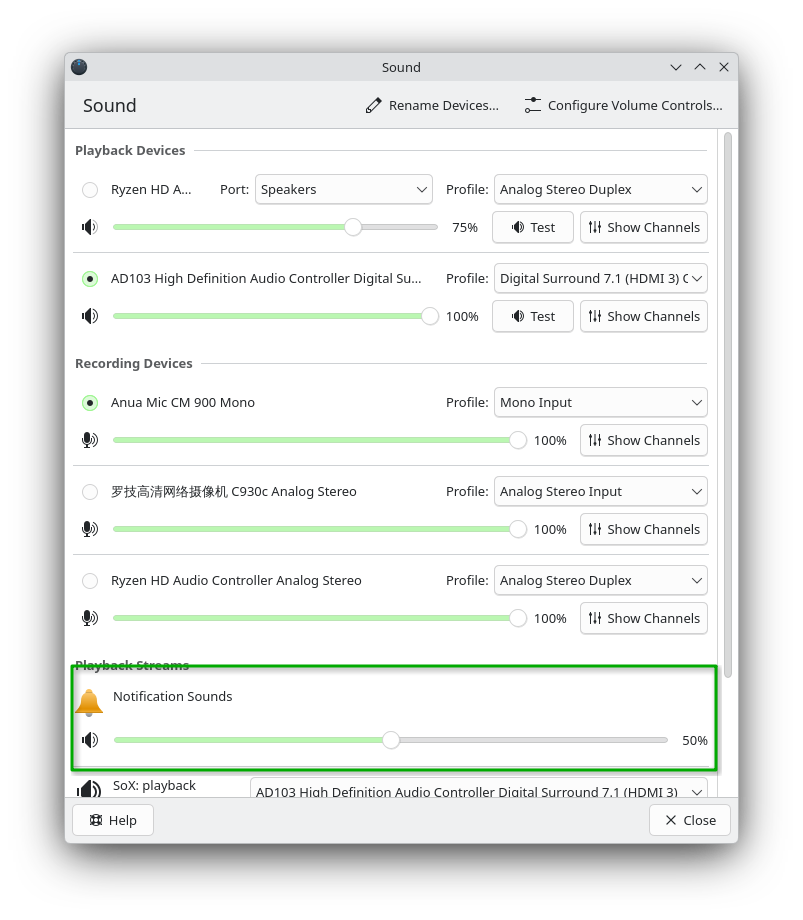
My changes don’t stick. They stay at 100%.
Anybody else ever had this issue? Is there some command I can type or some file I can edit to lower the volume of notification sounds?
Operating System: CachyOS Linux
KDE Plasma Version: 6.6.4
KDE Frameworks Version: 6.25.0
Qt Version: 6.11.0
Kernel Version: 7.0.3-1-cachyos (64-bit)
Graphics Platform: Wayland
Processors: 32 × AMD Ryzen 9 7945HX with Radeon Graphics
Memory: 64 GiB of RAM (62,0 GiB usable)
Graphics Processor 1: NVIDIA GeForce RTX 4090 Laptop GPU
Graphics Processor 2: AMD Radeon 610M
Manufacturer: ASUSTeK COMPUTER INC.
Product Name: ROG Strix G733PY
System Version: 1.0
