SMB share shows in Dolphin but I get " does not exist message" when I select it

New CachyOS user, long time user of mint.

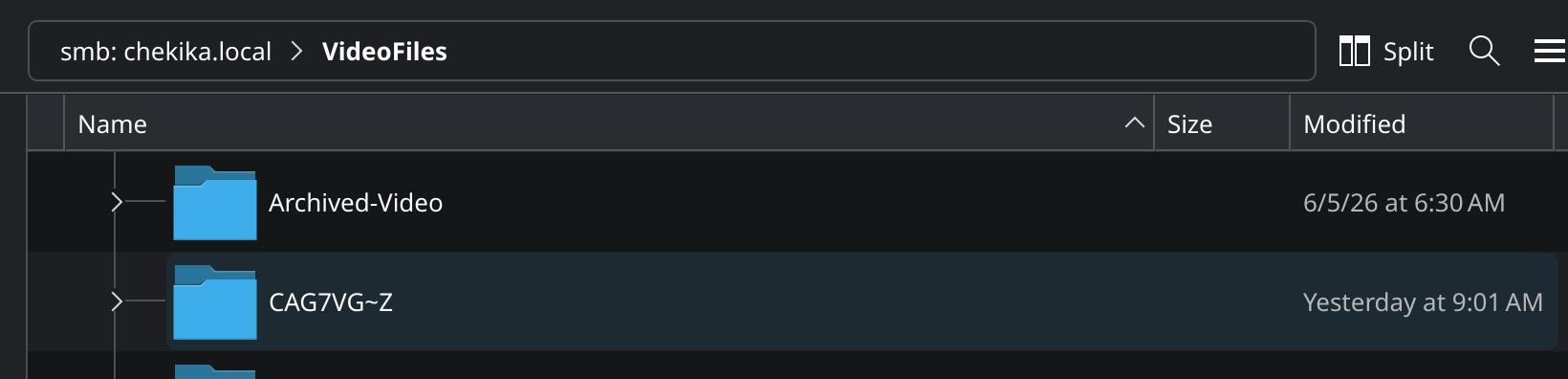
When I use Dolphin to open a share on my NAS a folder called CAG7VG-Z shows up. Whenever I select it I get the error message that the file or folder does not exist. This folder does not show up on my other systems (mac,windows and linux mint), or in the terminal both in my CachyOS system or in the root shell of my nas (Truenas custom built). What is going on ?

I’m not super sure. Check via real SMB client

smbclient //your-nas/share -U youruser
ls

Maybe you need the CIF tools?
sudo pacman -Syu kio-extras smbclient cifs-utils

interesting when used the smbclient program the miscreant folder did not appear, so it looks like something Dolphin is doing. here is a screen shot. The folder CAG7VG-Z only appears on dolphin and it wont let me delete it there

hmmm… based on my experiences, this kind of folder will shown up if

  1. the folder / file name is too damn long (kinda past of the limit i guess)
  2. the folder / file name has untranslated character, CMIIW tho

so i guess it’s better for you to check on the source first, and maybe rename it ? or change it to NFS mode instead of SMB

This looks like a temp folder or something.
Can you try clearing the KDE/KIO SMB cache.
I think you should mount the share via CIFS instead. Then edit fstab so it auto mounts each reboot.
That fixed it! I cleared the Dolphin file cache, then the Samba client cache and restarted.

I did not touch the network credentials .

Heck ya! Was it still there, after a reboot?