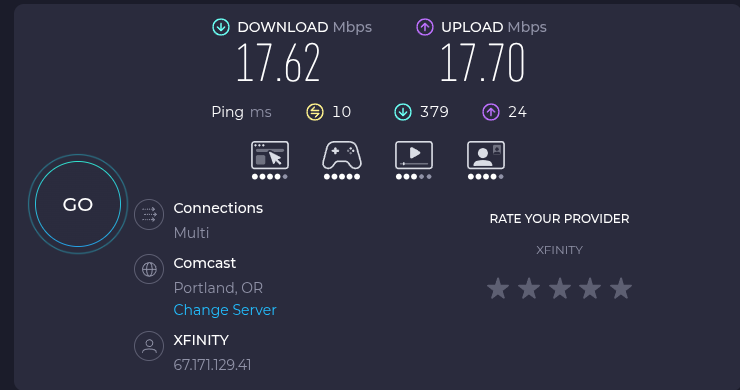
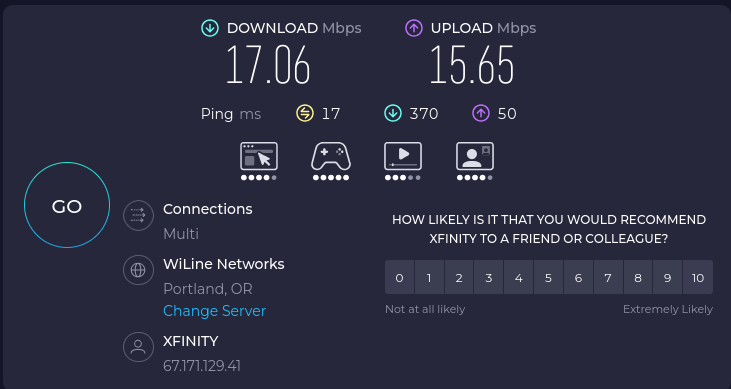
I just purchased and installed a EDUP BE6500 WiFi card to replace my motherboards onboard WiFi cause I was getting extremely slow speeds. I should be getting up to a gig, but as you can on the last test I didn’t even get 18 megs down. From my inxi it doesn’t seem that I’m even using the new card even though after installing the card I turnoff the motherboards wifi in the bios.
No on all counts cause the first thing I did was test WiFi without the VPN (completely turned off not just disconnected) and got the same results. Next I disabled the WiFi and connected via ethernet and tested with and without VPN enabled and no issues whatsoever, speeds were exactly what I should be getting.
I don’t expect to get gig service via the WiFi but upwards of 900+ yes from experience with both Xfinity and Quantum Fiber. Now that said I just rebooted in to a live Garuda and you can see no real difference. No network cable hooked up, no VPN installed. Beginning to think it’s on Xfinity’s end. That or the speed test are being funky cause pages seem to load nice and fast. Wish there was some other way to test the speed.
You can get information about the current signal strength, negotiated bitrate, etc with these commands:
nmcli dev wifi
iw dev wlan0 link
Replace wlan0 if your wifi device has a different name.
The negotiated bitrate is the theoretical maximum; in reality the limit will always be lower. But it does hint at what to expect. If it’s lower than expected, either the signal is too weak, or there is a configuration or driver issue affecting it.
If you post the output of those commands while wifi is connected, it could help diagnose what is going on.
If you have another computer on the same network, you could try transferring files between the two computers (ideally with one of them on ethernet so wifi isn’t used twice) to see if it’s a local wifi issue or something outside of your local network.
All that aside, wifi in general is unreliable and suboptimal. Magicking data across the ether always comes at a cost. Wired is the way to go, whenever possible.
I am surprised it is not more widely known how bad they are.
( Though in some places it may be virtually the only option besides dial-up or satellite. )
Anyways I also notice that at least one local network is rocking xfinity hardware with the basic default settings because, ex;
This is the same coverage from the same network device.
Its technically a different network - one thats intended for xfinity customers ‘on the go’ to have wifi .. as supplied by some other customer.
I probably do not need to express all the performance and security problems that might entail.
It is just one thing among others that you get with the service .. last I checked it can be disabled but not by the user .. they need to call and complain and it can be disabled remotely (more eww).
The xfinitywifi is guest wifi without a password on separate hardware within the modem / router. I may just turn it off like I have in the past. I am on the FuckTrump, and yes by the terminal output both networks are rocking over the 1 gig service. Looks to be giving me full speed then some. Just some setting in the modem / router for some reason isn’t sending the right info to the various speedtest. Like I said from what I’m seeing with sites loading I’m honestly not seeing any slow loading pages.Now as fior Xfinity performance it’s never been an issue. Other than a couple of months earlier this year I’ve had them for 13+ years and alway got the performance promised. I went back to them be Quantum Fiber kept playing games, plus I got the gig service for 50 a month locked in for 5 years and a unlimited mobile line for a year. After that I can switch to a mobile carrier like Tello again.
The simple fact that their hardware is outputting an extra network from the same device .. on the same radio channel .. would already be introducing enough noise for it to count as malware in my opinion.
To say nothing of how isolated the one network is from the other. And given how comcast/xfinity does things I would not have the highest hopes.
I guess we can be glad you have not experienced anything too obviously egregious.
But I will repeat .. even if everything else was somehow perfect .. those extra public networks are adding channel congestion.
Without getting to the heat/energy/processing of the box. Beyond the wireless. If we talk in terms of memory .. the router only has so much and half of it is being given to the public for that xfinity-everywhere service, not to the service you pay for for your own consumption.
This is just normal guest network/multiple SSID operation. It’s not just the same radio channel it’s the same radio so no “noise” just a tiny bit of overhead.