Hey guys! Since the recent Plasma 6.7 update, the lock screen on my PC is unresponsive whenever I come back from being afk for a while (e.g. when grabbing a bite to eat).
No response to any mouse or keyboard input. However, the clock still works and when I unplug the USB dongle, I hear the notification sound. Still, even after re-plugging, no kb/m input.
I realize the Internet is full of similar issue reports, although they all seem to differ slightly in circumstances and symptoms. The closest I could find was this one:
https://www.reddit.com/r/cachyos/comments/1pjwod6/kde_plasma_hangs_on_lockscreen/
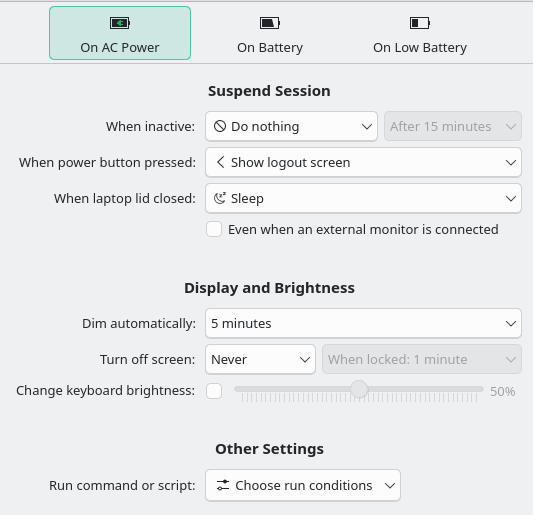
This is a laptop, but I always run it on AC power. My power settings:
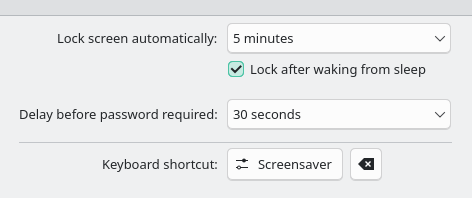
My screen lock settings:
My system specs:
Operating System: CachyOS Linux
KDE Plasma Version: 6.7.0
KDE Frameworks Version: 6.27.0
Qt Version: 6.11.1
Kernel Version: 7.0.12-1-cachyos (64-bit)
Graphics Platform: Wayland
Processors: 32 × AMD Ryzen 9 7945HX with Radeon Graphics
Memory: 64 GiB of RAM (62,0 GiB usable)
Graphics Processor 1: AMD Radeon 610M
Graphics Processor 2: NVIDIA GeForce RTX 4090 Laptop GPU
Manufacturer: ASUSTeK COMPUTER INC.
Product Name: ROG Strix G733PY
System Version: 1.0
Any ideas?