I have an HP omen max and I’ve been following the secure boot setup guide on the wiki. In both cases when i get to the step of entering sbctl status, I get the error “system is not booted with UEFI. I have tried both limine and grub, the error is the same in both. What am I missing?
Maybe we can double check you booted/installed in UEFI mode rather than BIOS-Legacy;
sudo efibootmgr
bash -c 'compgen -G /sys/firmware/efi/efivars/* && echo "Booted UEFI" || echo "Booted Legacy BIOS"'
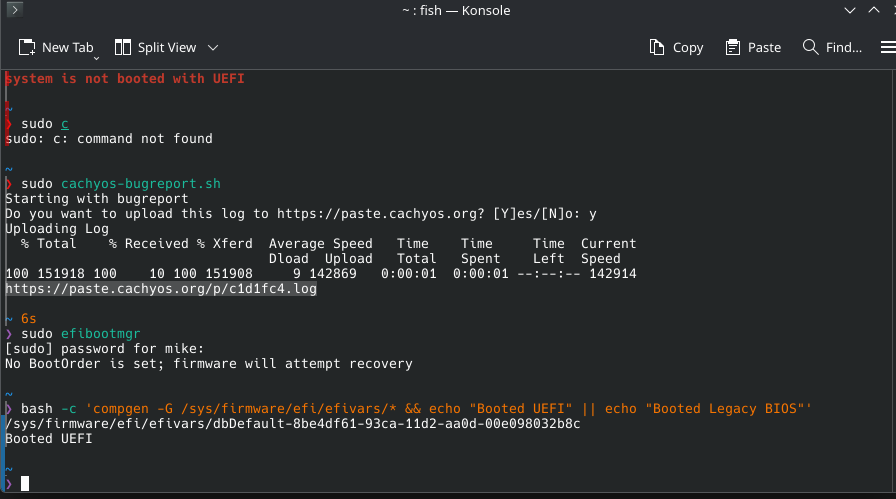

Yes the first example is somewhat puzzling.
Are you maybe chainloading somehow?
There is no visible ESP or something?
that 1st example is grub with cachyos, no chainloading. It is on a usb-c external drive though. Regardless, that one is just my attempt to troubleshoot using grub instead of limine. the second screenshot is my main install.
Could this be it?
Because the external itself does not have UEFI firmware like a PC does (it probably has SSD firmware or whatever but not a whole BIOS thing).
Whether that should technically stop sbctl or if it is just causing its pre-checks to fail I could not say.
Possibly, although that the 2nd screenshot is from my primary cachyos install with limine, and it is directly installed into my m2 slot on my mobo. Both throw the same error about not being booted with UEFI.
Does running bootctl tell you anything different than sbctl?
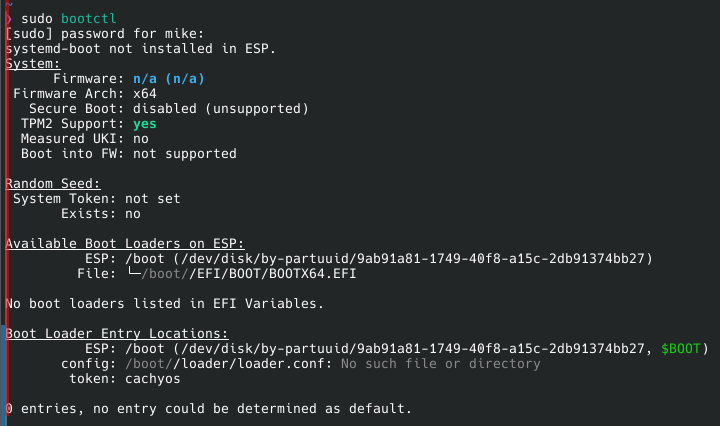
Any suggestions on where to go from here? It seems suspicious that there are no boot loaders listed in EFI variables, but I was thinking that might just be because sbctl has yet to generate keys. I’m open to troubleshooting if anyone has ideas.
Any luck? Did you manage to solve this? I’m facing exactly the same situation now. I’m on a Lenovo Legion 9i and see all the same outputs as you to those commands (except just running off one internal SSD)/
On a framework 12, can confirm I’m on UEFI. still face the same issue as op.
I am trying to install Arch and I have the exact same problem.
Is this a motherboard issue due to poor UEFI implementation?
I would love if we could find a solution to this.
If anyone could chime in, that would be great!
Hi! same here. No chance to activate the secure boot. In my case I have dual boot with W11 and CachyOS. Getting the same message: System is not booted with UEFI. The funny thing is this OMEN MAX 16 2025 only has UEFI. No legacy, no CSM. Only UEFI.
Same issue in my end.
My device is LOQ 15IRX10, BIOS Version: R3CN44WW
[root@archlinux daysling]# sbctl enroll-keys
open /sys/firmware/efi/efivars/SetupMode-8be4df61-93ca-11d2-aa0d-00e098032b8c: no such file or directory
[root@archlinux daysling]# cd /sys/firmware/efi/efivars/
[root@archlinux efivars]# ls
dbDefault-8be4df61-93ca-11d2-aa0d-00e098032b8c NhltEndpointsTableConfigurationVariable-a1d89a3a-4a90-429d-4365-1f64c3a29614
dbxDefault-8be4df61-93ca-11d2-aa0d-00e098032b8c PciBusSetup-ec87d643-eba4-4bb5-a1e5-3f3e36b20da9
FeData-1f2d63e1-febd-4dc7-9cc5-ba2b1cef9c5b PKDefault-8be4df61-93ca-11d2-aa0d-00e098032b8c
H2OFormDialogConfig-98ae8272-ce5a-46be-9f5d-d9f9cbbb99f2 SecureBootData-aa1305b9-01f3-4afb-920e-c9b979a852fd
HTTP_BOOT_CONFIG_IFR_NVDATA-4d20583a-7765-4e7a-8a67-dcde74ee3ec5 Tcg2ConfigInfo-07a66697-d400-4903-b3da-67a61d2b7058
IP6_CONFIG_IFR_NVDATA-02eea107-98db-400e-9830-460a1542d799 WIFI_MANAGER_IFR_NVDATA-3441803e-5a88-4941-82f0-858a1085276c
KEKDefault-8be4df61-93ca-11d2-aa0d-00e098032b8c
~ ❯ efibootmgr
No BootOrder is set; firmware will attempt recovery
~ ❯ sudo sbctl status
system is not booted with UEFI
No BootOrder is set; firmware will attempt recovery disappers when I restore the default keys in the BIOS. After restoring the default keys, sbctl status will show Setup mode as disabled but will mention I’m actually using UEFI.
Sorry for the late reply. I never figured it out on my HP omen max. I finally gave up and bought a legion pro 7, and following the secure boot guide on the wiki worked perfectly, although I was using a dedicated (2nd) ssd for cachy. Did you ever get it to work?
Interesting, we’re on the same machine (I got it wrong in my earlier reply), and no I couldn’t get it to work. Also just followed the steps in the wiki. I guess I’ll have to try again.