Hello!
I have an HDR display, so I was excited to finally play RDR2 in HDR on my fancy new RX 9070 XT, so I booted up RDR2 with these launch options off Steam (with proton-cachyos):
I’ve already verified that the game works fine (in my limited testing, although I did see a weird visual bug in the benchmark) on X11 without the Wayland driver, but I really wanna play this game with HDR
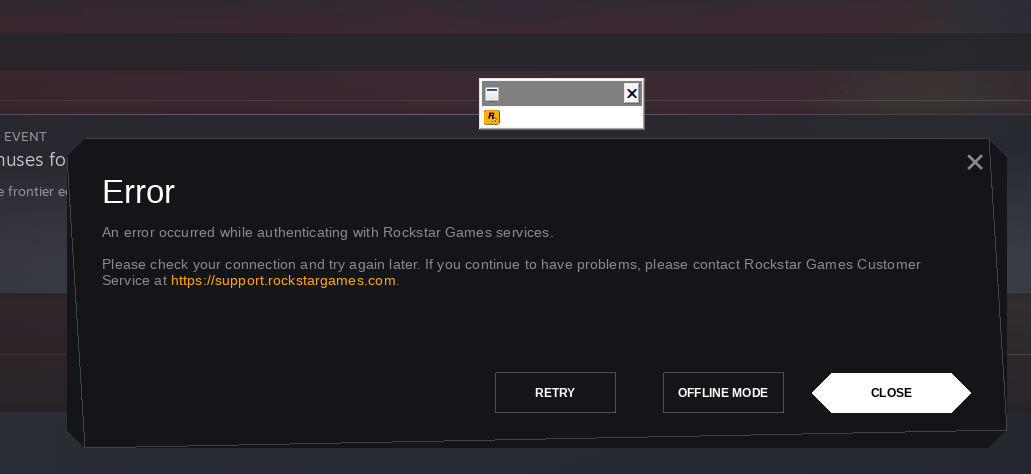
Starting it shows a black rectangle (the rockstar launcher?), after waiting a bit, it boots up but quickly stops and shows this error message:
Clicking “Retry” closes the window for a few seconds, before popping up again
“Offline mode” makes it disappear permanently without ever starting the game. (Steam still thinks it’s running though?)
“Close” seems to do the same thing as “Offline mode”?
Here’s my PROTON_LOG=1 output while running it with -scofflineonly:
I am downloading the game now via steam and will test, i have a 9070xt like OP, but i do remember wayland being an issue with GTA 5 Enhanced as well, as in the launcher will not work with wayland enabled.
edit: same results as OP, cant start with any version of cachy proton (native or SLR) or latest GE still.
Unfortunately, no. I eventually gave up and had to reboot into Windows whenever I wanted to play it, which is a shame, cause everything else seems to work in my library
Well, it works fine enough when not using the Wayland driver, and Proton Hotfix doesn’t have the Wayland driver enabled, so it’s not really of all that use. (I wanna use Wayland to be able to use HDR)
I do appreciate your suggestion, though!
As an update, I’ve tried a few Proton versions along with gamescope instead of the Wayland driver, and it seems to not work either. I can hear the audio, but there’s no video. (This game seems to despise HDR on Linux for some reason)
Just installed RDR2 via Steam. I literally did not do anything besides installing game via steam, then launching it, it prompted that I need to install RockStar Games, did that. Have set Proton-CachyOS. And game runs. Tried VIDEO Benchmark with DX12 and Vulcan. Both tests showed 142 FPS average on ULTRA settings. I remember on Windows11 I had around 112 to 120FPS on thse settings. So I just got 20FPS on top.
CachyOS is MEGA!