 Proton-Autogen – Automatic Proton/Wine launcher for .exe files
Hello CachyOS community 
I’d like to share a small tool I’ve been working on: Proton-Autogen.
It is a lightweight utility that allows running Windows .exe files on Linux using Proton, with an automatic fallback to Wine when needed.
The goal is to make launching Windows applications on Linux as simple as possible, without manually creating Steam shortcuts or configuring Wine prefixes.
 What it does
With Proton-Autogen, you can simply:
-
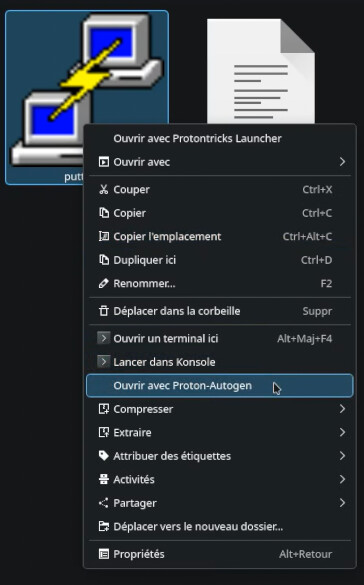
Right-click a
.exefile in your file manager -
Select “Open with Proton-Autogen”
-
The application launches automatically using Proton or Wine
It automatically:
-
Detects installed Proton versions (GE-Proton preferred)
-
Chooses the best available runtime
-
Falls back to Wine if Proton is unavailable
-
Supports GameMode (optional)
-
Integrates with file managers:
-
Nemo
-
Nautilus
-
Dolphin
-
 Features
-
Proton automatic detection
-
GE-Proton priority support
-
Wine fallback
-
CLI support
-
File manager integration
-
Lightweight and minimal dependencies
 Usage
Usage
proton-autogen game.exe
or
proton-autogen /path/to/app.exe
 Installation (CachyOS / Arch)
git clone https://github.com/N3oRay/proton-autogen.git
cd proton-autogen
sudo install -Dm755 usr/bin/proton-autogen /usr/bin/proton-autogen
sudo cp -r usr/share/* /usr/share/
 Motivation
I wanted a simpler way to run Windows .exe files on Linux without relying on full GUI tools or manual configuration every time.
Proton-Autogen tries to make Proton feel like a transparent execution layer rather than something you need to configure each time.
 Screenshot
 Project
GitHub: https://github.com/N3oRay/proton-autogen
 Notes
Notes
-
Not all Windows applications are compatible with Proton
-
Some programs may still require Wine tweaks
-
Compatibility depends on Proton version used
 Feedback welcome
This is still an early project, so any feedback or testing on CachyOS / Arch setups is appreciated.
