EDIT: I’ve started this thread with assumptions that my /boot partition was erroneously writing firmware updates, but this isn’t the case. CachyOS, or rather the Linux kernel, is exposing a UEFI Firmware bug after fwupdate pushed a new UEFI CRL (dbx) update, which my UEFI did not handle gracefully and started exhibiting bugs in relation to S2RAM or other sleep states on your computer.
Quick workaround:
- set
efi=noruntimein kernel boot parameters to disable linux talking to UEFI after bootloader handling - run
sudo bootctl installafter every systemd (package) update for as long as the kernel boot parameter is set
Long term fix is to re-program the entire UEFI chip, by means of a firmware programmer device, or a forced re-program through your UEFI firmware flash update utility. Using your motherboard utility to flash the same UEFI image will very likely not work as it usually doesn’t forcibly reprogram the whole chip, depending on your vendor.
If you’ve managed to re-flash, remove the efi=noruntime flag.
vvv ORIGINAL POST vvv
Shortest question: I _think_ the `boot` partition of my installation is permanently stuck trying to write erronous UEFI code to the BIOS flash chip of my computer on every startup, and/or every Cachy-Update upgrade. Please direct me to reverting any and all behavior that does this on the `boot` partition during startup, or otherwise within CachyOS itself.
Revelant information:
Hardware:
* Motherboard - MSI MAG X870E TOMAHAWK WIFI
• RAM - 2x G.Skill F5-6400J3239F24G (24GB DDR5, AMD EXPO @ 6400MT/s, CL32-39-39-102)
• Secure boot always disabled (conscious user choice)
• TPM 2.0 always disabled (conscious user choice)
Software:
• Bootloader: systemd-boot
• Kernel - `6.16.5-1-cachyos` built with the CachyOS Kernel Manager (build options config attached to post)
• Flatpaks configured (`sudo pacman -S flatpak`)
• (If at all relevant) DE: KDE Plasma 6.4.4, WM: Kwin (Wayland) (XWayland configured)
I’ve troubleshooted most relevant hardware (memtest86+ two full passes, prime95 blended stress testing, FurMark) and hadn’t suffered issues there. I am happy to retry to verify my claim if you deem it is needed.
On KDE Discover (Flatpak manager), a firmware update was pending with a UEFI CRL change. I’ve proceeded with the install even as Secure Boot is disabled (the CRL has no meaning when this is set). Upon restarting the computer, the UEFI prompted that a settings reset was made. Upon viewing changes, I noticed my RAM was registered completely wrong (please refer to attached screenshots). DIMM A2 would register a corrupt part number, non-matching “Chip Vendor” and " Chip Steeping" IDs, and most importantly, only register as 3072MB of memory instead of the expected 24576MB.
This does not pose a threat to booting into CachyOS and the same erronous memory is reported there.
I’ve snooped around installed packages and found `fwupdate` to be a candidate for writing the UEFI code erroneously. I’ve preemptively removed this package (`sudo pacman -R fwupdate`)
To fix the corrupt BIOS, I conduct a UEFI Firmware update through MSI’s UEFI Firmware utility (“MSI Click Bios X”, or more commonly refferred to ‘BIOS settings’ or ‘BIOS setup’. This works fine.
Except, for almost every reboot after a CachyOS update through `Cachy-Update` (or sometimes randomly), UEFI notes a system settings change. To which I see the corrupted registered memory again. So i’d need to re-flash the UEFI Firmware every so now and then to upright this problem. Which takes time and I’d need to manually set my UEFI preferences again.
How would I non-destructively remove any method of firmware updates through both CachyOS, and also (presumably) on the boot partition of my drive? This UEFI changing behavior is undesirable (and irrelevant to those who have Secure Boot turned OFF) and I would like to remove any trace of it in hopes of it not touching any UEFI any longer. It’s been keeping me busy all week and it’s _really_ getting on my nerves now.
I’m open to troubleshooting and debugging, of course.
N.B.: This hasn’t been an issue with W*ndows, although if i recall correctly Microsoft hadn’t pushed a UEFI CRL firmware change in a long time now.
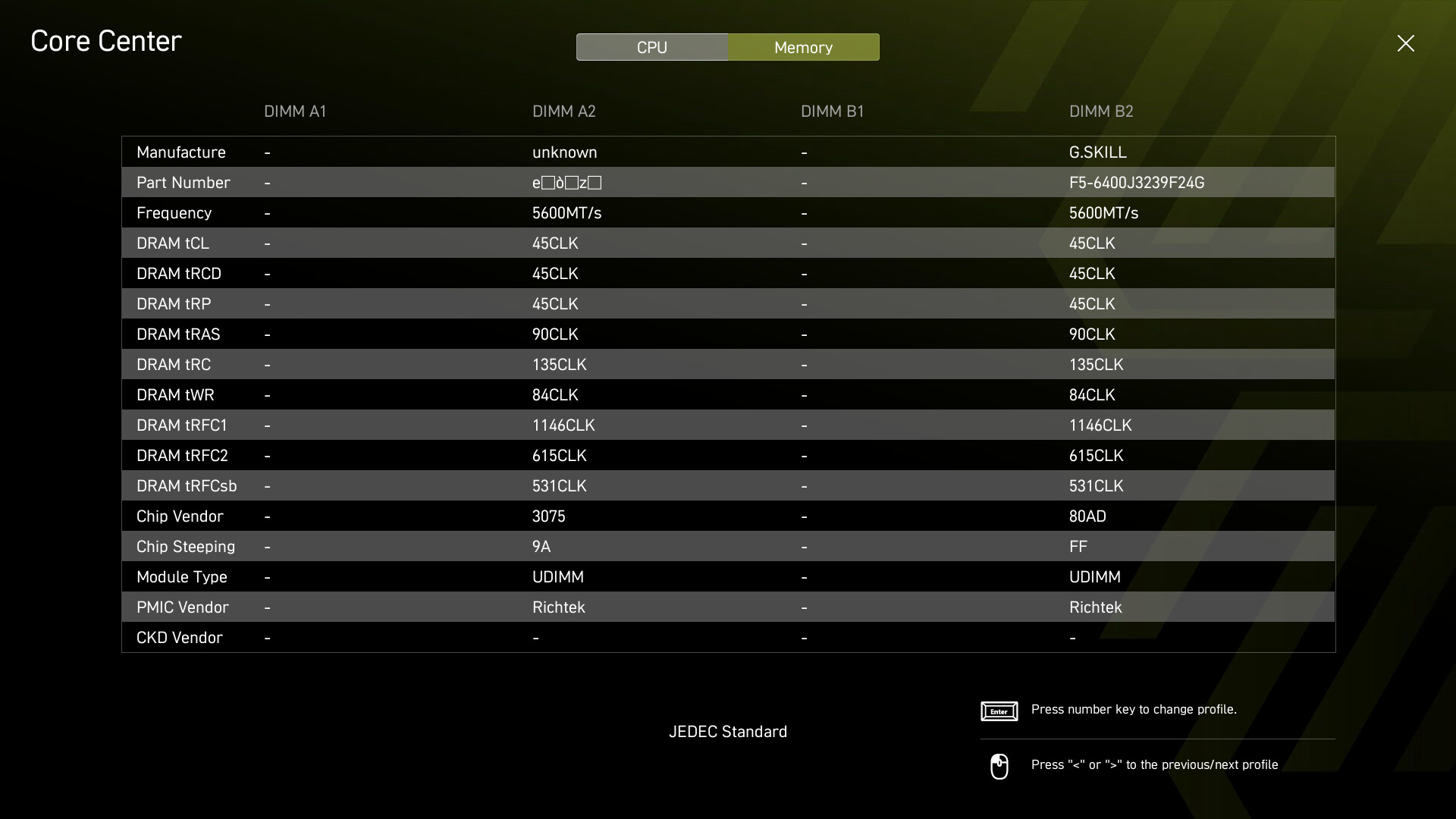
Addendum: As a new user I was only allowed one media upload, so I’ve only uploaded the relevant screenshot with an erroneous memory DIMM entry. I can upload other relevant screenshots once privileged enough.