Partial UEFI corruption with every cachyos package upgrade

EDIT: I’ve started this thread with assumptions that my /boot partition was erroneously writing firmware updates, but this isn’t the case. CachyOS, or rather the Linux kernel, is exposing a UEFI Firmware bug after fwupdate pushed a new UEFI CRL (dbx) update, which my UEFI did not handle gracefully and started exhibiting bugs in relation to S2RAM or other sleep states on your computer.

Quick workaround:

  • set efi=noruntime in kernel boot parameters to disable linux talking to UEFI after bootloader handling
  • run sudo bootctl install after every systemd (package) update for as long as the kernel boot parameter is set

Long term fix is to re-program the entire UEFI chip, by means of a firmware programmer device, or a forced re-program through your UEFI firmware flash update utility. Using your motherboard utility to flash the same UEFI image will very likely not work as it usually doesn’t forcibly reprogram the whole chip, depending on your vendor.

If you’ve managed to re-flash, remove the efi=noruntime flag.

vvv ORIGINAL POST vvv

Shortest question: I _think_ the `boot` partition of my installation is permanently stuck trying to write erronous UEFI code to the BIOS flash chip of my computer on every startup, and/or every Cachy-Update upgrade. Please direct me to reverting any and all behavior that does this on the `boot` partition during startup, or otherwise within CachyOS itself.

Revelant information:

Hardware:
* Motherboard - MSI MAG X870E TOMAHAWK WIFI

• RAM - 2x G.Skill F5-6400J3239F24G (24GB DDR5, AMD EXPO @ 6400MT/s, CL32-39-39-102)

• Secure boot always disabled (conscious user choice)

• TPM 2.0 always disabled (conscious user choice)

Software:

• Bootloader: systemd-boot

• Kernel - `6.16.5-1-cachyos` built with the CachyOS Kernel Manager (build options config attached to post)

• Flatpaks configured (`sudo pacman -S flatpak`)

• (If at all relevant) DE: KDE Plasma 6.4.4, WM: Kwin (Wayland) (XWayland configured)

I’ve troubleshooted most relevant hardware (memtest86+ two full passes, prime95 blended stress testing, FurMark) and hadn’t suffered issues there. I am happy to retry to verify my claim if you deem it is needed.

On KDE Discover (Flatpak manager), a firmware update was pending with a UEFI CRL change. I’ve proceeded with the install even as Secure Boot is disabled (the CRL has no meaning when this is set). Upon restarting the computer, the UEFI prompted that a settings reset was made. Upon viewing changes, I noticed my RAM was registered completely wrong (please refer to attached screenshots). DIMM A2 would register a corrupt part number, non-matching “Chip Vendor” and " Chip Steeping" IDs, and most importantly, only register as 3072MB of memory instead of the expected 24576MB.

This does not pose a threat to booting into CachyOS and the same erronous memory is reported there.

I’ve snooped around installed packages and found `fwupdate` to be a candidate for writing the UEFI code erroneously. I’ve preemptively removed this package (`sudo pacman -R fwupdate`)

To fix the corrupt BIOS, I conduct a UEFI Firmware update through MSI’s UEFI Firmware utility (“MSI Click Bios X”, or more commonly refferred to ‘BIOS settings’ or ‘BIOS setup’. This works fine.

Except, for almost every reboot after a CachyOS update through `Cachy-Update` (or sometimes randomly), UEFI notes a system settings change. To which I see the corrupted registered memory again. So i’d need to re-flash the UEFI Firmware every so now and then to upright this problem. Which takes time and I’d need to manually set my UEFI preferences again.

How would I non-destructively remove any method of firmware updates through both CachyOS, and also (presumably) on the boot partition of my drive? This UEFI changing behavior is undesirable (and irrelevant to those who have Secure Boot turned OFF) and I would like to remove any trace of it in hopes of it not touching any UEFI any longer. It’s been keeping me busy all week and it’s _really_ getting on my nerves now.

I’m open to troubleshooting and debugging, of course.

N.B.: This hasn’t been an issue with W*ndows, although if i recall correctly Microsoft hadn’t pushed a UEFI CRL firmware change in a long time now.
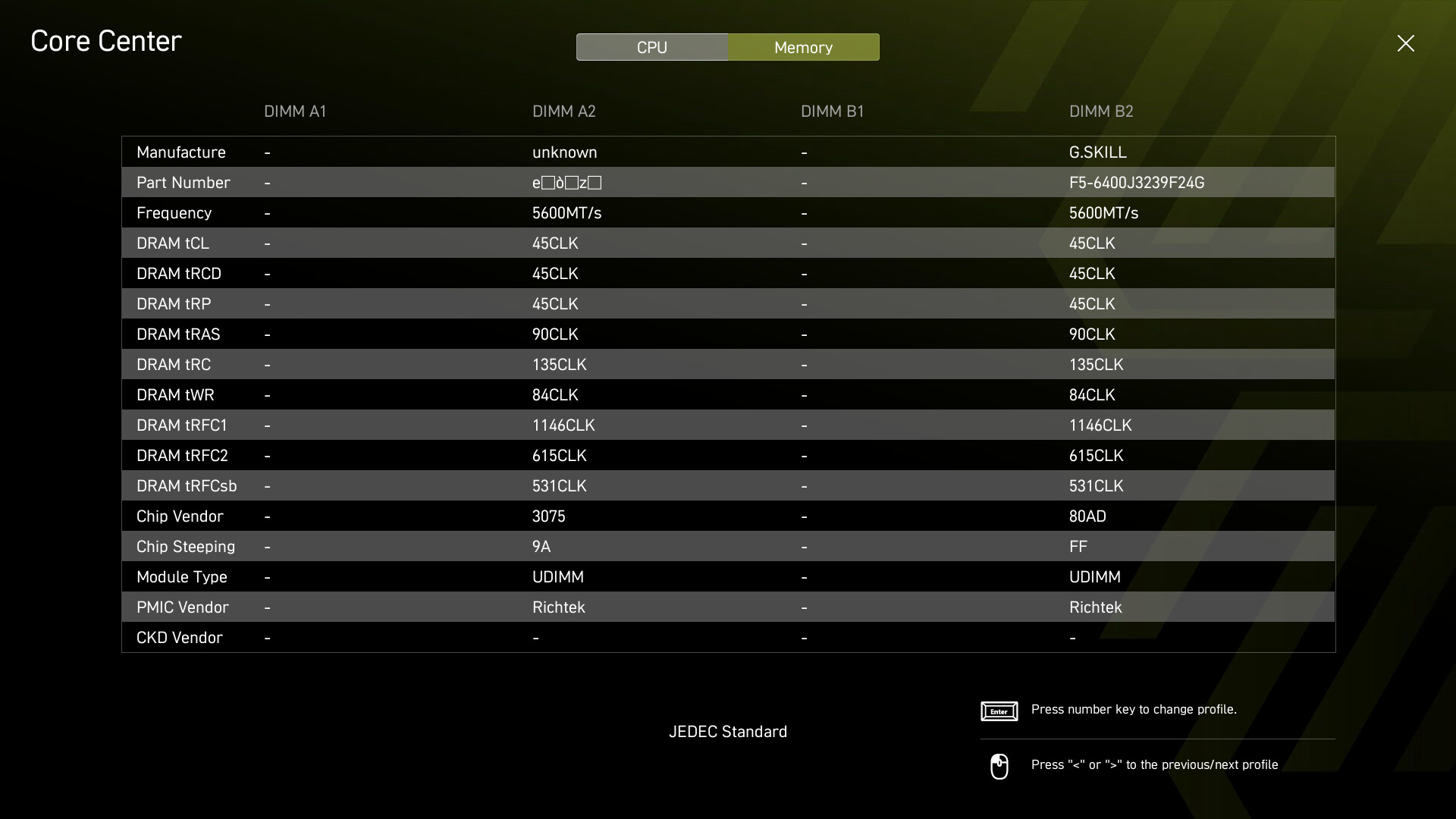
Addendum: As a new user I was only allowed one media upload, so I’ve only uploaded the relevant screenshot with an erroneous memory DIMM entry. I can upload other relevant screenshots once privileged enough.

Update: I’ve learned that too many entries in the UEFI CRL (dbx) can cause space exhaustion, potentially overwriting firmware space. I’ve done the following to mitigate this type of corruption:

  • Turned ON Secure boot
  • Turned OFF factory key installation
  • Manually deleted every entry in the dbx section, and by extension any other secure boot entry (albeit overkill)
  • Turned Secure Boot OFF

This might be necessary since the CRL (dbx entries) still takes up space inside UEFI even after re-flashing. I do not recommend this type of approach if your intent is to use Secure Boot.

Reminder to prevent fwupdate from running in CachyOS or otherwise remove it from your package manager, if you do not want it to make UEFI CRL changes.

I hope this mitigation is sufficient, and I haven’t run into any problems following this change. If I do still have issues I will reply again.

Update: I’ve learned that this specific issue only occurs when initiating suspend (sleep from KDE Plasma). This was NOT an issue before the UEFI CRL update. This is NOT an issue on other OSes (Bookwormpup, Windows 11).

I fear this issue is a combination of suspend and UEFI firmware under Cachy?

Edit: following this I’ve manually added efi=noruntime to my bootloader args. Hopefully this will mitigate this (presumed) UEFI corruption for good.

And just like that, you seem to have resolved a similar (or maybe same?) issue that I was having. I raised the topic over at level1 forums, as I thought it was the faulty hardware. Then, I sat on our hardware provider’s back about the issue, exchanging RAM’s, RAM slots, reinstalling the CPU. After that, I raised the issue with MSI as well. Nothing. After a while, the issue just stopped and hadn’t reappeared for a couple of months now, so I thought it sorta fixed itself. Because of the project I was working on back then, I couldn’t send the PC for detailed diagnostic as 10 days downtime weren’t an option. Seems like I didn’t even have to?

I’m new to Linux, so it never occurred to me that it could be the firmware update through cachy os!? Thanks for this report, I’ll link this thread back to Level1 as well.

Thanks for sharing your insight with me. It’s relieving to hear that I’m not the only one suffering this UEFI bug. I’ve been trying to figure out the timeline of events in the meantime and I suspect the following so far:

  • CachyOS pushes new dbx (UEFI CRL) list to UEFI using package fwupdate.
  • UEFI then attempts to append this list to its internal dbx database, and presumably, because too much data is to be written, this might overwrite other data stored in firmware.
  • After attempting to suspend (sleep) the system, the Linux kernel will pass on to UEFI that thes2ram state is requested. UEFI, at least on my machine, will then corrupt the DIMM memory entry.
  • Any erratic behavior will show after a system reboot, because the boot process will start from UEFI. Explaining my corrupt DIMM entry showing up then.

I advise users running into this issue to pass efi=noruntime to their kernel boot parameters and keep this parameter until you are able to reflash the entirety of your UEFI firmware (be it through a firmware programmer chip, OR though a new vendor UEFI (“re-flashing” the same “UEFI/BIOS” update will NOT flash the whole chip (and fix the corrupt firmware) unlike an update, which usually enforces a whole re-flash

NOTE: if you are using systemd-boot, and you are to upgrade your systemd package through pacman or cachy-update, manually re-install the bootloader after upgrading systemd. Do so with the following command:
sudo bootctl install

This is not neccesary if you do not employ the efi=noruntime parameter.

Oh yeah, and if you do not care for Secure Boot and other firmware updates, just uninstall the fwupdate package. Probably not advised for an environment that prefers or mandates secure environments like businesses, or even portable computers like laptops.

Wow, thank you @Reboot! I’m having this exact issue with Fedora KDE. I was so worried that my new precious motherboard, an MSI X870e Titanium Edge Wifi, had bad hardware.

I found this thread via @Radoman’s Level1 forum post, so thank you too!

Now, I just need to figure out the steps to resolve this under Fedora KDE.

Hi I just recently installed CachyOS and am running into pretty much the same issue on my MSI X870E-P Pro WiFi. One interesting thing is that I didn’t have to do a full reflash to get the RAM to show up correctly. Simply shutting the system and turning it on again allows my memory to show up correctly. However, my EXPO profile gets turned off so I have to reapply that.

Going to reflash the bios (downgrade then upgrade to my current bios) and apply the fix you suggested.

Still running into this issue after reflashing the bios and setting efi=noruntime. Though I haven’t uninstalled fwupd yet. Any other steps I should take @Reboot?

None except for the ones already listed. MSI needs to squash this UEFI-level bug before this problem can truly disappear, or be stuck working around it in the meantime.
A downgrade, into an upgrade using a UEFI flashing utility wouldn’t always work since it would still only do a bytecode difference in parts of the UEFI to be updated. dbxes would very likely be untouched in firmware.

So to truly mitigate this problem for the time being is to use a firmware programmer and reprogram the entire UEFI chip, and keep efi=noruntime as a boot option, as well as to uninstall firmware updater utilities within your distribution.