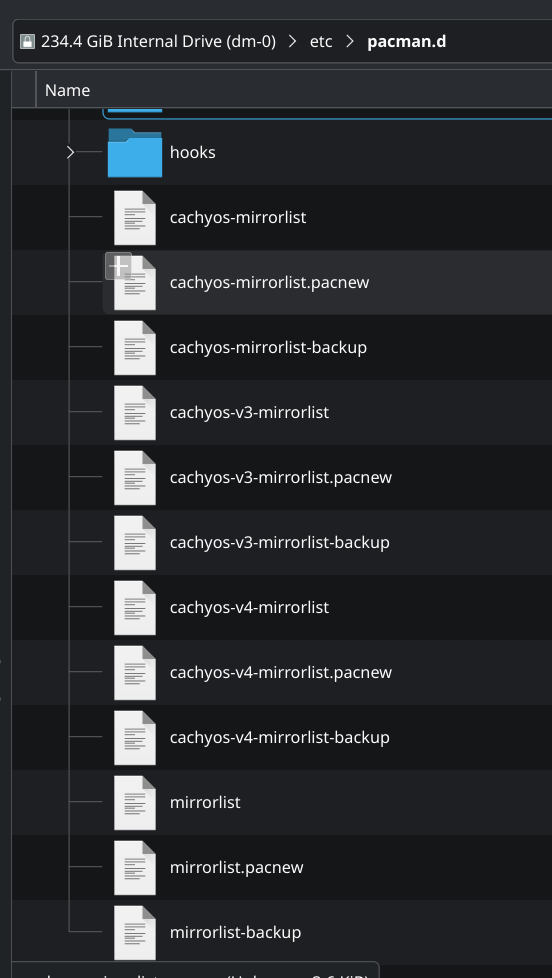
I got a warning in sudo pacman -Syu output about cachyos-mirrorlist. A quick search online pointed to pacdiff to see what was going on in the file. It seems to have opened up some vim thing (I’ve never used vim before). I see a huge wall of red highlighted text with “FAILED TO CONNECT” and “TOO FEW BYTES” errors. Scrolling through the files I’m noticing a few differences in the servers listed as well.
What should I do?
Edit: I don’t know if this is relevent or not but I also have this output from pacdiff:
What’s highly relevant about this is that you don’t understand the permissions required for /etc/ folder.
Pacdiff needs to read and write files in /etc/ and access pacman’s cache directory /var/cache and those download- subdirectories can only be read by root, so what option to choose?
What you saw in red was related to the old mirrorlist - but the red highlighting is just vim’s syntax coloring for diff output.
If you’ve never manually edited, then the easiest option is just to OVERWRITE the old file with the .pacnew version.
You only need to merge if you added any custom mirrors.
If you choose to overwrite the old mirrorlist, all the servers in the mirrorlist.pacnew are commented out. Don’t you need to run cachyos-rate-mirrors (or uncommneting servers manually) before trying to update?
# STARTED AT: 2026-06-03 22:08:06.504520330 -06:00
# VERSION: 0.28.3
# ARGS: rate-mirrors --save /tmp/tmp.m0aMDTaqq6 cachyos
# MIRRORS LEFT AFTER FILTERING: 26
# JUMP #1
# EXPLORING US
# VISITED US
# BLANK ITERATION
# COUNTRY JUMPING YIELDED TOO FEW MIRRORS (0), ADDING OTHERS TO UNLABELED
#

# TESTING UNLABELED MIRRORS
# TOO FEW BYTES LOADED https://mirror2.keiminem.com/cachyos/repo/
# TOO FEW BYTES LOADED https://mirror.keiminem.com/cachyos/repo/
# FAILED TO CONNECT TO https://archlinux.gay/cachy/repo/x86_64/cachyos/cachyos.files
# FAILED TO CONNECT TO https://cdn77.cachyos.org/repo/x86_64/cachyos/cachyos.files
# FAILED TO CONNECT TO https://mirror.zyner.org/mirror/cachyos/repo/x86_64/cachyos/cachyos.files
# TOO FEW BYTES LOADED https://us-mnz.soulharsh007.dev/cachyos/repo/
# FAILED TO CONNECT TO https://mirror.nju.edu.cn/cachyos/repo/x86_64/cachyos/cachyos.files
# FAILED TO CONNECT TO https://cachyos.next-works.it/repo/x86_64/cachyos/cachyos.files
# FAILED TO CONNECT TO https://cachyos.doridian.net/repo/x86_64/cachyos/cachyos.files
# FAILED TO CONNECT TO https://mirror.lesviallon.fr/cachy/repo/x86_64/cachyos/cachyos.files
# FAILED TO CONNECT TO https://mirror.jura12.ru/repo/x86_64/cachyos/cachyos.files
# TOO FEW BYTES LOADED https://us.cachyos.org/repo/
# TOO FEW BYTES LOADED https://mirrors.lansing2600.org/cachyos/repo/
# TOO FEW BYTES LOADED https://at.cachyos.org/repo/
# FAILED TO CONNECT TO https://mirror.hb9hil.org/cachyos/repo/x86_64/cachyos/cachyos.files
# FAILED TO CONNECT TO https://mirrors.ustc.edu.cn/cachyos/repo/x86_64/cachyos/cachyos.files
# FAILED TO CONNECT TO https://cachyos-mirror.m1k.cloud/repo/x86_64/cachyos/cachyos.files
# FAILED TO CONNECT TO https://mirror.cachy-arch.ru/cachyos/repo/x86_64/cachyos/cachyos.files
# FAILED TO CONNECT TO https://no.mirror.cx/cachyos/repo/x86_64/cachyos/cachyos.files
# FAILED TO CONNECT TO https://wan.metrosg.ru/cachyos/repo/x86_64/cachyos/cachyos.files
# TOO FEW BYTES LOADED https://cdn.lansing2600.org/cachyos/repo/
# FAILED TO CONNECT TO https://mirror.mergedcloud.de/cachyos/repo/x86_64/cachyos/cachyos.files
# FAILED TO CONNECT TO https://ca.mirror.cx/cachyos/repo/x86_64/cachyos/cachyos.files
# TOO FEW BYTES LOADED https://mirror.krfoss.org/cachyos/repo/
# FAILED TO CONNECT TO https://nl.mirror.cx/cachyos/repo/x86_64/cachyos/cachyos.files
# TOO FEW BYTES LOADED https://mirror5.krfoss.org/cachyos/repo/
#

# NO RESULTS TO RE-TEST
# ==== FAILED TO TEST SPEEDS, RETURNING UNTESTED MIRRORS ====
Server = https://cdn77.cachyos.org/repo/$arch/$repo
Server = https://us.cachyos.org/repo/$arch/$repo
Server = https://mirror.lesviallon.fr/cachy/repo/$arch/$repo
Server = https://no.mirror.cx/cachyos/repo/$arch/$repo
Server = https://nl.mirror.cx/cachyos/repo/$arch/$repo
Server = https://ca.mirror.cx/cachyos/repo/$arch/$repo
Server = https://mirror.zyner.org/mirror/cachyos/repo/$arch/$repo
Server = https://at.cachyos.org/repo/$arch/$repo
Server = https://mirror.mergedcloud.de/cachyos/repo/$arch/$repo
Server = https://us-mnz.soulharsh007.dev/cachyos/repo/$arch/$repo
Server = https://mirrors.lansing2600.org/cachyos/repo/$arch/$repo
Server = https://cdn.lansing2600.org/cachyos/repo/$arch/$repo
Server = https://mirror.nju.edu.cn/cachyos/repo/$arch/$repo
Server = https://mirrors.ustc.edu.cn/cachyos/repo/$arch/$repo
Server = https://cachyos.next-works.it/repo/$arch/$repo
Server = https://cachyos-mirror.m1k.cloud/repo/$arch/$repo
Server = https://cachyos.doridian.net/repo/$arch/$repo
Server = https://mirror.hb9hil.org/cachyos/repo/$arch/$repo
Server = https://archlinux.gay/cachy/repo/$arch/$repo
Server = https://mirror.jura12.ru/repo/$arch/$repo
Server = https://mirror.cachy-arch.ru/cachyos/repo/$arch/$repo
Server = https://wan.metrosg.ru/cachyos/repo/$arch/$repo
Server = https://mirror.keiminem.com/cachyos/repo/$arch/$repo
Server = https://mirror2.keiminem.com/cachyos/repo/$arch/$repo
Server = https://mirror.krfoss.org/cachyos/repo/$arch/$repo
Server = https://mirror5.krfoss.org/cachyos/repo/$arch/$repo
And here’s the contents of cachyos-mirrorlist.pacnew:
######################################################
####                                              ####
####        CachyOS Repository Mirrorlist         ####
####                                              ####
######################################################
## CDN77 (World Wide Datacenters)
Server = https://cdn77.cachyos.org/repo/$arch/$repo
## Rerouted to mirror
# Server = https://cdn.cachyos.org/repo/$arch/$repo
## Germany, disabled due Netcup issues:
## : OpenSSL SSL_read: SSL_ERROR_SYSCALL, errno 0"
# Server = https://mirror.cachyos.org/repo/$arch/$repo
## USA Mirror much thanks to corpdecker!
Server = https://us.cachyos.org/repo/$arch/$repo
## India Mirror much thanks to https://github.com/albonycal
## Disabled due issues at installation
## Server = https://mirror.albony.xyz/cachylinux/repo/$arch/$repo
## France Mirror much thanks to Antoine Viallon (aviallon)
Server = https://mirror.lesviallon.fr/cachy/repo/$arch/$repo
## Russia Mirror # Removed till sync issue is resolved
# Server = https://mirror.truenetwork.ru/cachy/repo/$arch/$repo
## Norway Mirror much thanks to QuadFeed
# Server = https://mirror.fast0ne.com/repo/$arch/$repo
## Norway,Netherlands,Canada Mirror much thanks to innoix
Server = https://no.mirror.cx/cachyos/repo/$arch/$repo
Server = https://nl.mirror.cx/cachyos/repo/$arch/$repo
Server = https://ca.mirror.cx/cachyos/repo/$arch/$repo
## Sweden Mirror much thanks to Zyner!
Server = https://mirror.zyner.org/mirror/cachyos/repo/$arch/$repo
## South Korea much thanks to Mihate Hiura!
# Server = https://mirror.funami.tech/cachy/repo/$arch/$repo
## Austria Mirror much thanks to Soulharsh!
Server = https://at.cachyos.org/repo/$arch/$repo
## Germany Mirror much thanks to Soulharsh!
## Server = https://de-nue.soulharsh007.dev/cachyos/repo/$arch/$repo
## Germany Mirror much thanks to MergedEyes!
Server = https://mirror.mergedcloud.de/cachyos/repo/$arch/$repo
## USA Mirror much thanks to Soulharsh!
Server = https://us-mnz.soulharsh007.dev/cachyos/repo/$arch/$repo
## USA Mirror & CDN mirror provided by Lansing 2600 in Lansing, MI, USA
Server = https://mirrors.lansing2600.org/cachyos/repo/$arch/$repo
Server = https://cdn.lansing2600.org/cachyos/repo/$arch/$repo
## China Mirror 10GBs much thanks to eScience Center, Nanjing University!
Server = https://mirror.nju.edu.cn/cachyos/repo/$arch/$repo
## China Mirror much thanks to University of Science and Technology of China!
Server = https://mirrors.ustc.edu.cn/cachyos/repo/$arch/$repo
## Hong Kong Mirror much thanks to Saren!
# Server = https://cachy-mirror.wtako.net/repo/$arch/$repo
## Quebec, Canada Mirror from All Things Linux
Server = https://mirror.allthingslinux.org/cachyos/repo/$arch/$repo
## Italy Mirror much thanks to NextWorks!
Server = https://cachyos.next-works.it/repo/$arch/$repo
## Italy Mirror much thanks to ironashram!
Server = https://cachyos-mirror.m1k.cloud/repo/$arch/$repo
## Bangladesh 10 GBs much thanks to Limda!
Server = https://mirror.limda.net/cachy/repo/$arch/$repo
## Finland Mirror much thanks to doridian!
Server = https://cachyos.doridian.net/repo/$arch/$repo
## Switzerland Mirror much thanks to Fabian!
Server = https://mirror.hb9hil.org/cachyos/repo/$arch/$repo
## Russia Mirror from Yandex
# Server = https://mirror.yandex.ru/cachyos/repo/$arch/$repo
## Russia Mirror much thanks to quinowell and haku.host
Server = https://archlinux.gay/cachy/repo/$arch/$repo
## Russia Mirror much thanks to jura12
Server = https://mirror.jura12.ru/repo/$arch/$repo
## Russia Mirror much thanks to cachy-arch.ru
Server = https://mirror.cachy-arch.ru/cachyos/repo/$arch/$repo
## Russia Mirror much thanks to wan666 from metrosg.ru
Server = https://wan.metrosg.ru/cachyos/repo/$arch/$repo
I already read it and I think I understand. Basically something happened on my end to change the file and now pacman detected that my file is different than the one upstream.
My current theory is that something happened to the file when I was setting regdom in an attempt to fix my issue linked above.
All I want to know is:
How important this is (Seems pretty important as it looks like a list of where the OS sources packages from. I may very well be wrong)
What is the proper way to resolve this (I’m seeing multiple answers and it seems as though doing the wrong one may screw stuff up)
Edit: If I’m understanding correctly, cachyos-rate-mirrors will rewrite the mirrorlist files with optimal server lists but won’t remove the .pacnew files. So I’m guessing I should just delete the .pacnew files then run cachyos-rate-mirrors or maybe sudo cachyos-rate-mirrors?
I just want to make sure I’m understanding this correctly before I screw something up.
Also correct but only needed if you have not set DIFFPROG elsewhere (like /etc/environment) … and that you want meld and it is installed and so on.
Why? pacdiff -s is all thats needed.
The DIFFPROG variable will be used if set anywhere, including on the same line.
I think you might be confusing the need of sudo E.. which is, yes, for preserving env vars .. but is more like preserving the USER environment while using sudo. It is not needed for normal pacdiff use and might cause unexpected behavior .. depending on what you were expecting exactly.
$ man sudo
[...]
     -E, --preserve-env
             Indicates  to the security policy that the user wishes to preserve their existing environment variables.  The security policy may return an error if the user does not have
             permission to preserve the environment.
[...]
I thought cachyos-rate-mirrors updated the mirrorlist files to whatever they should be anyway. That’s what it sounded like. This is so confusing
And just linking to the same page over and over isn’t going to change anything. That page doesn’t explain what to do, it just explains what things are. I already read that page. How the heck am I supposed to know if I need to merge or not? No one up until this point said anything about merging. One person mentioned overwriting and then was immediately told that’s a bad idea. These things are definitely the reason linux isn’t overtaking windows any time soon.
This is going to more or less be true .. I had just sort of interpreted, possibly incorrectly, the situation to include multiple pacnew files - so not just the mirrorlist.
Sorry about that, I had not noticed.
Those who understand how this works generally like it this way.
I do not want my updates overwriting my files.
There are various other guides and long threads here as well but pacnews of various forms are part of how package management works on Arch. Package management being foundational to a distro and should be among the main consideration when choosing one.
There is no single ‘you must do this’ because the nature of pacnews is they could be about any file of just about any format or relation or syntax. The point is to compare the new against your local file and decide what to incorporate.
Sorry y’all. I was a bit hangry when I wrote my previous response. I really appreciate all the help and info. This just shows I need to do a bit more research.
To be fair I picked CachyOS for the optimizations since I’m on older/outdated hardware despite knowing that Arch would probably be overwhelming for me. I guess I was hoping that Cachy would be a bit more noob friendly than other arch based distros. I suppose I did this to myself



 If you use FISH, you can use functions…