adso
May 3, 2026, 4:01pm
1
Hi, this my first topic.
After my first installation of CachyOs, i installed Onlyoffice correctly, but when i open the program, i see the icon in the taskbar, but the related window is not visible when i click on. I unistalled and reinstalled it, but the problem is the same. Can you help me?
Thanks
Will you also show us this:
/usr/bin/onlyoffice-desktopeditors
Copy and paste back that return please, and Welcome @adso
axra
May 3, 2026, 4:55pm
3
What Desktop ? CPU/GPU ? Kernel ?
What’s your desktop?
I’m running KDE/Plasma with Wayland, no issues here.
adso
May 3, 2026, 6:07pm
5
❯ /usr/bin/onlyoffice-desktopeditors
(DesktopEditors:3034): Gtk-WARNING **: 20:06:11.984: gtk_disable_setlocale() must be called before gtk_init()
adso
May 3, 2026, 6:10pm
6
my desktop pc is an Acer with Intel Core i5 6400 Skylake with NVIDIA 470.256.02 on Kde Plasma
What @axra was asking about is Desktop Environment “Plasma Gnome Niri Openbox or Cosmic“
adso:
libva error: vaGetDriverNames() failed with unknown libva error
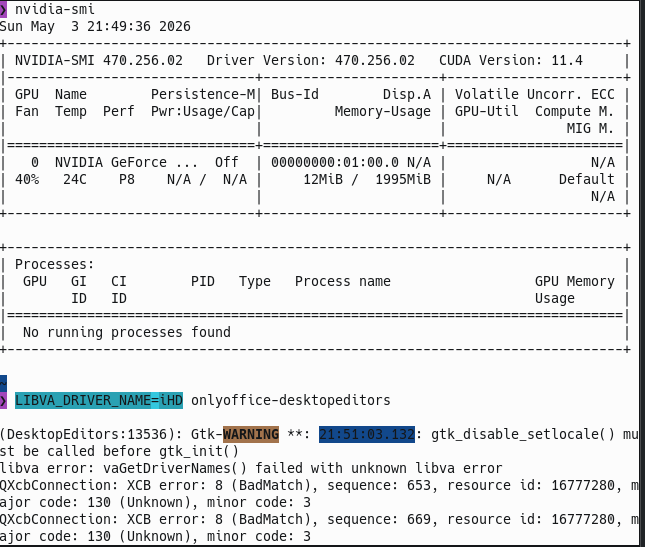
But I’m not sure your driver is working correctly, run this now:
nvidia-smi
If that shows a good install then run this to check against the window showing correctly now:
LIBVA_DRIVER_NAME=iHD onlyoffice-desktopeditors
One last effort here, and if this won't work then you may just be out of luck.
prime-run onlyoffice-desktopeditors
Please copy and paste, to avoid screenshots, easiser to read.
One more thing that might work:
LIBVA_DRIVER_NAME=none onlyoffice-desktopeditors
Information that might be useful:
pacman -Qs nvidia
Last resort: You could try installing the flatpak version of OnlyOffice instead. It comes packaged with its own dependencies, might side-step the issue. sudo pacman -S flatpak then flatpak install onlyoffice. Probably best to uninstall current version first.
adso
May 3, 2026, 8:35pm
11
Wow, thanks a lot!
I resolved with your last suggest.
Would you mind ticking the Solution from whom replied helped you please.