I’m trying to figure out a strange issue. When I run a game, no matter the launcher, if I use proton-cachyos-native, I can see and use my other mounted drives without issue. Wine is also able to see and use them. But the second I use any other proton build, be it Proton-Experimental, Proton-GE, or even proton-cachyos-slr, the other mounts disappear. This causes issues when running a launcher like Battle.net, as I don’t have space to install a large game like Diablo 4 on my root drive to work around this.
I can use STEAM_COMPAT_MOUNTS as an option in Steam to get to the mount I need, but that doesn’t work for Lutris, Heroic, Faugus, or umu. It feels like a permissions issue, but my user is the owner of each mounted directory and their permissions are set to 777.
I’m not using flatpaks, I’ve installed everything from the repos. Any insight or suggestions would be appreciated.
can you describe what is your mounted drive is? (just normal plain hdd / ssd ? or network mount like samba / nfs ?)
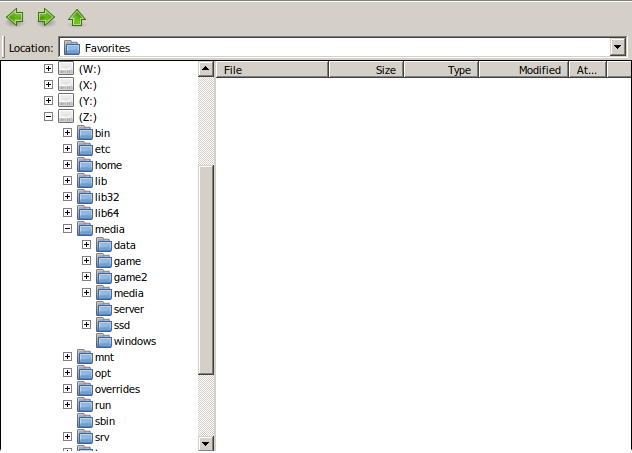
if some proton didn’t see / auto assign the drive letter in the windows explorer, you can always use the Z drive, which is literally like this (your root system), on my system under media was all my ssd / hdd mounted on my system, if you want to connect it to samba / nfs, most common place was in mnt
I have 2 NVMe SSDs and 2 SATA SSDs. All are formatted as btrfs. They are mounted under / as /games1, /games2, etc. I did check under the Z drive and they just don’t show up there.
Actually wait. When Steam decided to install Proton Hotfix to one of them, that drive did show up under Z:, but I could only see the the path to Proton Hotfix. Every other directory on the drive was missing.
Perhaps being mounted under / is the issue? My drives are under /run/media/NAME/DRIVE and every Proton/Wine I’ve thrown at it picks it up in the Z: folder. I only say this as you usually want to use /mnt or /media and that’s usually what I see.
i think this is your root problem
try to change the mount point to some folder that your user has access to there / is mostly only RW by root so the fix should be change your mount to /media/games1 or /mnt/games1 or /run/media/<username>/games1
and make sure to chmod that folder (not the /)
That did the trick! Although I did put them inside of a new folder I called mounts in my home directory just to be absolutely sure I would have full access.
Home is perfectly fine, the other directories given are more “standard practice” that is mostly accepted as normal and give the same permissions as home. Overall key is the mount being in a folder you have 100% control over.