NVidia 580 fails to build during update

I wish I could have gotten a screen scrape. Some error happened during software update after fresh install of CachyOS on new AMD 6-core. The really befuddling thing is I don’t even see 580 listed in package installer. As a result of this Einstein (sp?) will not work under BOINC and only one monitor will work. Not normally an Arch user, I was hoping to go into package install and “force re-install” like we can with other distros. Not saying it would work, but I could scrape the error.

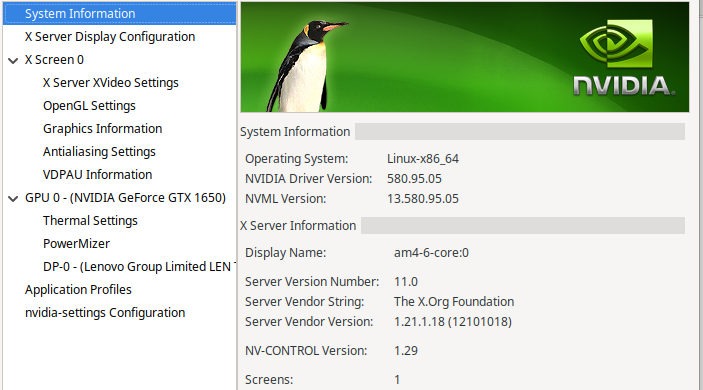
Despite failure to build, still says it is using 580. Further attempts to reboot and apply updates do not appear to trigger the build to happen again.

Appreciate any advice here. Only reason I built this system was to finally use this video card I had sitting on the shelf for years.

Lets check first:

pacman -Q | grep -e linux -e nvidia 
archlinux-keyring 20251012-1
lib32-nvidia-utils 580.95.05-2
lib32-opencl-nvidia 580.95.05-2
libva-nvidia-driver 0.0.14-1.1
linux-api-headers 1:6.16-2
linux-cachyos 6.17.4-4
linux-cachyos-headers 6.17.4-4
linux-cachyos-lts 6.12.53-2
linux-cachyos-lts-headers 6.12.53-2
linux-cachyos-lts-nvidia-open 6.12.53-2
linux-cachyos-nvidia-open 6.17.4-4
linux-cachyos-zfs 6.17.4-4
linux-firmware 1:20251011-2
linux-firmware-amdgpu 1:20251011-2
linux-firmware-atheros 1:20251011-2
linux-firmware-broadcom 1:20251011-2
linux-firmware-cirrus 1:20251011-2
linux-firmware-intel 1:20251011-2
linux-firmware-mediatek 1:20251011-2
linux-firmware-nvidia 1:20251011-2
linux-firmware-other 1:20251011-2
linux-firmware-radeon 1:20251011-2
linux-firmware-realtek 1:20251011-2
linux-firmware-whence 1:20251011-2
nvidia-prime 1.0-5
nvidia-settings 580.95.05-2
nvidia-utils 580.95.05-3
opencl-nvidia 580.95.05-3
python-linux-procfs 0.7.4-1
python-proton-keyring-linux 0.2.0-5
syslinux 6.04.pre3.r3.g05ac953c-4.1
util-linux 2.41.2-1.1
util-linux-libs 2.41.2-1.1

I for now suggest the open driver as seen in my post.
For the effort of re-installing:

 paru -S linux-cachyos-nvidia-open
[sudo] password for me: 
warning: linux-cachyos-nvidia-open-6.17.4-4 is up to date -- reinstalling
resolving dependencies...
looking for conflicting packages...

Package (1)                           Old Version  New Version  Net Change

cachyos-v3/linux-cachyos-nvidia-open  6.17.4-4     6.17.4-4       0.00 MiB

Total Installed Size:  19.89 MiB
Net Upgrade Size:       0.00 MiB

:: Proceed with installation? [Y/n] 
(1/1) checking keys in keyring                                               [--------------------------------------------] 100%
(1/1) checking package integrity                                             [--------------------------------------------] 100%
(1/1) loading package files                                                  [--------------------------------------------] 100%
(1/1) checking for file conflicts                                            [--------------------------------------------] 100%
:: Processing package changes...
(1/1) reinstalling linux-cachyos-nvidia-open                                 [--------------------------------------------] 100%
:: Running post-transaction hooks...

To Check the Driver:

nvidia-smi
Sat Oct 25 09:19:05 2025       
+-----------------------------------------------------------------------------------------+
| NVIDIA-SMI 580.95.05              Driver Version: 580.95.05      CUDA Version: 13.0     |
+-----------------------------------------+------------------------+----------------------+
| GPU  Name                 Persistence-M | Bus-Id          Disp.A | Volatile Uncorr. ECC |
| Fan  Temp   Perf          Pwr:Usage/Cap |           Memory-Usage | GPU-Util  Compute M. |
|                                         |                        |               MIG M. |
|=========================================+========================+======================|
|   0  NVIDIA GeForce RTX 3050 ...    On  |   00000000:01:00.0 Off |                  N/A |
| N/A   33C    P0            749W /   60W |       8MiB /   4096MiB |      7%      Default |
|                                         |                        |                  N/A |
+-----------------------------------------+------------------------+----------------------+

+-----------------------------------------------------------------------------------------+
| Processes:                                                                              |
|  GPU   GI   CI              PID   Type   Process name                        GPU Memory |
|        ID   ID                                                               Usage      |
|=========================================================================================|
|  No running processes found                                                             |
+-----------------------------------------------------------------------------------------+

Per your request.

❯ pacman -Q | grep -e linux -e nvidia
archlinux-keyring 20251012-1
lib32-nvidia-utils 580.95.05-2
lib32-opencl-nvidia 580.95.05-2
libva-nvidia-driver 0.0.14-1.1
linux 6.17.5.arch1-1
linux-api-headers 1:6.16-2
linux-cachyos 6.17.4-4
linux-cachyos-headers 6.17.4-4
linux-cachyos-lts 6.12.53-2
linux-cachyos-lts-headers 6.12.53-2
linux-cachyos-lts-nvidia-open 6.12.53-2
linux-cachyos-nvidia-open 6.17.4-4
linux-firmware 1:20251011-2
linux-firmware-amdgpu 1:20251011-2
linux-firmware-atheros 1:20251011-2
linux-firmware-broadcom 1:20251011-2
linux-firmware-cirrus 1:20251011-2
linux-firmware-intel 1:20251011-2
linux-firmware-mediatek 1:20251011-2
linux-firmware-nvidia 1:20251011-2
linux-firmware-other 1:20251011-2
linux-firmware-radeon 1:20251011-2
linux-firmware-realtek 1:20251011-2
linux-firmware-whence 1:20251011-2
nvidia-settings 580.95.05-2
nvidia-utils 580.95.05-3
opencl-nvidia 580.95.05-3
util-linux 2.41.2-1.1
util-linux-libs 2.41.2-1.1

Do the new “open” drivers allow BOINC to use CUDA? I have a dozen or so extra video cards that will run two monitors just fine. Only reason I have this one is Nvidia uncerimoniously dropped support for all of them. Open drivers for those don’t let BOINC use CUDA. Not a gamer. I write books and develop embedded systems, mostly medical devices. I can get by with an ancient Lenovo dual display port card but when machines aren’t in use I want BOINC to find cures for things.

Rolling back now. Will report after reboot.

Well, that didn’t go so good, but it identified an issue.

❯ paru -S linux-cachyos-nvidia-open
[sudo] password for roland: 
warning: linux-cachyos-nvidia-open-6.17.4-4 is up to date -- reinstalling
resolving dependencies...
looking for conflicting packages...

Package (1)                           Old Version  New Version  Net Change

cachyos-v3/linux-cachyos-nvidia-open  6.17.4-4     6.17.4-4       0.00 MiB

Total Installed Size:  19.89 MiB
Net Upgrade Size:       0.00 MiB

:: Proceed with installation? [Y/n] y
(1/1) checking keys in keyring                     [----------------------] 100%
(1/1) checking package integrity                   [----------------------] 100%
(1/1) loading package files                        [----------------------] 100%
(1/1) checking for file conflicts                  [----------------------] 100%
:: Running pre-transaction hooks...
(1/1) Performing snapper pre snapshots for the following configurations...
==> root: 56
:: Processing package changes...
(1/1) reinstalling linux-cachyos-nvidia-open       [----------------------] 100%
:: Running post-transaction hooks...
(1/6) Arming ConditionNeedsUpdate...
(2/6) Updating module dependencies...
(3/6) Update Nvidia module in initcpio (for DRM KMS)
==> Building image from preset: /etc/mkinitcpio.d/linux-cachyos-lts.preset: 'default'
==> Using default configuration file: '/etc/mkinitcpio.conf'
  -> -k /boot/vmlinuz-linux-cachyos-lts -g /boot/initramfs-linux-cachyos-lts.img
==> Using drop-in configuration file: '10-chwd.conf'
==> Starting build: '6.12.53-2-cachyos-lts'
  -> Running build hook: [base]
  -> Running build hook: [udev]
  -> Running build hook: [autodetect]
  -> Running build hook: [microcode]
  -> Running build hook: [kms]
  -> Running build hook: [modconf]
  -> Running build hook: [block]
  -> Running build hook: [keyboard]
  -> Running build hook: [keymap]
  -> Running build hook: [consolefont]
==> WARNING: consolefont: no font found in configuration
  -> Running build hook: [plymouth]
  -> Running build hook: [filesystems]
==> Generating module dependencies
==> Creating zstd-compressed initcpio image: '/boot/initramfs-linux-cachyos-lts.img'
  -> Early uncompressed CPIO image generation successful
==> Initcpio image generation successful
==> Building image from preset: /etc/mkinitcpio.d/linux-cachyos.preset: 'default'
==> Using default configuration file: '/etc/mkinitcpio.conf'
  -> -k /boot/vmlinuz-linux-cachyos -g /boot/initramfs-linux-cachyos.img
==> Using drop-in configuration file: '10-chwd.conf'
==> Starting build: '6.17.4-4-cachyos'
  -> Running build hook: [base]
  -> Running build hook: [udev]
  -> Running build hook: [autodetect]
  -> Running build hook: [microcode]
  -> Running build hook: [kms]
  -> Running build hook: [modconf]
  -> Running build hook: [block]
  -> Running build hook: [keyboard]
  -> Running build hook: [keymap]
  -> Running build hook: [consolefont]
==> WARNING: consolefont: no font found in configuration
  -> Running build hook: [plymouth]
  -> Running build hook: [filesystems]
==> Generating module dependencies
==> Creating zstd-compressed initcpio image: '/boot/initramfs-linux-cachyos.img'
  -> Early uncompressed CPIO image generation successful
==> Initcpio image generation successful
==> Building image from preset: /etc/mkinitcpio.d/linux.preset: 'default'
==> Using default configuration file: '/etc/mkinitcpio.conf'
  -> -k /boot/vmlinuz-linux -g /boot/initramfs-linux.img
==> Using drop-in configuration file: '10-chwd.conf'
==> Starting build: '6.17.5-arch1-1'
  -> Running build hook: [base]
  -> Running build hook: [udev]
  -> Running build hook: [autodetect]
  -> Running build hook: [microcode]
  -> Running build hook: [kms]
  -> Running build hook: [modconf]
  -> Running build hook: [block]
  -> Running build hook: [keyboard]
  -> Running build hook: [keymap]
  -> Running build hook: [consolefont]
==> WARNING: consolefont: no font found in configuration
  -> Running build hook: [plymouth]
  -> Running build hook: [filesystems]
==> ERROR: module not found: 'nvidia'
==> ERROR: module not found: 'nvidia_modeset'
==> ERROR: module not found: 'nvidia_uvm'
==> ERROR: module not found: 'nvidia_drm'
==> Generating module dependencies
==> Creating zstd-compressed initcpio image: '/boot/initramfs-linux.img'
==> WARNING: errors were encountered during the build. The image may not be complete.
error: command failed to execute correctly
(4/6) Check if user should be informed about rebooting after certain system package upgrades.
==> INFO: Reboot is recommended due to the upgrade of core system package(s).
(5/6) Checking which packages need to be rebuilt
(6/6) Performing snapper post snapshots for the following configurations...
==> root: 57

~ 32s

CachyOS doesn’t define a console font?

After reboot still only one monitor.

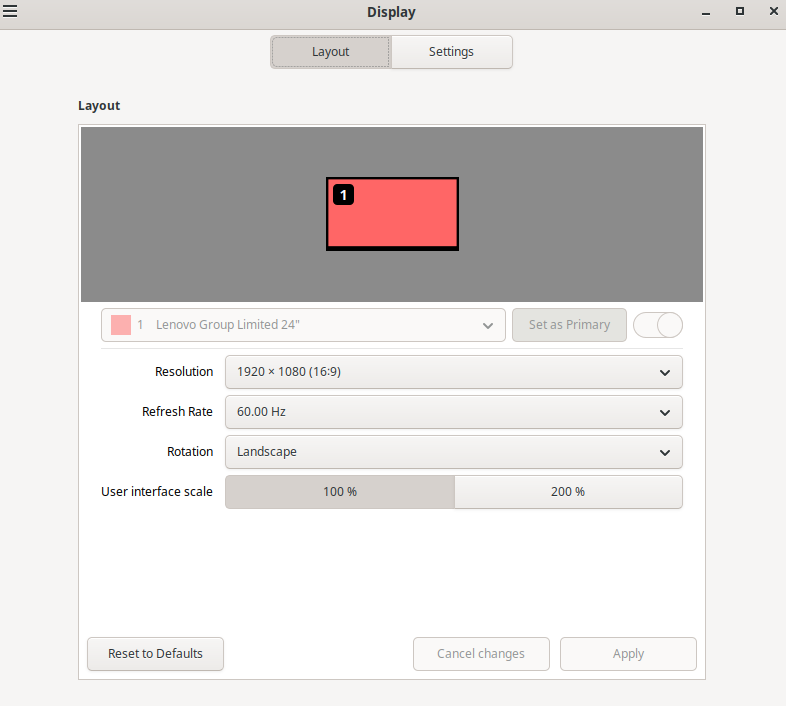
While there are issues building that driver, I think I need to pursue a firmware update with the card vendor. When I booted Ubuntu 24.04 and a few other “live” thumb drives, they all only found one monitor. All three ports do work, one at a time. I just cannot get two to work. Gotta be some diagnostics or something I can get from MSI.

Thanks for the assist.

This is un-tested by me, But CUDA can work with the NVIDIA open-source driver (nvidia-open) on Arch Linux.

The nvidia-open driver provides the kernel components of the GPU stack, while the userspace components, including CUDA libraries, compilers, and other tools, remain proprietary and are separate from the open-source driver.

Therefore, installing CUDA alongside the nvidia-open driver is feasible and does not require the proprietary nvidia driver.

Please ensure the following packages are installed:

  • nvidia-open for the open-source kernel driver

  • nvidia-utils for userspace utilities

  • cuda for the CUDA toolkit

nvcc --version
nvcc: NVIDIA (R) Cuda compiler driver
Copyright (c) 2005-2025 NVIDIA Corporation
Built on Wed_Aug_20_01:58:59_PM_PDT_2025
Cuda compilation tools, release 13.0, V13.0.88
Build cuda_13.0.r13.0/compiler.36424714_0

I’m not sure how well it works so you’ll have to check it out.

This warning occurs because the consolefont hook is enabled in the mkinitcpio configuration but no specific font is set in the configuration file. Nothing to worry about. :wink:

One monitor suggests a hardware or as you pointed out firmware issue. (Cable, or Port)

Well, I have to re-install. Machine will no longer boot. Once it starts loading the graphics (judging by the screen) it crashes to recovery mode. Didn’t know about the 3 packages that were needed.

Is there a link to what video cards nvidia-open supports accessing the CUDA on? I have some older ZOTAC cards with 384 CUDA core that used to reliably run BOINC, then Nvidia kicked all previously paying customers to the curb. Got some Quadro and K2000 cards too. All worked well until a couple of years ago when they were abandoned.

Has to be firmware, OR, despite no documentation stating it and all of the online testimony as to never needing to plug in the 4-pin MOBO plug, this card needs the extra juice from the MOBO.

Individually all 3 ports work. Just cannot make two work at the same time. Going to open support ticket with MSI as the user forum just has a bunch of people reading my post without any suggestions or “me to” comments.

Since I have to wipe and re-install, will try LMDE 7 (latest Mint based on Debian instead of Ubuntu because they and many others believe Ubuntu is about to go bye-bye. Appears Fuchsia will be their forward direction pretty soon.)

As always, I will report back. Just busy with corn harvest and land tillage for next few days.

MSI support ticket CSD#1268245 of anyone wishes to follow along.

Hi,

seems CachyOS dropped closed Nvidia Drivers Support when the dkms not sucessfuly builds after a Kernel Upgrade. You can check this by execucuting pacman -U nvidia-dkms-xyz in a Terminal. The exact Packaga Names you find with “ls /var/cache/pacman/pkg” - there should be located 3 Packages: nvidia-utils, lib32-nvidia, nvidia-dkms

kindly Regards and good luck

Just to round it out, this wasn’t a driver problem. You can read about the saga here. Admittedly 580 didn’t work with Cachy when I tired this, but the problems were:

  1. I bought a video card that didn’t have only Display Port on it just because it was on sale.
  2. Video cables only work in one direction. Something I knew then promptly forgot because I only bought Display Port cards.

When I tested I was testing each port directly with a monitor one at a time with same connection on both ends. My primary desk has a Display Port based KVM because multi-tasking means multiple machines. That’s where the wheels came off the cart.

Now I remember why I only buy Display Port computers and video cards . . . until I forgot and bought this one.
Thanks for the assistance.