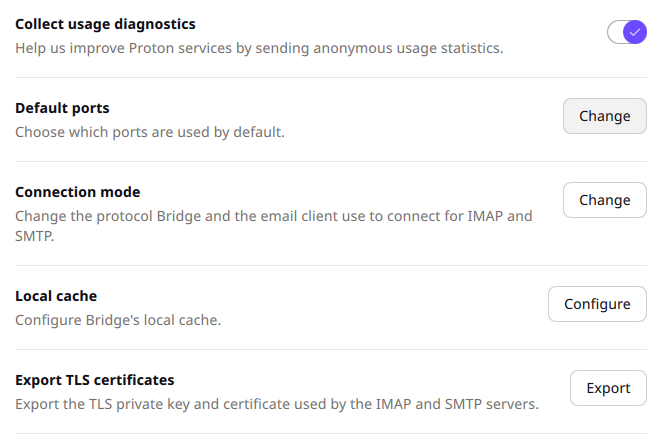
I just did a clean install of CachyOS to validate what I had experienced before:
I installed and logged into the protonmail bridge, it connects and syncs. But when I access Settings () - some configuration options sometimes work. Most of them do not work.
I noticed that the buttons that do work change the background color of the button when I hover over the button. Example: the ‘Default Ports’ button always works, the connection mode worked the first time it started (while the bridge was still sync’ing) and I was able to change the configuration options. None of the other buttons ever worked - and I need the ‘Export TLS certificates’ button.
All that works fine on Linux Mint, but not on CachyOS. I searched far and wide and have come up empty. Does anybody have any advice what to try next?
For CachyOS I used the ‘Cachy OS Package Installer’, ‘Repo’-tab.
I honestly don’t remember where I installed it from for Mint. Either the Mint-included system tools or I downloaded the package from the Protonmail website directly.
For Linux Protomail offes the packages: DEB, RPM or PKGBUILD. I can uninstall the bridge and reinstall any of the packages from Protonmail directly. Which format should I use? (I am new to Arch Linux distros)
There’s no need to install yay since the AUR helper paru comes installed by default on CachyOS systems.
Though there’s no reason to use the AUR in the first place since the package in question is in the CachyOS and Arch Linux native repositories.
Which is why it was installed by Bunny using pacman by way of the CachyOS Package Installer.
On to the actual issue, @Bunny it’s possible that therearee functional parts of protonmail-bridge that are locked behind optional dependencies that you weren’t promoted to install.
protonmail-bridge-core was installed along with protonmail-bridge as a dependency as you can see in my link above. And that core package has a few optional dependencies which may be what you’re looking for to activate the TLS functionality that seems to be missing. You can view those here:
To install all three as dependencies and see if they fix your issue, you would use:
Edit: On that note I would advise against using CachyOS Package Installer as your graphical package manager. Once upon a time it was meant to be developed into something a little more feature complete but it was never seemed like it was a priority since many people seemed to favor octopi instead. However, even that package manager was removed from the CachyOS Installer in favor of Shelly.
I’m still an Octopi user myself, but Shelly should have come preinatalled if you started using CachyOS within the last couple months, and I’d definitely recommend using that instead of the tired old bones of the CachyOS Package Installer.
I didn’t install yay, I used paru: paru -S protonmail-bridge
I tried: sudo pacman -Syu --asdeps gnome-keyring org.freedesktop.secrets pass which installed gnome-keyring and reinstalled kwallet
but the bridge behavior did not change
Then I uninstalled it all, (sudo pacman -Rns protonmail-bridge), manually deleted the configurations under ~/.config/ and rebooted
Next I installed protomail-bridge from Shelly (I saw the dependendencies that @Dirge mentioned)
After that ran sudo pacman -Syu --asdeps gnome-keyring org.freedesktop.secrets pass again (made changes)
started the bridge, logged in, and I’m back to the same behavior: bridge works (currently sync’ing) but the config UI does not
Though: only button now working (there are some toggles that always worked) in the UI is changing the ‘default keychain’. It is set to ‘secret-service’, the other option is ‘secret-service-dbus’
I will let the bridge complete syncing now (10 minutes or so - the bridge is basically a local IMAP server that connects to protonmail’s proprietary encrypted backend). In the past that didn’t make a difference.
Unfortunately I don’t have anything else for trying to fix the native package. I don’t have a paid Proton account myself, or I’d do some testing with the bridge application.
So while I’m sure someone out there could get this running properly, my own suggestion at this point would be to wipe out what you have and install from an alternate source like the AUR or Flatpak.
All buttons in the Protonmail advanced config UI worked and I was able to export the certs to configure Vivaldi! Wanted to try Vivaldi for email and calendar. I tried Thunderbird and that was pretty clunky.
 ) - some configuration options sometimes work. Most of them do not work.