This is sort of a continuation of a different thread, as the problem and solutions are related, I wanted to share more of my findings with Kernel 7.0
The Problem
The issue, in short, is that the scroll wheel in wireless mode on some Logitech Mice is not responsive, with Kernel version 6.19 and on, including version 7.0 it consumes the first scroll in any given direction and works only on subsequent scrolls.
So if you alternate between scrolling up and down, 1 scroll each, you never move the page.
The Solution:
This really is a driver issue, the way the input is interpreted is likely due to a bug introduced in changes to the Logitech Hid++ driver/module. So the only lasting, proper fix is changing that.
Workaround 1 (Use Older Kernel):
Use LTS Kernel version 6.18, I’ve tested all three kernel version, 6.18, 6.19 and 7.0, the issue is not present in 6.18. However, if you insist on using the latest kernel…
Workaround 2 (Using Solaar):
Foreword: This was my original “fix” to the problem, it is still working, however, it’s not as reliable as it was in 6.19, now in 7.0, after some time or some event (I haven’t yet tracked down), the scroll wheel switches to a hybrid hi-res mode. This fix for 6.19 made scrolling binary just like how it works in 6.18, you either scroll 1 unit up or down, however this new bug in 7.0 causes it to scroll smoothly between two “clicks”, it’s still 1 scroll per scroll, but more “analog”. Restarting Solaar fixes it.
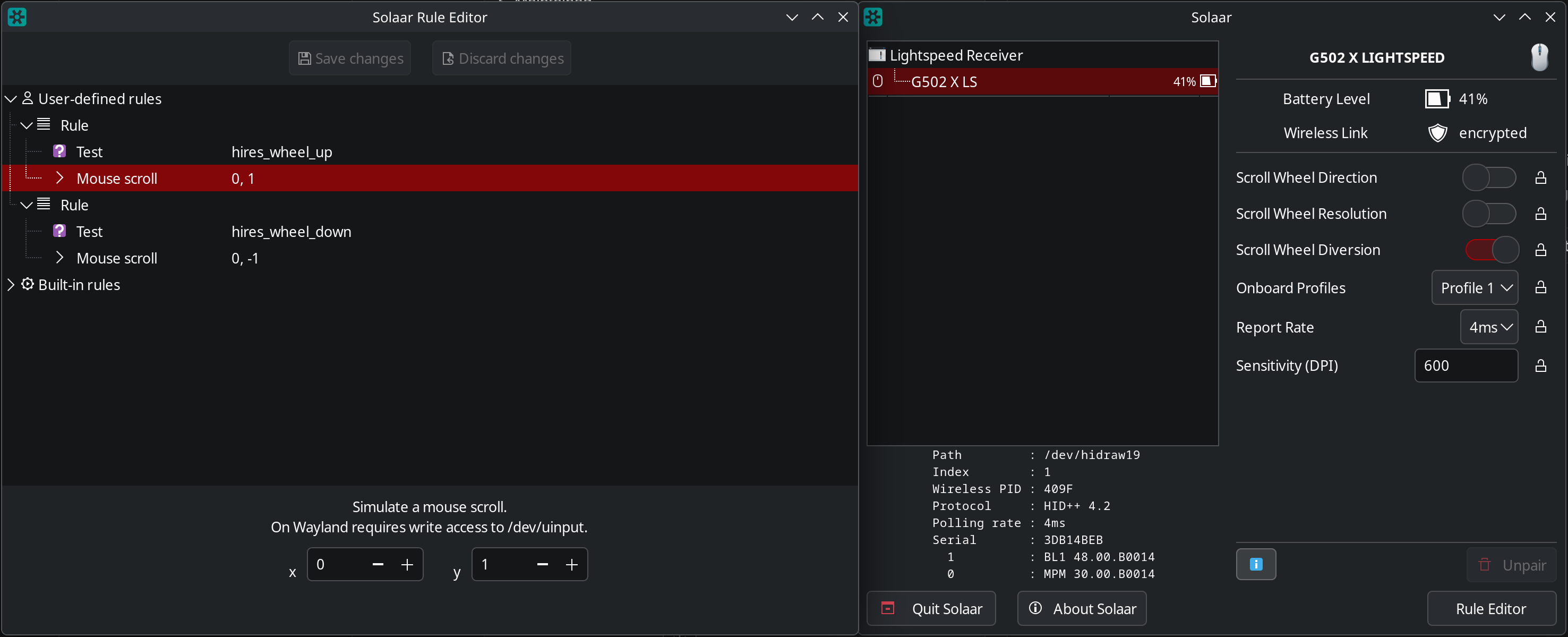
The fix is simple, capture hid++ events related to the scroll wheel and convert them to discrete scroll inputs in Solaar. The below image is all you have to setup.
I’ve been using the blacklist workaround for awhile now, but recently KDE XWayland (All XWayland apps) started crashing when I scroll fast.
EDIT: Looks like the workaround stopped working too, my scroll wheel is back to being absolutely unusable, if I turn my mouse off and on it works fine for a bit, but probably after it sleeps it goes back to unusable.
The Solaar rules seem to work, hopefully fixes the crash and issue permanently. This mouse is literally unusable with highres scrolling that’s default on and can’t be turned off.
Nope Solaar fix is no better, still fails after mouse sleep, still KDE Xwayland crashes when scrolling too fast, guess I’m stuck downgrading to an unsupported unpatched kernel to fix this.
EDIT: I swear Cachy needs a more LTS kernel, so often issues aren’t resolved before LTS updates, but with the recent kernel vulns it’s risky to pin old kernel versions. LTS is already 7.0.7, I need a patched 6.18
I guess I learned my lesson, no more logitech hardware, it’s just not supported on Linux.
I’m confused. Is this issue for newer Logitech devices using Bolt or Bluetooth? Because my Unify Logitech MX Master 2S with “high-resolution” scroll-wheel does not, and has not, exhibited this behavior.
Edit: Kernels 6.18.28, 7.0.5 and 7.1-rc3 are working fine for me.
Well, the mouse didn’t spontaneously change its behavior. It’s a change to the driver and/or kernel that broke it. I have a G502 X Plus and it works fine on an older kernel. Not really Logitech’s fault.
There is a kernel bug report tracking this: Bugzilla
Disappointingly, the maintainers are demanding users do a git bisect (compile and test multiple kernels to identify the exact point of regression), which is a bit like a doctor demanding a patient remove their own appendix before being willing to treat them.
The driver was unchanged for years. Then, about 7 months ago (right around 6.19-rc1 and 6.19-rc2) it suddenly started getting several changes. So it looks like they broke it and now they want us to fix it for them.
Reports mostly mention the various G502 SKUs, but I’ve also seen reports of the same on G604 and other models with free scroll.
The 2S is quite old, so may well have a scroll wheel that works a bit differently from the newer models. Or it’s a matter of the receiver; 2S uses Unifying, while all the others are Lightspeed devices.
This might be of limited value, but I switched from Win to Cachy around kernel 6.18 and have a G604 (Lightspeed receiver). I had the scroll issue initially, but fixed it (discussed in the original thread), and have since had no scrolling problems. I haven’t touched the mouse software since then, but I have installed updates on an almost daily basis without any problems (kernel 7.0.5).
I keep planning to reconfigure my mouse buttons, but haven’t found the time. The profile saved to the device has copy/paste mapped to scroll wheel left/right tilt, so any scroll wheel sensitivity hiccups would be apparent very quickly.
Maybe I’m not having problems because it’s a G604 vs G502, not sure. But, those having problems should check the suggestions in the old thread because, at least for me, the fix has survived into kernel 7.
I also had issues after switching from windows to cachyos a few months back with my logitech unifying receiver and mouse scroll speed (mostly after sleep/resume).
So as @BrandonK stated, i also found the other thread back than and fixed it with solaar.
Worked until the kernel 7 arrived.
I noticed, i could not wake my PC anymore with my logitech keyboard or mouse.
So it thought it must be an stricter energy saving feature in the kernel, and yes it is.
I solved it, by allowing usb Wakeup from the Unifying receiver and possible also solve the scroll speed issue, because it does’nt loose power during sleep/standby.
So here you go:
Find your receiver:
for d in /sys/bus/usb/devices/*; do [ -f "$d/idVendor" ] && echo "$(cat $d/idVendor):$(cat $d/idProduct) - Wakeup: $(cat $d/power/wakeup 2>/dev/null)"; done
Logitech has an vendor id of 046d, so my output line of my receiver looked like this:
046d:c52b - Wakeup: disabled
Note your vid pid of your device and add a udev rule:
Press CTRL-X, y and enter to save. Reboot and enter sleep state from start menu.
You should be able to wake your pc (if enabled in BIOS like mine), and hopefully also the scrollwheel issue is gone.
There’s a bug report for it on bugzilla here, if anyone can help test this issue we can get this resolved faster. This isn’t a 7.0 specific issue, the regression happened somewhere between 6.18.31 and 6.19.10