Every time I reboot, my lock screen wallpaper resets to the CachyOS default. I’m using KDE Plasma 6 with plasmalogin. The config in ~/.config/kscreenlockerrc shows the correct wallpaper path but it doesn’t apply visually. Seems like plasmalogin’s greeter doesn’t read the user config. Is there a fix or will this be addressed in a future update?
System: CachyOS, KDE Plasma 6, Wayland, plasmalogin
I have the same issue, but for me it is not every time but seemingly random. I have not yet investigated it thoroughly.
Are you talking about the login screen or lockscreen? Those are two different things.
Sounds like “plasmalogin” issue, not KDE config issue. If kscreenlockerrc has the right wallpaper but the greeter still shows the default, then it’s probably not reading the user config consistently. Plasma Login Manager is still in development, so it’s probably a bug that will be fixed in a future update.
Interesting I didn’t know that. I have this issue often (but not always) after waking up from suspend, so I guess that’s the lock screen. I also had the issue for my desktop wallpaper, but not in the last week or so, so maybe that was fixed already.
I use the standard CachyOS green space wallpaper and applied it to login/lock screen like so: KDE Plasma | CachyOS
So it’s a wallpaper in the standard shared directory, not a user directory. I’ve read somewhere that could make a difference.
Just now this issue occured again on my desktop. Here is a screenshot of my second monitor (same issue on primary monitor):
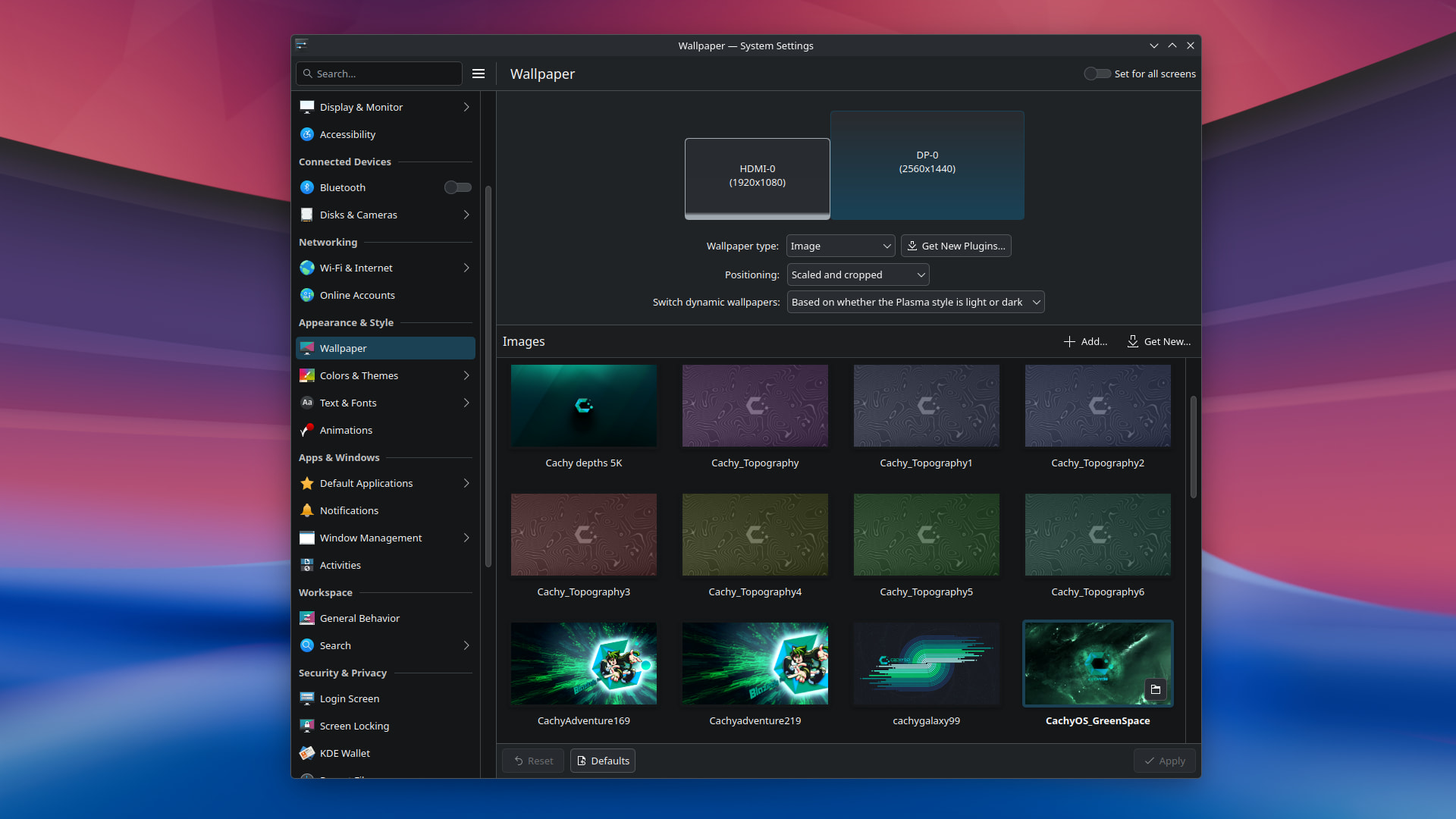
As you can see the “System Settings” show that CachyOS_GreenSpace is selected, but in the background you can clearly see a different wallpaper: Waterfall by Krystian Zajdel.
The lock screen also shows the incorrect wallpaper.
I think the login screen showed the correct wallpaper. This was after a fresh boot. The first boot today. I did run a system update yesterday, but I always reboot after a system update so this was not the first boot after updating. The issue did not occur yesterday. Previously the wallpaper would reset to Sub-Arctic, but apparently the default breeze wallpaper was changed to Waterfall recently: Move old wallpaper, add new one, update previews (5e05f717) · Commits · Plasma / Plasma Breeze visual style · GitLab
This is the first time I saw this but with the Waterfall wallpaper.
Here is the result of sudo cachyos-bugreport.sh: dfce44d
Maybe someone can see something suspicious i the boot logs.
I just did a reboot (without changing anything) and this time the wallpaper is correct for login screen and desktop, but not for the lock screen. Here is the result of sudo cachyos-bugreport.sh after the second boot: 52ab105
Diffing the two boot logs shows there are a bunch of errors, that only occured in the first boot:
Jun 21 14:06:50 systemsettings[1485]: qrc:/kcm/kcm_wallpaper/main.qml:142:13: QML Connections: Detected function “onConfigurationChanged” in Connections element. This is probably intended to be a signal handler but no signal of the target matches the name.
Jun 21 14:06:50 systemsettings[1485]: Could not find required directory “images” for package “/usr/share/wallpapers/GreenFeathers/” should be QList(“images/”)
Jun 21 14:06:50 systemsettings[1485]: Could not find required directory “images” for package “/usr/share/wallpapers/OrangeFeathers/” should be QList(“images/”)
Jun 21 14:06:50 systemsettings[1485]: Could not find required directory “images” for package “/usr/share/wallpapers/GreenFeathers/” should be QList(“images/”)
Jun 21 14:06:50 systemsettings[1485]: Could not find required directory “images” for package “/usr/share/wallpapers/OrangeFeathers/” should be QList(“images/”)
I don’t have an idea what could cause these errors though.
I meant the login screen i didn’t knew they were different.
There is from my digging currently a bug where when you set the login background and hit apply it doesn’t actually transfer the image to the correct folder to display. Steps I took to fix it:
I first checked if the plasmalogin was pointed at the correct directory for displaying an image:
sudo nano /etc/plasmalogin.conf
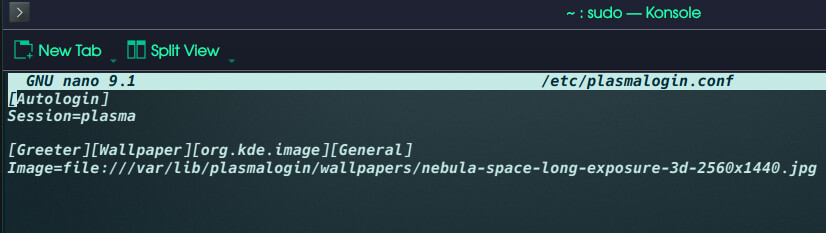
I copied the image I wanted into the desired location for login screen:
sudo cp “/desired image path here.jpg” /var/lib/plasmalogin/wallpapers/
then I verified it ended up where I wanted it:
sudo ls -la /var/lib/plasmalogin/wallpapers/
Then I triggered a reset to login to confirm it worked with:
sudo systemctl restart plasmalogin
online sources about the bug in question: