Hello, I am new to the cachy community but have been using for 2 good years now. I have used several computer configutations and never had any issues with CachyOS untill this time when I am on a Lenovo Legion Pro 7 16IAX10H and sound doesn’t work at all. I have tried some things I found om Arch forums but didn’t work. I am not at a skill level where I can compile my own kernel and it seems that is the required solution. Is there an simpler way to get sound working without going above my skill level. I have everything sound wise installed like pipewire wireplumber and so on. The problem is the kernel and the missing drivers for Realtek ALC3306 codec which this laptop uses.
Hey, I’m new here too, but I have a question: Was it Series 5 or Series 6 for the drivers back then on Windows? Do you remember? I have the Series 6 sound card, and it was recognized without any issues on my end. That’s why I’m asking: Which version was it back then on Windows, Series 5 or 6?
Hi. Thank you for replying. I am back on Windows since I cannot get sound to work on Cachyos. I tried a few othee distros with same result. The only known way to make it work is by following this guide on Github. But this is above my skill. I tried a few times fand failed misserabily to make it work. I have no idea how to compile a kernel atm.
As for what sound card my laptop uses I think it’s Realtek ALC3306 and is sometimes incorrectly recognized by the kernel as an ALC287, which may cause only the top speakers to function out of the box and it has flimsy sound and some games are completly muted.
In Device Manager, under the driver properties, there should be a version number listed. The driver signature should include a version number such as 5.00 or 6.00 and the manufacturer’s name.
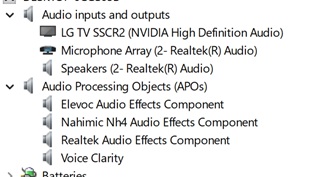
I am on Windows and everything works as it should on Windows no sound problem just on Linux. I was asking which of those in the picture above should I look for te version number. I don’t think however the 10 gem legion uses steelseries. I think it has Hartman and Nahimic?
If you show me in Windows, I’ll know which sound card you have installed!! Then I can better figure out what to do in Linux—it would really help if you could tell me the driver version number in Windows, you know?