I did a system update yesterday, and this morning I realize that the System Monitor Plasmoid gives a steady 0 for both Usage and Power of GPU:
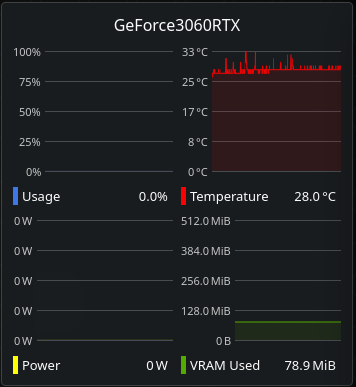
Also, a steady 78MB of used VRAM and some 30°C seem pretty unbelievable… This is how it looked before:
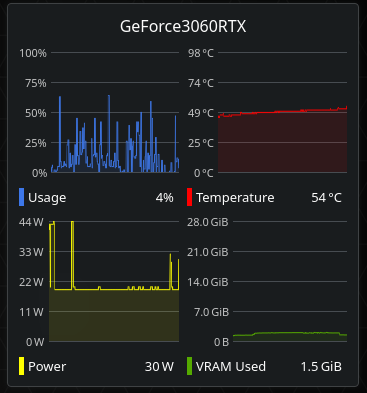
And this is inxi -Fzxa
inxi -Fzxa
System:
  Kernel: 6.16.4-3-cachyos arch: x86_64 bits: 64 compiler: clang v: 20.1.8
    clocksource: tsc avail: hpet,acpi_pm parameters: quiet zswap.enabled=0
    nowatchdog splash rw rootflags=subvol=/@
    root=UUID=0b4778d2-2b54-48a9-a184-b2a951e9335a
    resume=UUID=14b5e04a-1c2f-41c2-a2a5-cd9ffe1ec2a0
    initrd=\initramfs-linux-cachyos.img
  Desktop: KDE Plasma v: 6.4.4 tk: Qt v: N/A info: frameworks v: 6.17.0
    wm: kwin_wayland vt: 2 dm: SDDM Distro: CachyOS base: Arch Linux
Machine:
  Type: Desktop System: Micro-Star product: MS-7E26 v: 1.0
    serial: <superuser required>
  Mobo: Micro-Star model: PRO B650-S WIFI (MS-7E26) v: 1.0
    serial: <superuser required> uuid: <superuser required> UEFI: American
    Megatrends LLC. v: 1.J0 date: 03/13/2025
Battery:
  ID-1: hidpp_battery_0 charge: 89% condition: N/A volts: 4.1 min: N/A
    model: Logitech G Pro Wireless Gaming Mouse type: N/A serial: <filter>
    status: discharging
CPU:
  Info: model: AMD Ryzen 7 8700G w/ Radeon 780M Graphics bits: 64 type: MT MCP
    arch: Zen 4 gen: 4 level: v4 note: check built: 2022+ process: TSMC n5 (5nm)
    family: 0x19 (25) model-id: 0x75 (117) stepping: 2 microcode: 0xA70520A
  Topology: cpus: 1x dies: 1 clusters: 1 cores: 8 threads: 16 tpc: 2
    smt: enabled cache: L1: 512 KiB desc: d-8x32 KiB; i-8x32 KiB L2: 8 MiB
    desc: 8x1024 KiB L3: 16 MiB desc: 1x16 MiB
  Speed (MHz): avg: 2758 min/max: 423/5177 boost: enabled scaling:
    driver: amd-pstate-epp governor: powersave cores: 1: 2758 2: 2758 3: 2758
    4: 2758 5: 2758 6: 2758 7: 2758 8: 2758 9: 2758 10: 2758 11: 2758 12: 2758
    13: 2758 14: 2758 15: 2758 16: 2758 bogomips: 134398
  Flags: avx avx2 ht lm nx pae sse sse2 sse3 sse4_1 sse4_2 sse4a ssse3 svm
  Vulnerabilities:
  Type: gather_data_sampling status: Not affected
  Type: ghostwrite status: Not affected
  Type: indirect_target_selection status: Not affected
  Type: itlb_multihit status: Not affected
  Type: l1tf status: Not affected
  Type: mds status: Not affected
  Type: meltdown status: Not affected
  Type: mmio_stale_data status: Not affected
  Type: old_microcode status: Not affected
  Type: reg_file_data_sampling status: Not affected
  Type: retbleed status: Not affected
  Type: spec_rstack_overflow mitigation: Safe RET
  Type: spec_store_bypass mitigation: Speculative Store Bypass disabled via
    prctl
  Type: spectre_v1 mitigation: usercopy/swapgs barriers and __user pointer
    sanitization
  Type: spectre_v2 mitigation: Enhanced / Automatic IBRS; IBPB:
    conditional; STIBP: always-on; PBRSB-eIBRS: Not affected; BHI: Not
    affected
  Type: srbds status: Not affected
  Type: tsa mitigation: Clear CPU buffers
  Type: tsx_async_abort status: Not affected
Graphics:
  Device-1: NVIDIA GA106 [GeForce RTX 3060 Lite Hash Rate] vendor: ASUSTeK
    driver: nvidia v: 580.76.05 alternate: nouveau,nvidia_drm
    non-free: 550-570.xx+ status: current (as of 2025-04; EOL~2026-12-xx)
    arch: Ampere code: GAxxx process: TSMC n7 (7nm) built: 2020-2023 pcie:
    gen: 4 speed: 16 GT/s lanes: 8 link-max: lanes: 16 ports: active: none
    off: DP-2,DP-3 empty: DP-1,HDMI-A-1 bus-ID: 01:00.0 chip-ID: 10de:2504
    class-ID: 0300
  Device-2: Advanced Micro Devices [AMD/ATI] Phoenix1 vendor: Micro-Star MSI
    driver: amdgpu v: kernel arch: RDNA-3 code: Phoenix process: TSMC n4 (4nm)
    built: 2023+ pcie: gen: 4 speed: 16 GT/s lanes: 16 ports: active: none
    empty: DP-10, DP-4, DP-5, DP-6, DP-7, DP-8, DP-9, HDMI-A-2, Writeback-1
    bus-ID: 41:00.0 chip-ID: 1002:15bf class-ID: 0300 temp: 33.0 C
  Display: wayland server: X.org v: 1.21.1.18 with: Xwayland v: 24.1.8
    compositor: kwin_wayland driver: gpu: nv_platform,nvidia,nvidia-nvswitch
    d-rect: 3840x1080 display-ID: 0
  Monitor-1: DP-2 pos: primary,left model: Dell P2214H serial: <filter>
    built: 2013 res: mode: 1920x1080 hz: 60 scale: 100% (1) dpi: 102 gamma: 1.2
    size: 477x268mm (18.78x10.55") diag: 547mm (21.5") ratio: 16:9 modes:
    max: 1920x1080 min: 640x480
  Monitor-2: DP-3 pos: right model: Dell U2212HM serial: <filter>
    built: 2013 res: mode: 1920x1080 hz: 60 scale: 100% (1) dpi: 103 gamma: 1.2
    size: 475x267mm (18.7x10.51") diag: 545mm (21.5") ratio: 16:9 modes:
    max: 1920x1080 min: 640x480
  API: EGL v: 1.5 hw: drv: nvidia drv: amd radeonsi platforms: device: 0
    drv: nvidia device: 1 drv: radeonsi device: 3 drv: swrast gbm: drv: radeonsi
    surfaceless: drv: nvidia wayland: drv: nvidia x11: drv: nvidia
    inactive: device-2
  API: OpenGL v: 4.6.0 compat-v: 4.5 vendor: nvidia mesa v: 580.76.05
    glx-v: 1.4 direct-render: yes renderer: NVIDIA GeForce RTX 3060/PCIe/SSE2
    memory: 11.72 GiB display-ID: :0.0
  API: Vulkan v: 1.4.321 layers: 6 device: 0 type: discrete-gpu
    name: NVIDIA GeForce RTX 3060 driver: nvidia v: 580.76.05
    device-ID: 10de:2504 surfaces: N/A device: 1 type: integrated-gpu name: AMD
    Radeon Graphics (RADV PHOENIX) driver: mesa radv v: 25.2.1-cachyos1.3
    device-ID: 1002:15bf surfaces: N/A
  Info: Tools: api: clinfo, eglinfo, glxinfo, vulkaninfo
    de: kscreen-console,kscreen-doctor gpu: nvidia-settings,nvidia-smi
    wl: wayland-info x11: xdpyinfo, xprop, xrandr
Audio:
  Device-1: NVIDIA GA106 High Definition Audio vendor: ASUSTeK
    driver: snd_hda_intel v: kernel pcie: gen: 4 speed: 16 GT/s lanes: 8
    link-max: lanes: 16 bus-ID: 01:00.1 chip-ID: 10de:228e class-ID: 0403
  Device-2: Advanced Micro Devices [AMD/ATI] Radeon High Definition Audio
    [Rembrandt/Strix] vendor: Micro-Star MSI driver: snd_hda_intel v: kernel
    pcie: gen: 4 speed: 16 GT/s lanes: 16 bus-ID: 41:00.1 chip-ID: 1002:1640
    class-ID: 0403
  Device-3: Advanced Micro Devices [AMD] Family 17h/19h/1ah HD Audio
    vendor: Micro-Star MSI driver: snd_hda_intel v: kernel pcie: gen: 4
    speed: 16 GT/s lanes: 16 bus-ID: 41:00.6 chip-ID: 1022:15e3 class-ID: 0403
  API: ALSA v: k6.16.4-3-cachyos status: kernel-api
    tools: alsactl,alsamixer,amixer
  Server-1: JACK v: 1.9.22 status: off tools: N/A
  Server-2: PipeWire v: 1.4.7 status: active with: 1: pipewire-pulse
    status: active 2: wireplumber status: active 3: pipewire-alsa type: plugin
    tools: pactl,pw-cat,pw-cli,wpctl
Network:
  Device-1: Realtek RTL8125 2.5GbE vendor: Micro-Star MSI driver: r8169
    v: kernel pcie: gen: 2 speed: 5 GT/s lanes: 1 port: e000 bus-ID: 0c:00.0
    chip-ID: 10ec:8125 class-ID: 0200
  IF: enp12s0 state: up speed: 1000 Mbps duplex: full mac: <filter>
  Device-2: MEDIATEK MT7922 802.11ax PCI Express Wireless Network Adapter
    driver: mt7921e v: kernel pcie: gen: 2 speed: 5 GT/s lanes: 1
    bus-ID: 0d:00.0 chip-ID: 14c3:0616 class-ID: 0280
  IF: wlan0 state: down mac: <filter>
  Info: services: NetworkManager, systemd-timesyncd, wpa_supplicant
Bluetooth:
  Device-1: MediaTek Wireless_Device driver: btusb v: 0.8 type: USB rev: 2.1
    speed: 480 Mb/s lanes: 1 mode: 2.0 bus-ID: 1-7:5 chip-ID: 0e8d:0616
    class-ID: e001 serial: <filter>
  Report: btmgmt ID: hci0 rfk-id: 0 state: down bt-service: enabled,running
    rfk-block: hardware: no software: yes address: N/A
Drives:
  Local Storage: total: 10.92 TiB used: 397.01 GiB (3.6%)
  SMART Message: Unable to run smartctl. Root privileges required.
  ID-1: /dev/nvme0n1 maj-min: 259:0 vendor: Kingston model: SNV3S2000G
    size: 1.82 TiB block-size: physical: 512 B logical: 512 B speed: 63.2 Gb/s
    lanes: 4 tech: SSD serial: <filter> fw-rev: P3BR0A23 temp: 28.9 C
    scheme: GPT
  ID-2: /dev/nvme1n1 maj-min: 259:1 vendor: Western Digital model: WD BLACK
    SN850X HS 2000GB size: 1.82 TiB block-size: physical: 512 B logical: 512 B
    speed: 63.2 Gb/s lanes: 4 tech: SSD serial: <filter> fw-rev: 620361WD
    temp: 28.9 C scheme: GPT
  ID-3: /dev/sda maj-min: 8:0 vendor: Western Digital
    model: WD40EZRZ-00GXCB0 size: 3.64 TiB block-size: physical: 4096 B
    logical: 512 B speed: 6.0 Gb/s tech: HDD rpm: 5400 serial: <filter>
    fw-rev: 0A80 scheme: GPT
  ID-4: /dev/sdb maj-min: 8:16 vendor: Western Digital
    model: WD40EZRZ-00GXCB0 size: 3.64 TiB block-size: physical: 4096 B
    logical: 512 B speed: 6.0 Gb/s tech: HDD rpm: 5400 serial: <filter>
    fw-rev: 0A80 scheme: GPT
Partition:
  ID-1: / raw-size: 500 GiB size: 500 GiB (100.00%) used: 46.51 GiB (9.3%)
    fs: btrfs dev: /dev/nvme1n1p3 maj-min: 259:4
  ID-2: /boot raw-size: 2 GiB size: 2 GiB (99.80%) used: 535 MiB (26.2%)
    fs: vfat dev: /dev/nvme1n1p1 maj-min: 259:2
  ID-3: /home raw-size: 600 GiB size: 600 GiB (100.00%)
    used: 99.79 GiB (16.6%) fs: btrfs dev: /dev/nvme1n1p4 maj-min: 259:5
  ID-4: /var/log raw-size: 500 GiB size: 500 GiB (100.00%)
    used: 46.51 GiB (9.3%) fs: btrfs dev: /dev/nvme1n1p3 maj-min: 259:4
  ID-5: /var/tmp raw-size: 500 GiB size: 500 GiB (100.00%)
    used: 46.51 GiB (9.3%) fs: btrfs dev: /dev/nvme1n1p3 maj-min: 259:4
Swap:
  Kernel: swappiness: 150 (default 60) cache-pressure: 50 (default 100)
    zswap: no
  ID-1: swap-1 type: zram size: 14.73 GiB used: 1.6 MiB (0.0%) priority: 100
    comp: zstd avail: lzo-rle,lzo,lz4,lz4hc,deflate,842 dev: /dev/zram0
  ID-2: swap-2 type: partition size: 64 GiB used: 0 KiB (0.0%) priority: -2
    dev: /dev/nvme1n1p2 maj-min: 259:3
Sensors:
  System Temperatures: cpu: 38.4 C mobo: 37.5 C gpu: amdgpu temp: 31.0 C
  Fan Speeds (rpm): N/A
Info:
  Memory: total: 16 GiB note: est. available: 14.73 GiB used: 4.49 GiB (30.5%)
  Processes: 470 Power: uptime: 13m states: freeze,mem,disk suspend: deep
    avail: s2idle wakeups: 0 hibernate: platform avail: shutdown, reboot,
    suspend, test_resume image: 5.79 GiB services: org_kde_powerdevil,
    power-profiles-daemon, upowerd Init: systemd v: 257 default: graphical
    tool: systemctl
  Packages: pm: pacman pkgs: 1510 libs: 462 tools: octopi,paru Compilers:
    clang: 20.1.8 gcc: 15.2.1 Shell: Zsh v: 5.9 default: fish v: 4.0.2
    running-in: konsole inxi: 3.3.38
 I guess this will be a recurring nuisance…