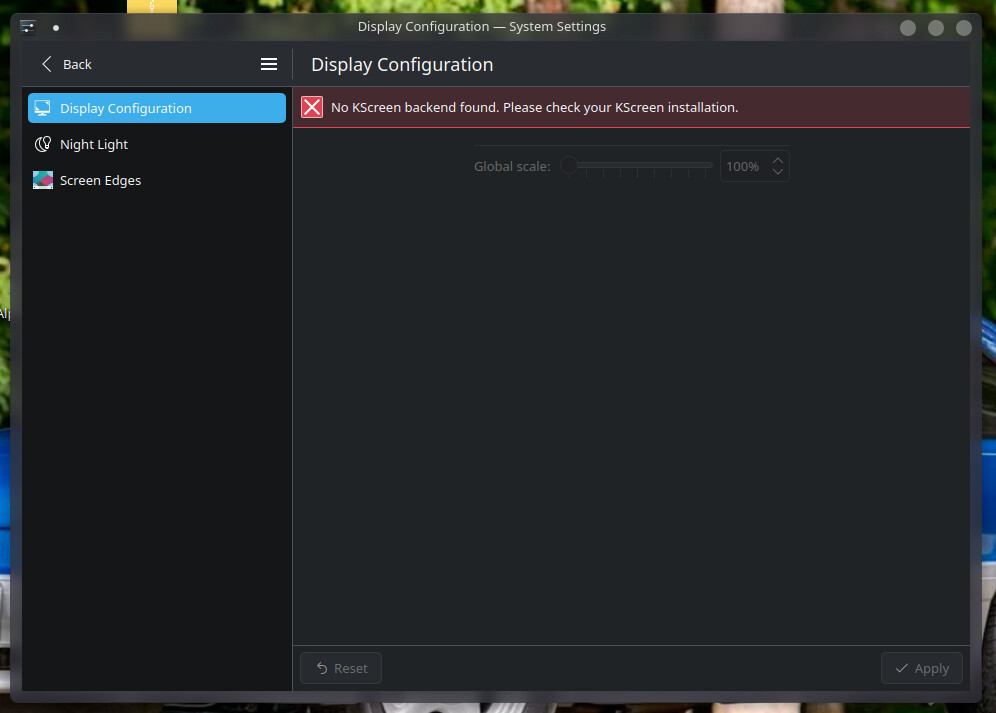
Yes, I have this too.
Display Configuration just shows:
“No KScreen backend found”?
❯ inxi -Farz
System:
Kernel:7.0.12-1-cachyosarch:x86_64bits:64compiler:clangv:22.1.6
clocksource:tscavail:hpet,acpi_pm
parameters:initrd=\initramfs-linux-cachyos.img
root=UUID=4a3d9d3c-4153-46ba-9cfb-b061ebbc24c0 rw
cryptdevice=UUID=c990f5ad-1e3c-4a74-aed4-331f38790b2b:luks-c990f5ad-1e3c-4a74-aed4-331f38790b2b
zswap.enabled=0 nowatchdog quiet splash
Desktop:KDE Plasmav:6.7.0tk:Qtv:N/Ainfo:frameworksv:6.27.0
wm:kwin_waylandwith:krunnervt:2dm:SDDMDistro:CachyOS
base:Arch Linux
Machine:
Type:Mini-pcMobo:AZWmodel:SER8v:V10serial:<superuser required>
part-nu:75uuid:<superuser required>Firmware:UEFIvendor:American
Megatrends LLC.v:HPT.8xxx.SER8.V035.P8C0M0C15.14.Linkdate:06/26/2025
CPU:
Info: model:AMD Ryzen 7 8845HS w/ Radeon 780M Graphicsbits:64
type:MT MCParch:Zen 4gen:4level:v4note:checkbuilt:2022+
process:TSMC n5 (5nm)family:0x19 (25)model-id:0x75 (117)stepping:2
microcode:0xA70520A
Topology: cpus:1xdies:1clusters:1cores:8threads:16tpc:2
smt:enabledcache: L1:512 KiBdesc:d-8x32 KiB; i-8x32 KiBL2:8 MiB
desc:8x1024 KiBL3:16 MiBdesc:1x16 MiB
Speed (MHz): avg:2773min/max:419/5138boost:enabledscaling:
driver:amd-pstate-eppgovernor:powersavecores: 1:27732:27733:2773
4:27735:27736:27737:27738:27739:277310:277311:277312:2773
13:277314:277315:277316:2773bogomips:121372
Flags-basic:avx avx2 ht lm nx pae sse sse2 sse3 sse4_1 sse4_2 sse4a
ssse3 svm
Vulnerabilities:
Type:gather_data_samplingstatus:Not affected
Type:ghostwritestatus:Not affected
Type:indirect_target_selectionstatus:Not affected
Type:itlb_multihitstatus:Not affected
Type:l1tfstatus:Not affected
Type:mdsstatus:Not affected
Type:meltdownstatus:Not affected
Type:mmio_stale_datastatus:Not affected
Type:old_microcodestatus:Not affected
Type:reg_file_data_samplingstatus:Not affected
Type:retbleedstatus:Not affected
Type:spec_rstack_overflowmitigation:Safe RET
Type:spec_store_bypassmitigation:Speculative Store Bypass disabled via
prctl
Type:spectre_v1mitigation:usercopy/swapgs barriers and __user pointer
sanitization
Type:spectre_v2mitigation:Enhanced / Automatic IBRS; IBPB:
conditional; STIBP: always-on; PBRSB-eIBRS: Not affected; BHI: Not
affected
Type:srbdsstatus:Not affected
Type:tsamitigation:Clear CPU buffers
Type:tsx_async_abortstatus:Not affected
Type:vmscapemitigation:IBPB before exit to userspace
Graphics:
Device-1:Advanced Micro Devices [AMD/ATI] HawkPoint1driver:amdgpu
v:kernelarch:RDNA-3code:Phoenixprocess:TSMC n4 (4nm)built:2023+
pcie: gen:4speed:16 GT/slanes:16ports: active:DP-1,HDMI-A-1
empty:DP-2, DP-3, DP-4, DP-5, DP-6, Writeback-1bus-ID:65:00.0
chip-ID:1002:1900class-ID:0300temp:38.0 C
Display:waylandserver:``X.org``v:1.21.1.23with:Xwaylandv:24.1.12
compositor:kwin_waylanddriver: X: loaded:amdgpuunloaded:modesetting
alternate:fbdev,vesadri:radeonsigpu:amdgpud-rect:1920x1080
display-ID:0
Monitor-1:DP-1pos:primarymodel:LG (GoldStar) Ultra HD
serial:<filter>built:2023res: mode:1920x1080hz:60scale:100% (1)
dpi:163gamma:1.2size:600x340mm (23.62x13.39")diag:690mm (27.2")
ratio:16:9modes: max:3840x2160min:640x480
Monitor-2:HDMI-A-1pos:primarymodel:LG (GoldStar) TV SSCR2
serial:<filter>built:2020res: mode:1920x1080hz:60scale:100% (1)
dpi:61gamma:1.2size:1600x900mm (62.99x35.43")diag:1836mm (72.3")
ratio:16:9modes: max:3840x2160min:720x400
API:EGLv:1.5hw: drv:amd radeonsiplatforms: device:0drv:radeonsi
device:1drv:swrastgbm: drv:radeonsisurfaceless: drv:radeonsiwayland:
drv:radeonsix11: drv:radeonsi
API:OpenGLv:4.6vendor:amd mesav:26.1.2-arch2.1glx-v:1.4
direct-render:yesrenderer:AMD Radeon 780M Graphics (radeonsi phoenix ACO
DRM 3.64 7.0.12-1-cachyos)device-ID:1002:1900memory:7.81 GiB
unified:yesdisplay-ID::0.0
API:Vulkanv:1.4.350layers:6device:0type:integrated-gpuname:AMD
Radeon 780M Graphics (RADV PHOENIX)driver:mesa radvv:26.1.2-arch2.1
device-ID:1002:1900surfaces:N/A
Info: Tools: api:clinfo, eglinfo, glxinfo, vulkaninfo
de:kscreen-console,kscreen-doctorwl:wayland-info
x11:xdpyinfo, xprop, xrandr
Audio:
Device-1:Advanced Micro Devices [AMD/ATI] Radeon High Definition Audio
driver:snd_hda_intelv:kernelpcie: gen:4speed:16 GT/slanes:16
bus-ID:65:00.1chip-ID:1002:1640class-ID:0403
Device-2:Advanced Micro Devices [AMD] Audio Coprocessor
driver:snd_pci_psv:kernelalternate:snd_pci_acp3x, snd_rn_pci_acp3x,
snd_pci_acp5x, snd_pci_acp6x, snd_acp_pci, snd_rpl_pci_acp6x,
snd_sof_amd_renoir, snd_sof_amd_rembrandt, snd_sof_amd_vangogh,
snd_sof_amd_acp63, snd_sof_amd_acp70pcie: gen:4speed:16 GT/slanes:16
bus-ID:65:00.5chip-ID:1022:15e2class-ID:0480
Device-3:Advanced Micro Devices [AMD] Ryzen HD Audio
driver:snd_hda_intelv:kernelpcie: gen:4speed:16 GT/slanes:16
bus-ID:65:00.6chip-ID:1022:15e3class-ID:0403
API:ALSAv:k7.0.12-1-cachyosstatus:kernel-api
tools:alsactl,alsamixer,amixer
Server-1:sndiodv:N/Astatus:offtools:aucat,midicat,sndioctl
Server-2:JACKv:1.9.22status:offtools:N/A
Server-3:PipeWirev:1.6.6status:activewith: 1:pipewire-pulse
status:active2:wireplumberstatus:active3:pipewire-alsatype:plugin
tools:pactl,pw-cat,pw-cli,wpctl
Network:
Device-1:Realtek RTL8125 2.5GbEdriver:r8169v:kernelpcie: gen:2
speed:5 GT/slanes:1port:f000bus-ID:01:00.0chip-ID:10ec:8125
class-ID:0200
IF:enp1s0state:upspeed:1000 Mbpsduplex:fullmac:<filter>
Device-2:Intel Wi-Fi 6 AX200driver:iwlwifiv:kernelpcie: gen:2
speed:5 GT/slanes:1bus-ID:02:00.0chip-ID:8086:2723class-ID:0280
IF:wlan0state:downmac:<filter>
Info: services:NetworkManager,systemd-timesyncd
Bluetooth:
Device-1:Intel AX200 Bluetoothdriver:btusbv:0.8type:USBrev:2.0
speed:12 Mb/slanes:1mode:1.1bus-ID:1-5:5chip-ID:8087:0029
class-ID:e001
Report:btmgmtID:hci0rfk-id:0state:upaddress:<filter>bt-v:5.2
lmp-v:11status: discoverable:nopairing:noclass-ID:6c0104
Drives:
Local Storage: total:931.51 GiBused:474.53 GiB (50.9%)
SMART Message:Unable to run smartctl. Root privileges required.
ID-1:/dev/nvme0n1maj-min:259:0vendor:Crucialmodel:CT1000P3PSSD8
size:931.51 GiBblock-size: physical:512 Blogical:512 Bspeed:63.2 Gb/s
lanes:4tech:SSDserial:<filter>fw-rev:P9CR411temp:32.9 C
scheme:GPT
Partition:
ID-1:/raw-size:929.5 GiBsize:913.83 GiB (98.31%)
used:474.27 GiB (51.9%)fs:ext4dev:/dev/dm-0maj-min:253:0
mapped:luks-c990f5ad-1e3c-4a74-aed4-331f38790b2b
ID-2:/bootraw-size:2 GiBsize:2 GiB (99.80%)used:266.2 MiB (13.0%)
fs:vfatdev:/dev/nvme0n1p1maj-min:259:1
Swap:
Kernel: swappiness:180 (default 60)cache-pressure:50 (default 100)
zswap:no
ID-1:swap-1type:zramsize:23.21 GiBused:3.25 GiB (14.0%)
priority:100comp:zstdavail:lzo-rle,lzo,lz4,lz4hc,deflate,842
dev:/dev/zram0
Sensors:
System Temperatures: cpu:45.1 Cmobo:41.5 Cgpu:amdgputemp:38.0 C
Fan Speeds (rpm):N/A
Repos:
Packages:1553pm:pacmanpkgs:1534libs:406tools:octopi,parupm:rpm
pkgs:0pm:flatpakpkgs:19
Active pacman repo servers in:/etc/pacman.d/cachyos-mirrorlist
1: https://mirror.krfoss.org/cachyos/repo/$arch/$repo``
2: https://cdn77.cachyos.org/repo/$arch/$repo``
3: https://mirror5.krfoss.org/cachyos/repo/$arch/$repo``
4: https://us-mnz.soulharsh007.dev/cachyos/repo/$arch/$repo``
5: https://cachyos.doridian.net/repo/$arch/$repo``
6: https://us.cachyos.org/repo/$arch/$repo``
7: https://cdn.lansing2600.org/cachyos/repo/$arch/$repo``
8: https://at.cachyos.org/repo/$arch/$repo``
9: https://mirror.mergedcloud.de/cachyos/repo/$arch/$repo``
10: https://mirror.zyner.org/mirror/cachyos/repo/$arch/$repo``
11: https://ca.mirror.cx/cachyos/repo/$arch/$repo``
12: https://nl.mirror.cx/cachyos/repo/$arch/$repo``
13: https://mirror.hjk.gg/cachyos/repo/$arch/$repo``
14: https://mirrors.lansing2600.org/cachyos/repo/$arch/$repo``
15: https://cachyos.next-works.it/repo/$arch/$repo``
16: https://mirror.cachy-arch.ru/cachyos/repo/$arch/$repo``
17: https://wan.metrosg.ru/cachyos/repo/$arch/$repo``
18: https://no.mirror.cx/cachyos/repo/$arch/$repo``
19: https://mirror.lesviallon.fr/cachy/repo/$arch/$repo``
20: https://archlinux.gay/cachy/repo/$arch/$repo``
21: https://cachyos-mirror.m1k.cloud/repo/$arch/$repo``
22: https://mirror.nju.edu.cn/cachyos/repo/$arch/$repo``
23: https://mirror.keiminem.com/cachyos/repo/$arch/$repo``
24: https://mirror2.keiminem.com/cachyos/repo/$arch/$repo``
25: https://mirror.hb9hil.org/cachyos/repo/$arch/$repo``
26: https://mirrors.ustc.edu.cn/cachyos/repo/$arch/$repo``
27: https://mirror.jura12.ru/repo/$arch/$repo``
Active pacman repo servers in:/etc/pacman.d/cachyos-v4-mirrorlist
1: https://mirror.krfoss.org/cachyos/repo/$arch_v4/$repo``
2: https://cdn77.cachyos.org/repo/$arch_v4/$repo``
3: https://mirror5.krfoss.org/cachyos/repo/$arch_v4/$repo``
4: https://us-mnz.soulharsh007.dev/cachyos/repo/$arch_v4/$repo``
5: https://cachyos.doridian.net/repo/$arch_v4/$repo``
6: https://us.cachyos.org/repo/$arch_v4/$repo``
7: https://cdn.lansing2600.org/cachyos/repo/$arch_v4/$repo``
8: https://at.cachyos.org/repo/$arch_v4/$repo``
9: https://mirror.mergedcloud.de/cachyos/repo/$arch_v4/$repo``
10: https://mirror.zyner.org/mirror/cachyos/repo/$arch_v4/$repo``
11: https://ca.mirror.cx/cachyos/repo/$arch_v4/$repo``
12: https://nl.mirror.cx/cachyos/repo/$arch_v4/$repo``
13: https://mirror.hjk.gg/cachyos/repo/$arch_v4/$repo``
14: https://mirrors.lansing2600.org/cachyos/repo/$arch_v4/$repo``
15: https://cachyos.next-works.it/repo/$arch_v4/$repo``
16: https://mirror.cachy-arch.ru/cachyos/repo/$arch_v4/$repo``
17: https://wan.metrosg.ru/cachyos/repo/$arch_v4/$repo``
18: https://no.mirror.cx/cachyos/repo/$arch_v4/$repo``
19: https://mirror.lesviallon.fr/cachy/repo/$arch_v4/$repo``
20: https://archlinux.gay/cachy/repo/$arch_v4/$repo``
21: https://cachyos-mirror.m1k.cloud/repo/$arch_v4/$repo``
22: https://mirror.nju.edu.cn/cachyos/repo/$arch_v4/$repo``
23: https://mirror.keiminem.com/cachyos/repo/$arch_v4/$repo``
24: https://mirror2.keiminem.com/cachyos/repo/$arch_v4/$repo``
25: https://mirror.hb9hil.org/cachyos/repo/$arch_v4/$repo``
26: https://mirrors.ustc.edu.cn/cachyos/repo/$arch_v4/$repo``
27: https://mirror.jura12.ru/repo/$arch_v4/$repo``
Active pacman repo servers in:/etc/pacman.d/mirrorlist
1: https://archlinux.cachyos.org/repo/$repo/os/$arch``
2: https://arch.mirror.constant.com/$repo/os/$arch``
3: https://mirror.krfoss.org/archlinux/$repo/os/$arch``
4: https://mirror.osbeck.com/archlinux/$repo/os/$arch``
5: https://mirror.quantum5.ca/archlinux/$repo/os/$arch``
6: https://fastly.mirror.pkgbuild.com/$repo/os/$arch``
7: https://elda.asgardius.company/archlinux/$repo/os/$arch``
8: https://uk.repo.c48.uk/arch/$repo/os/$arch``
9: https://berlin.mirror.pkgbuild.com/$repo/os/$arch``
10: https://geo.mirror.pkgbuild.com/$repo/os/$arch``
11: https://nl.mirror.cx/archlinux/$repo/os/$arch``
12: https://archlinux.mailtunnel.eu/$repo/os/$arch``
13: https://fi.arch.niranjan.co/$repo/os/$arch``
14: https://arch.yhtez.xyz/$repo/os/$arch``
15: https://mirror.raiolanetworks.com/archlinux/$repo/os/$arch``
16: https://umea.mirror.pkgbuild.com/$repo/os/$arch``
17: https://london.mirror.pkgbuild.com/$repo/os/$arch``
18: https://mirror.scd31.com/arch/$repo/os/$arch``
19: https://ams.nl.mirrors.bjg.at/arch/$repo/os/$arch``
20: https://mirrors.aliyun.com/archlinux/$repo/os/$arch``
21: https://lidsol.fi-b.unam.mx/archlinux/$repo/os/$arch``
22: https://mirror.abderraziq.com/archlinux/$repo/os/$arch``
23: https://taipei.mirror.pkgbuild.com/$repo/os/$arch``
24: https://mirror.nw-sys.ru/archlinux/$repo/os/$arch``
25: https://mirror2.givebytes.net/archlinux/$repo/os/$arch``
26: https://mirror.xtom.com.hk/archlinux/$repo/os/$arch``
27: https://www.miraa.jp/archlinux/$repo/os/$arch``
28: https://mirror.twds.com.tw/archlinux/$repo/os/$arch``
29: https://mirrors.jlu.edu.cn/archlinux/$repo/os/$arch``
30: https://in.arch.niranjan.co/$repo/os/$arch``
31: https://ftpmirror.infania.net/mirror/archlinux/$repo/os/$arch``
32: https://sg.arch.niranjan.co/$repo/os/$arch``
33: https://singapore.mirror.pkgbuild.com/$repo/os/$arch``
34: https://mirror.lcarilla.de/archlinux/$repo/os/$arch``
Info:
Memory: total:24 GiBavailable:23.22 GiBused:15.95 GiB (68.7%)
Processes:528Power: uptime:1d 12h 52mstates:freeze,mem,disk
suspend:s2idlewakeups:0hibernate:platformavail:shutdown, reboot,
suspend, test_resumeimage:9.23 GiBservices:org_kde_powerdevil,
power-profiles-daemon, upowerdInit:systemdv:260default:graphical
tool:systemctl
Compilers: clang:22.1.6gcc:16.1.1Shell:fishv:4.7.1
running-in:konsoleinxi: 3.3.40