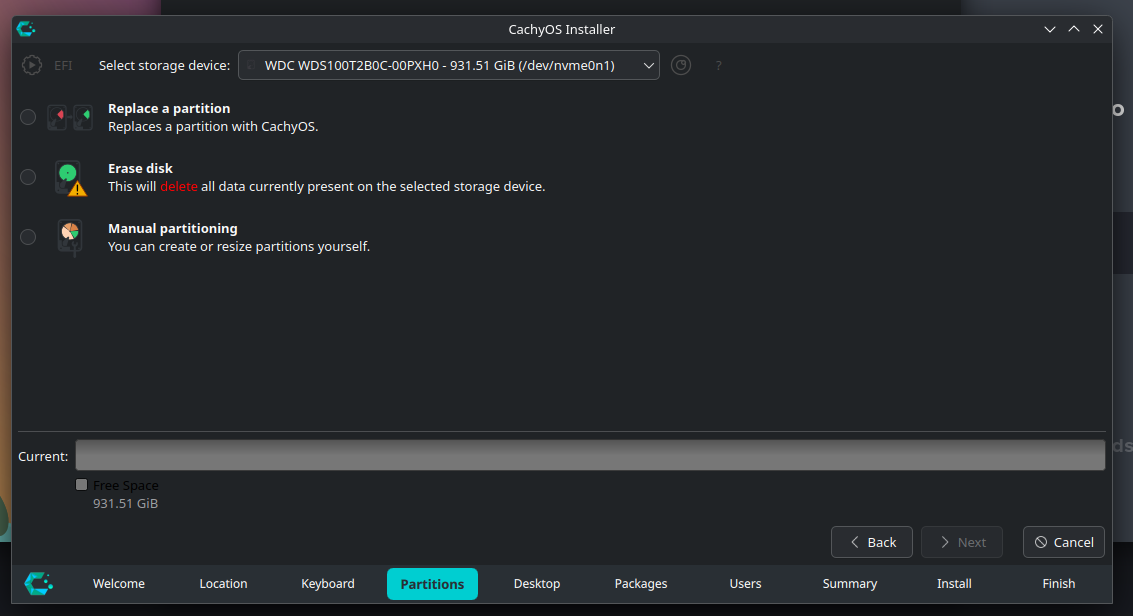
Hello!
I’m trying to install Cachy to dual boot with Windows 10. My idea is to install it on the same drive (SSD) as Windows 10 is. However that drive is just shown as free space with filesystem unknown. This issue does not happen on another hard drive I have just for data.
This issue also didn’t happen when I tried to install other distros (Fedora 42, per example)
Here’s a screenshot of GParted, it can distinguish clearly each partition of the drive.
And here is the lsblk -f output.
Good luck with that. I managed to get Kubuntu, Mint and Tuxedo running on the same drive as Win10 following this guide, but Cachy didn’t want to play along. Also, one fine morning Windows decided that the boot media is missing and died. Like completely. Tuxedo still boots fine but Windows complains about “Missing boot device” or something. So from my personal experience, I would totally advise against a dual-boot system on the same drive. Better get a second drive and install Cachy on that.
Just my 2 cents.
Edit: hello and welcome to the forum 
Thank you, I’ll try to do it following that guide to see if I get any luck.
As for the dual-boot problem, yes, I’m aware there may have complications due to windows shenanigans. I used Fedora and Windows in the same drive for about 2 months with no issues, but then again, might be too short of a time to judge.
Hi Forum, hi @Fufumiga
even if I am late to this discussion, maybe someone finds this useful:
For MultiBoot (1x CachyOS, 2x Windows) on my PC I use the UEFI boot menu. I use separate EFI partitions for each system. I realize that this is not a solution for everyone, but I do not boot into the other OSes that frequently, so that it does not bother me that much.
I have one separate drive with only Windows and one shared with Windows and CachyOS installed
This is what my layout on the shared Drive looks like:
Device           Size   Type                         Mount Point
/dev/nvme2n1p1   100M   EFI System                   -
/dev/nvme2n1p2   16M    Microsoft reserved           -
/dev/nvme2n1p3   281G   Microsoft basic data         -
/dev/nvme2n1p4   538M   Windows recovery environment -
/dev/nvme2n1p5   500M   EFI System                   /boot/efi
/dev/nvme2n1p6   194,8G Linux filesystem             /
Some Context:
-Windows was installed before CachyOS.
-I used manual partitioning during install
I went that route especially because of Windows shenanigans in the past. (Even two Windows installs do not really get along unless you separate them). About 1,5 months into this setup, so far I’ve had no issues.
I hope anyone who reads this has a nice day!