I have been using CachyOS for 3weeks and now i want to reinstall windows for a thing, but on the part of the installation that needs to select the disk where u want to install it, theres no disk but i have one of 2 tb NVME and it doesn’t show and says failed loading driverf. Can someone help or i will be on CachyOS forever?
If I remember correctly then the Windows Setup has a problem when it detects file systems which it cannot read.
So I would try to first boot CachyOS from an USB stick and then delete your CachyOS partitions with tools like fdisk
Here is an article about how to use fdisk to delete partitions:
But double check that you delete the correct one!
Are you trying to dual boot or remove Cachy entirely? Can you post the output of ‘sudo fdisk -l’ and ‘lsblk’?
In either case you could use a partition manager (IE “Partitionmanager” from KDE or “gparted”) to either partition off an NTFS segment of the NVME for the Windows install, or nuke the Linux partition entirely and let Windows use the whole disk. If you’re wanting to wipe the entire NVME drive and go back to 100% Windows then running one of the mentioned utilities from a Live USB as described by Ckorn is the route you’d want to go, after booting into the live environment just create a new GPT partition scheme on the drive to overwrite everything.
Note that if you’re trying to dual boot, especially from the same physical drive, Windows may try to take control of your boot manager which would result in problems booting back into Linux. I’m not up to date on the proper steps for dual booting, so I’d recommend looking into that more or waiting for more input here if that’s what you want to do.
Remove cachyOS entierly and install windows
In that case I’d boot a live environment from a USB (Doesn’t really matter if it’s CachyOS, Mint, or gparted’s own bootable live).
Once in the live environment, open whatever partition manager is included, select your NVME drive that you want to install Windows to, and select “Create New Partition Table”, select type GPT.
Apply changes (this will wipe the NVME drive), and reboot to attempt the Windows install again - It should see the drive as unallocated space.
Im new sry, how do i do that
I see. I assume you should be able to create windows USB boot up stick already. I think you was stuck how to boot on the USB stick drive rather then boot on CachyOS on your internal drive now.
What you have to do is to go to your machine BIOS/UEFI, disable “secure boot” and manage the boot sequence to make the Windows USB stick drive to boot up first, you should be able to redefine your harddisk partitions and remove CachyOS and install windows again. 
However, I think you will regret, you definitely will come back to either any Linux distributions in future. It’s because Linux is the future and Windows will become less people use it as well as Intel now in hardware. 
@pyhk The problem is that the Windows setup does not recognize the CachyOS partitions.
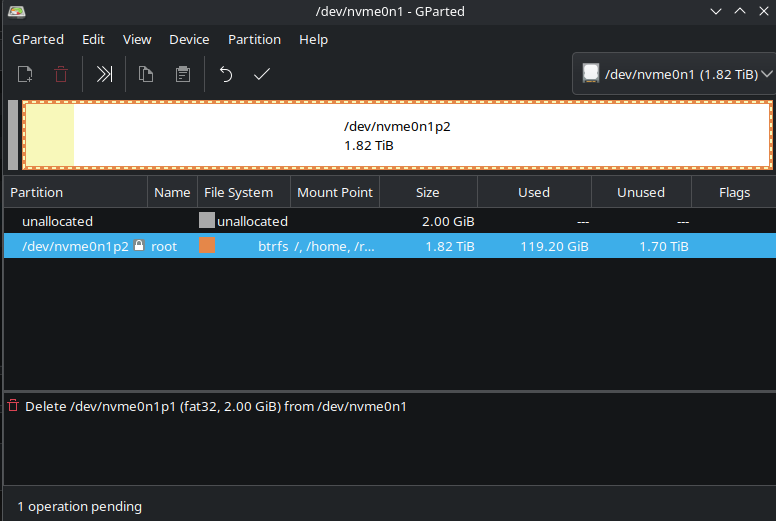
@SkibidiGonz When you boot your PC with the CachyOS live image you can use gpartedas a graphical tool to delete the CachyOS partition:
sudo pacman -S gparted gpart ntfsprogs
This should install gparted.
Then you can delete the partition in the GUI.
There are some screenshots here:
Windows setup should then be able to use the drive again when there are not partitions.
Yes, i already create a bootable usb
Yes, i probably come back but i want to play games with EAC so on windows i can’t, just in 2 weeks i fall in love with linux, windows is trash compared to linux but if the kernel doesn’t support EAC or any anti-cheat i prefer windows.
- Boot from the cachyos liveusb (or any other linux live usb).
- Open a terminal.
- Type sudo fdisk -l followed by Enter/Return key to identify the drive.
- `❯ sudo fdisk -l
[sudo] password for username:
Disk /dev/sda: 894.25 GiB, 960197124096 bytes, 1875385008 sectors
Disk model: SAMSUNG MZ7LM960
Units: sectors of 1 * 512 = 512 bytes
Sector size (logical/physical): 512 bytes / 512 bytes
I/O size (minimum/optimal): 512 bytes / 512 bytes
Disklabel type: gpt
Disk identifier: 7C5A3E10-FCF4-46F8-B892-7DF06BDDC559
Device Start End Sectors Size Type
/dev/sda1 2048 206847 204800 100M EFI System
/dev/sda2 206848 239615 32768 16M Microsoft reserved
/dev/sda3 239616 1660219391 1659979776 791.5G Microsoft basic data
/dev/sda4 1660219392 1661474815 1255424 613M Windows recovery environment
/dev/sda5 1661474816 1665669119 4194304 2G EFI System
/dev/sda6 1665669120 1875384974 209715855 100G Linux filesystem
`
4. Delete the Master Boot Record (MBR) typing ```
dd if=/dev/zero of=/dev/sda bs=512 count=1
That’s exactly the way to go. Windows first, then Linux.
A quote from Lotti Huber that I often use: “There are other ways, but this works too.”
Right click and delete just like you did with the 2GB partition.
Then apply the icon on the right in the toolbar. 
ok, i delete all the partitions and apply all, then i create 1 with all the space, and done right? Then go to bios with a bootable USB and execute the iso and all that stuff.
Bro, u were so right, i want to go back to linux again. xD windows 11 is crashing me.

Well. Laptop nowadays is not expensive. If you need to balance work and play, it’s better to have at least 2. One with discrete graphic chips such as RTX… with Windows, other is for work with Linux. If you need better working experience or interested in learning computer, 1 more Mac mini or Macbook would be excellent.
I eliminated my desktop one year ago and had 3 laptops now:
-
Lenovo Legion Pro 7 16IRX9H with Core i9-14900HX and RTX4090 12GB
I bought it new last year to replace my desktop for gaming and do MS Window’s work so I upgrade it myself with 32GB Ram and 4TB SSD x 2. However, once I start exploring new knowledge of Linux, I have stop any gaming now and might install one Linux distribution later and dual boot with Windows.
-
Macbook Pro M4 Pro 48GB 1TB SSD
I bought this in 2nd hand with very good value. It’s an upgrade and sold my old Macbook Air 2020 model for my web development of Python Django study, it’s a huge upgrade. I had also tried install Ollama and run local LLM on it. Once I becoming an expert with Linux and have spare time, I might try to install Asahi Linux on it.
 -
Lenovo IdeaPad Slim 5 16IMH9 - Type 83DC with 16GB Ram and 1TB SSD
I bought this 2nd hand as well mainly for learning Linux for my Python Django project deployment. Now is dual boot with Linux Mint and CachyOS.
It’s a bit off topic so I have to add something about installation here, since all of my machine is quite new so it’s ok to pick up rEFInd Boot Manager. It’s quick and easy. If you would like to install Linux again, make sure you understand Boot Managers and File system just in case if you would like to make a dual boot system in future. 
No bro, my pc is good, and i dont work i’m 14yo. I just began from children to learn about all this and all the time i used windows because the people says that Linux is shit and all that stuff, then i tried it and i love Linux. I dont care if i cant play competitive games, because i have a feeling that in less than a year we can play all the games like windows. My pc if u want to know is fully overclocked, the ram, cpu, gpu… going up with voltajes, timings all that stuff, i have R5 7600X, RX7600, DDR5 6000MHz cl 36 and b650-plus. I went for low latency than fps.
And installing EAC in Steam, using the latest proton did not help? Just checking…