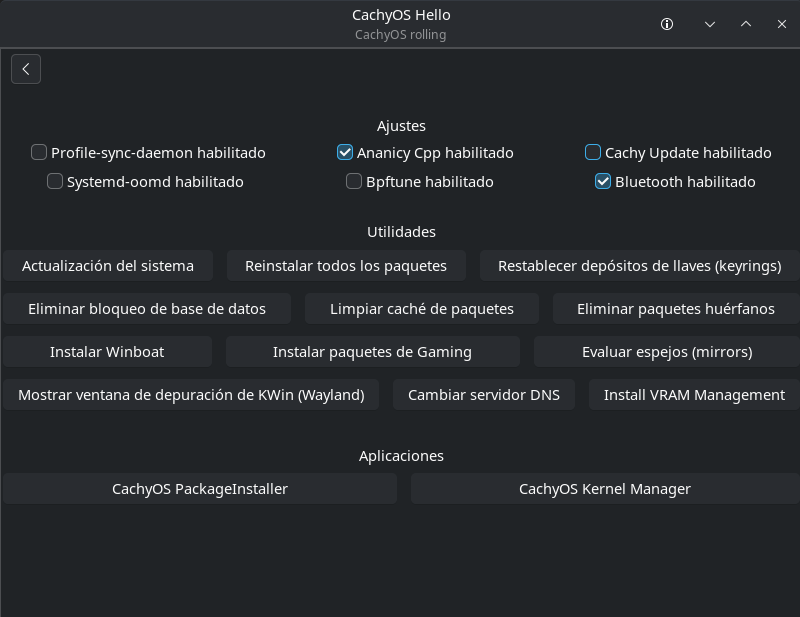
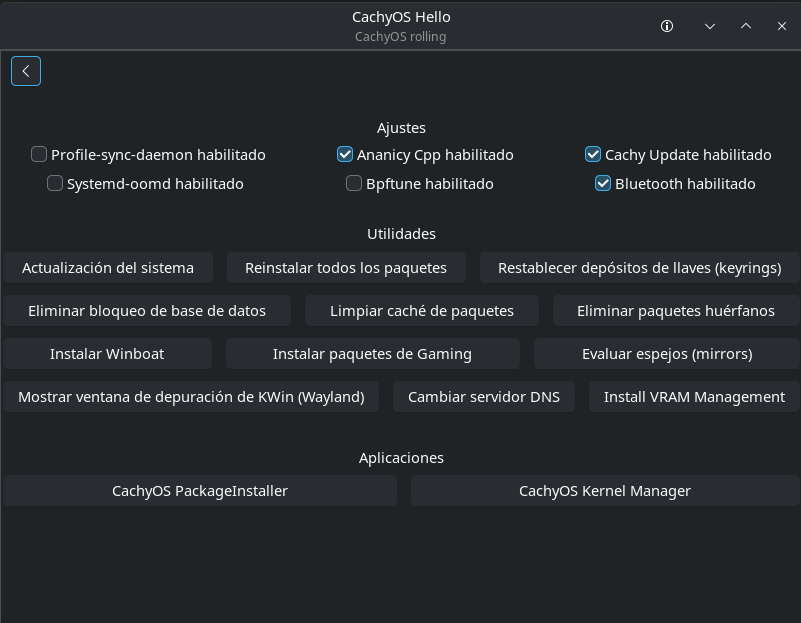
I click the box to disable it, but it doesn’t save the option and its still enabled when I open it again.
You can uninstall it, if you don’t wanna use it.
paru -Rns cachy-update
Or if you still want to be able to run it from the menu, just without the tray applet running you can remove the service which loads it.
sudo rm /etc/systemd/user/graphical-session.target.wants/arch-update-tray.service
The checkbox in ‘CachyOS Hello’ app does not appear to save the setting properly in the current build.
do not forget to remove the timer too, or he / she will still receive the notification after X time
Unrelated, but why would you want to disable it?
Maybe because an update notifier on a rolling release distro where there are updates every single day is actually more trouble than it is worth?
( They tend to cause folks to attempt updates immediately after a single package is upgraded when 3 dozen will be .. so the upgrades do not work or work as expected .. because the user is trying to upgrade package A when packages A B and C all need to be upgraded together. And they would be. But some notifier app told the user to update -now- when B and C had not yet been uploaded. This situation is made much more common by these notifiers. )
Thats why we have so many threads here with answers like “wait 5-10 minutes and try again” being valid solutions.
that’s a none issue IMO. One just waits a bit and try again. One can also simply update once per day for example, and if there’s a similar issue (happens rarely) wait and try again. Cachy-update isn’t forcing you to start the update. Being bothered by the notification that updates are available is weird.
The sheer number of queries and answers to that effect would tell me its not exactly a non-issue.
Then what function is the update-notifier performing? What value does it add?
So we should waste desktop and network resources on pinging the mirrors to check for updates to get a graphical notification that we will not use and will actively ignore? Makes total sense and is not multiplications of wasteful for both the user and the servers. 
( Ditto for attempted-failed-retry-again upgrades. )
Anyways these are some of my reasons and I can only guess as to whether OP has similar rationale.
IMO you’re creating issue where there’s none. What you describe can happen anyway. I updated whenever there are updates available, and not once have I encounter any issues with it. Update notifier’s function is to notify you there are updates available.
“we should waste desktop and network resources on pinging the mirrors to check for updates to get a graphical notification that we will not use and will actively ignore” 
Scenario you described can occur even when you execute the command manually, and also when you don’t upgrade “every single day”. Updating every single day is perfectly normal on a RR distro.
No the rate at which this would occur is much much higher with a notifier running constantly and telling you after a single package needs an upgrade.
I also do not see how anything I wrote would be for or against updating daily. I said nothing about that being an issue.
I said that with Arch/Cachy there are available updates every day. Which is true.
Sure.
But then we still have the notifier providing no additional value.
If you are going to run the upgrade at least once each day anyways so then .. why the notifier?
I am still not convinced. I still see them as useless at best.
But that is also fine and you can keep using them if you like.
That? Btw what do you mean by this: “with a notifier running constantly and telling you after a single package needs an upgrade.”
That what?
It says there are available updates every day with Arch/Cachy.
There is some package in the repositories that is updated every calendar day.
What is not being understood?
Exactly what it says.
The occurrence of people trying to upgrade before the mirror has fully synced happens much more frequently when there is
- a notifier
- that is running constantly
- that notifies immediately of a single package upgrade
I do not know how it could possibly be otherwise.
And even if you cannot follow the logic of it intuitively you can just look around these forums to get an idea of the frequency.
It simply checks every hour. You can configure the timer and set the frequency to whatever you like. I’ve never encounter an issue, and maybe once a situation where I had to wait a bit. If you simply check once per day, there’s still a chance you’ll encounter inconsistency.
Devs who have set the timer might/should have more experience with this than you, and it’s configurable, so where’s the issue. Frequent updates are way better than postponing, and new users that have just migrated from Windows tend to ignore updates what is going to create issues sooner or later.
What you said about resources is over exaggerated IMO. Although it could become an issue if the number of users exploded.
Removing it is what I did, and I like the results a lot.
Whenever I get curious about what I might be missing out on, I just do “sudo pacman -Syu” from the terminal and answer yes or no after a quick glance. It’s really not necessary to do constant checks and updates.
Above I mistyped once per hour, that’s wrong. It’s once per day +/- some random delay (up to 1h) as stated in arch-update.timer