So I plugged in my phone and did some file transfers to and from it. Now that I’m done, I would like to “safely remove” the phone from the computer. I tried right-clicking on the device shown in the side panel of Dolphin but there were no options like that in the context menu. On Windows, I can right-click on the phone in the side panel of Windows Explorer (or on the taskbar) and choose the “safely remove” option. How do I do this with KDE Plasma?
You can use
sync
in the Konsole to write all buffered data to the devices. After that you can safely remove the device.
I’m currently on Gnome, so I can’t check, but if I’m not totally wrong, then there should be on the right side of the taskbar a symbol that looks like an USB Stick and that should offer an option to remove the device.
iirc, if you have the default bar layout for kde, on the bar you probably have an up arrow and you have an entry for plugged devices like external drives and stuff

So far, I just unplugged it without thinking about it too much  Did that for a year now…
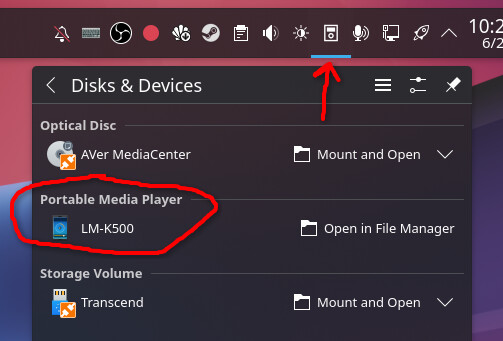
If you go to Dolphin, on the left side should be your various devices it picked up. Next to that device there should be an arrow point up, that is the eject one.
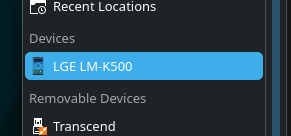
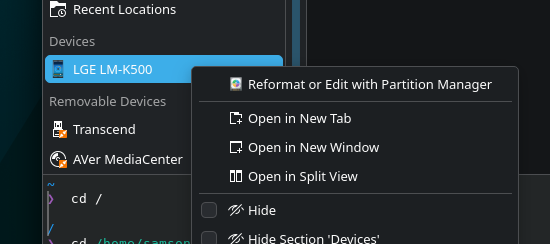
I used to worry about this too, but as long as there is no USB eject icon on the system tray I have always assumed that the device was disconnected and safe to remove, and I’ve never ever had a problem with device corruption, It’s worth asking the question, but if there’s no USB connection icon then there’s nothing to worry about.
You can use sync like Gozu mentioned then, but honestly if it has been over 5-10mins since the last transfer you’re usually safe just pulling it.
Not sure why there isn’t an icon and it shows up differently, though. Mine shows up with my other drives so it somehow isn’t being read as proper USB storage? That is an interesting one.