My battery life drains 10 minutes quick and i understand how performance based this OS is but i need to have a balance for whenever my laptop is plugged and unplugged
Any tips on how I can increase my battery life when unplugged?
My battery life drains 10 minutes quick and i understand how performance based this OS is but i need to have a balance for whenever my laptop is plugged and unplugged
Any tips on how I can increase my battery life when unplugged?
It might make sense to start with system info .. that way we know if power-profiles-daemon is used as well as hardware, etc.
sudo cachyos-bugreport.sh
fresh reboot
It might be worth mentioning that ‘gaming’ laptops pretty universally have poor power efficiency - they are more like mobile desktop replacements.
And it looks like you probably have BIOS updates.
Wow .. it is definitely time for a new battery.
With this kind of health it should not be assumed you can rely on the battery at all.
We can continue looking at config things but that should definitely be handled and otherwise be plugged in at all times.
Like how the DE is GNOME and at least up til recently it was probably the least power efficient of any option outside of some sort of broken configuration. To maximize power/efficiency you might even consider a tweaked minimalist WindowManager environment.
Flatpak is going to be another thing introducing extra overhead so if you could do away with it in favor of native packages you will save a bit there too.
In whatever case you can work with PPD (currently installed) or an alternative like TLP or tuned to set maximums or even dynamically change profiles or similar based upon power state. A number of things can be found here:
( Note other links there such as to Power Management or CPU frequency scaling. )
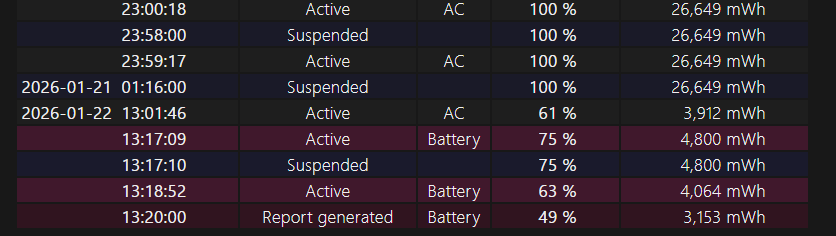
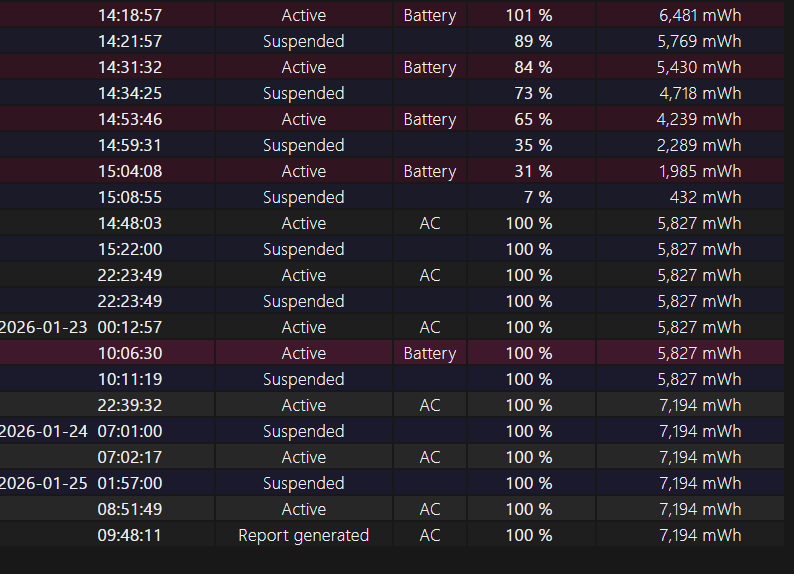
i checked my windows and i had linux installed 4 days ago, the battery was “sorta” normal at the time for being a 6 year old laptop, it’d be still on 26K mWh (and was like that since 2025) and it just drastically reduce my battery’s lifespan upon launch on cachyOS for some dumb reason
edit: when i had cachyOS it still had the same Battery lifespan (26K), but apparently this day specifically had less
To profile power draw you can use powertop and use htop or btop to monitor the core clock speeds and loading of the CPU and I believe nvtop will show power draw for most GPUs.
With ppd, you would want to use the balanced or power-save options when not plugged-in.
As for the battery, it is possible that one of the cells has failed / is failing and this is why the reported values are so low. You could try booting windows and using hwmonitor or hwinfo to double check the reported capacity of the battery. There is nothing that CachyOS would have done to damage or cause the battery to report a lower capacity than previously.
Battery management is done by the laptop’s firmware, and while there might be software toggles for setting the max charge limit, the firmware decides when and how to charge the battery. The battery itself likely has a BMS chip that is reporting its health or the laptop has a chip on the motherboard that does this. In any event, the reported values and management of the battery are purely firmware. The OS (WIndows or Linux) cannot suddenly cause the battery to report a different value unless the battery itself is failing or aging abnormally.
My friend found out that I might have been using CachyOS for an extended period of time and told me I should use windows to balance things out which would essentially bring atleast some of the battery back
it turns out his theory was correct as I haven’t used CachyOS for like a day straight which is a bit weird considering one day of using it and it went from 6k-5k
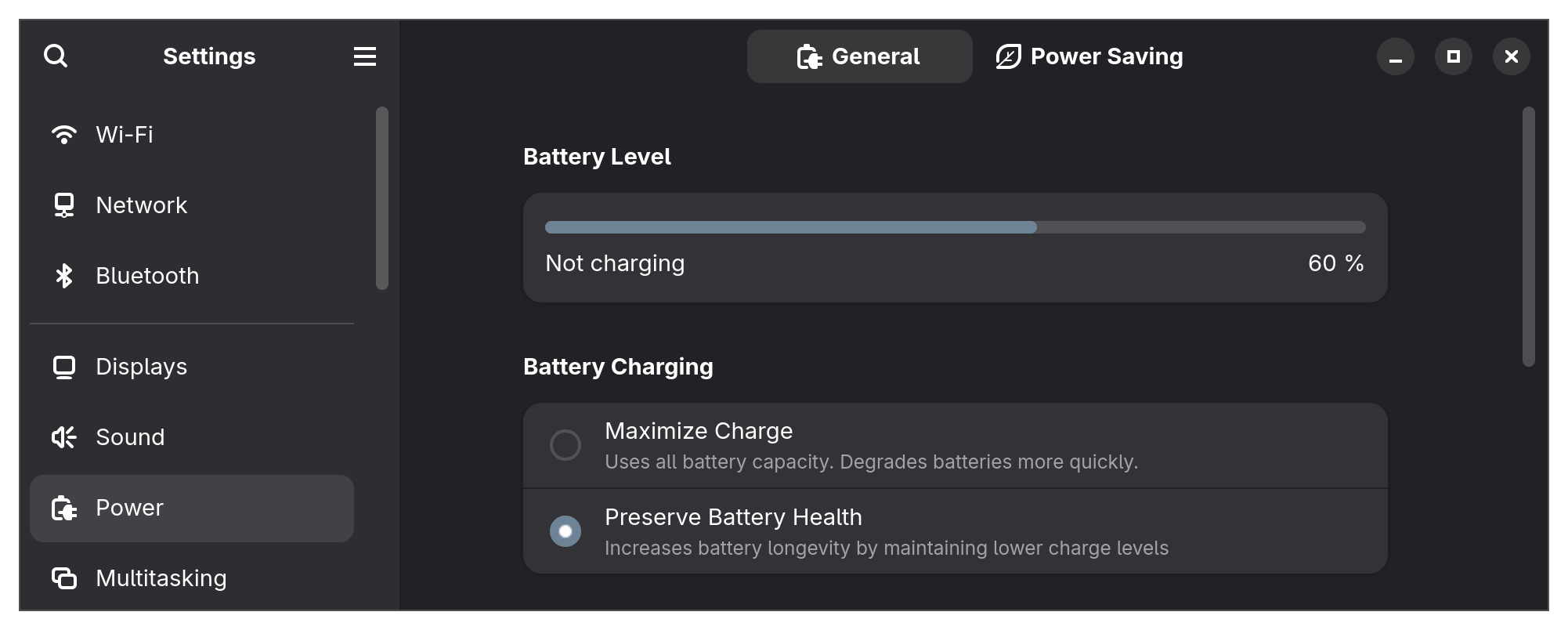
Could be that the battery max charge level is configured to a low value in Linux. My Lenovo IdeaPad has a “battery conservation mode” where the max charge is limited to 60% for use when docking for extended periods (24hrs or more). If you use KDE there may be a setting somewhere that you need to edit.
Lithium ion cells can be damaged from micro-cycling around 90-100% state-of-charge. Manufacturers ship lithium cells at around 40-60% state-of-charge to prevent them from aging as quickly while tied up in the supply chain before being sold to a buyer. Keeping your battery below 80% SoC is good for long-term battery life, and you can turn that off so you can charge to 90-95% or whatever the firmware will let you while plugged in before going mobile with your laptop.
I think the reported figure is just the current SoC, not the actual battery capacity in milliamp-hours.
If you reboot into your UEFI firmware / BIOS, there should be a menu that tells you the current health of the battery based on the battery’s BMS measurements.
EDIT: Ah, yes. The reported figure is in milliwatt-hours, so its just saying how much energy is left not the battery health as a percentage based on the original amp-hour rating. Amp-hours is usually how batteries are rated capacity wise.
Usually everything is done via coulombs (integral of the electric current used to charge the cell) and coulombic efficiency of the chemistry is used to estimate the battery’s current amp-hour capacity. The health is then the ratio of the measured/estimated Ah reported by the BMS after performing a full discharge/recharge cycle and the manufacturer’s specified Ah rating.
EDIT2: Huh, looks like most tools report watt-hours for the health stuff too. I do “test and measurement” stuff for work and we only use amp-hours… Learn something every day. I wonder if the BMS actually samples the voltage curve during discharge to get this value or is it just estimated?
I guess the question is, why isn’t your battery always charging when using CachyOS?
Could be you need some Asus kernel module, or just a misconfiguration of some setting somewhere.
Try using upower -b to see your battery statistics.
For my 6 year-old battery, upower reports:
$ upower -b
Device: /org/freedesktop/UPower/devices/battery_BAT1
  native-path:          BAT1
  vendor:               Celxpert
  model:                BASE-BAT
  serial:               E240
  power supply:         yes
  updated:              Sat 24 Jan 2026 08:01:00 PM MST (19 seconds ago)
  has history:          yes
  has statistics:       yes
  battery
    present:             yes
    rechargeable:        yes
    state:               pending-charge
    warning-level:       none
    energy:              34.79 Wh
    energy-empty:        0 Wh
    energy-full:         57.92 Wh
    energy-full-design:  63.5 Wh
    voltage-min-design:  7.72 V
    capacity-level:      Normal
    energy-rate:         0 W
    voltage:             7.688 V
    charge-cycles:       20
    percentage:          60%
    capacity:            91.2126%
    technology:          lithium-polymer
    charge-threshold-enabled:      yes
    charge-threshold-supported:    yes
    icon-name:          'battery-full-charging-symbolic'
I bought the laptop second-hand and the battery life hasn’t changed much from when I got it, was around 92% of the MFG’s rated capacity. Keeping it around 60% SoC most of the time has helped slow aging and capacity loss from excessive charge cycles.
EDIT: What options does KDE show for battery management? GNOME keeps it simple with basically three options: 1) none (let the firmware decide) 2) “Maximize Charge” and 3) “Preserve Battery Health”. I can also just run my own script to manually toggle “conservation mode” by echoing 1 to /sys/bus/platform/drivers/ideapad_acpi/VPC2004:00/conservation_mode.
I forget the syntax, but it’s possible to change the CPU mode with a simple kernel parameter in GRUB (assuming you use GRUB).
Mine is set for “ondemand” (faster on demand), but “performance” is known to be faster/drains power faster. There’s also a setting for “powersave”(?) which saves battery life. Also, there’s another setting which can be used to specifically set the CPU speed manually. I’d look into that first; those settings are called “CPU Governor”.
I used to only use “performance”, but it made my laptop heat up really fast. But now I only leave it set to “ondemand” because I don’t actually need the constantly fast setting. Also, when I tried the “powersave”(? or whatever it’s called) temporarily, it really did make my battery last longer which was fine as long as I wasn’t needing more CPU power. For simple web browsing it was fine. My laptop hardware is optimized for power-saving, so it worked out.
I think you’ll get good results if you look into this “CPU Governor” stuff.