Hi all, ive been using cacyos with no issues for the last 2 weeks. everything works well. However the qemu vm installs guests well but lacks internet conection. i am using core ultra 125u, ram 32GB 5600,
I was advised from the arch forum to use vmware which i did and it has internet but again the problem is the screen tearing, i disabled the 3D settings on the display options but that left me with minor screen flikering on the guest session.
i still prefer qemu/kvm through virtual machine manager but now no internet. tried lots of work arrounds including uninstall and installs, , fire wall disabling aswell as cachy hello options but nothing with internet con nectivity. this works in other kde versions wonder why not here.
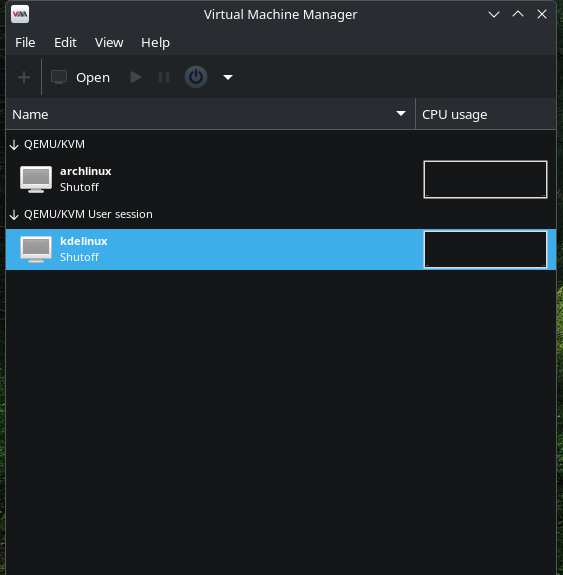
I have the same problem, and sometimes disabling the firewall worked but sometimes not. Then I tried creating a QEMU/KVM User session as pictured in the screenshot and the internet works 100% all the time in the guest.
I was so ready to lay out everything I did to try to get my internet working on a VM, and it turns out after studying nftables, iptables, bridge devices, all I needed to do was to switch to a QEMU/KVM User Session.
Just bumping this to also say thanks re: the User Session suggestion. I freely admit I don’t know WTF I’m doing. I have used QEMU/KVM with success on other distros. On Fedora I just use dnf install @virtualization and haven’t had issues. For whatever reason, no Internet on CachyOS but switching to a User Session worked, and that’s A-OK w/ me. Whatever works for the few job related Windows apps I need. Thanks @JBTR
Just wanted to tag in here as well… I was really baffled about WTF was going on with the guest networking. I’ve used virt-manager on Debian, Mint, Fedora, etc. etc. Never had to use ‘user session’ before. But it worked this time, here, on cachyos.
Hi there, new CachyOS user here and I encountered this no network issue as well after following the setup here:
For me the fix was to add the following line to /etc/libvirt/network.conf:
firewall_backend = "iptables"
then restart libvirtd:
sudo systemctl restart libvirtd
I’m able to run it without the “User Session”
UPDATE: Thanks to this thread I looked into user sessions a little more, and decided it’s actually the way to go for my purpose since it provides better host network isolation, which is something I’d rather have: