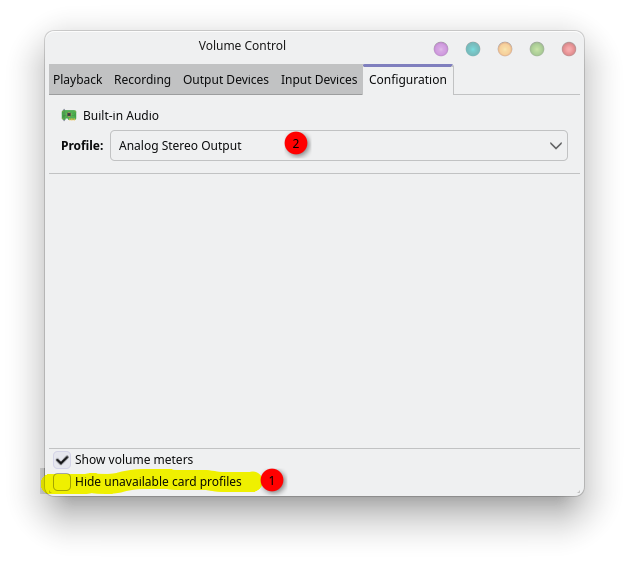
Resident evil 2 remake runs -20fps on cachy over windows10 atleast on my rig which is new hardware.
Are there any games known to run faster on linux? I would like to try since my first impression was “oh werid everyone said cachy is a gaming beast optimized for performance and modern hardware but now i saw a game performing worse and -20fps is something”
See the top of Gaming with CachyOS Guide | CachyOS
Some games run better, some (primarily through Proton or using DX12, or if using Nvidia) run worse, most are similar. YouTube comparison videos tend to cherry-pick games that run better on Linux, if you want specific examples.
Also, “on Linux” is a nebulous term, as it depends on distro, kernel tweaks, DE and setup, GPU vendor and drivers, game-specific tweaks (like through Steam launch options), Proton version (or native), etc. etc.
Haven’t used Windows in a few years, but all my games, current and old, run flawlessly(on the nvidia 580 drivers)
On a 5800X3D / 4070 Ti Super system I’ve played quite a few games (Cyberpunk, Diablo IV, Doom Dark Ages, Forza Horizon 5, Hunt Showdown 1896, Crisol) without any issues other than Borderlands 4 needing a bunch of tweaking. All of those games (minus BL4 which runs about 20 fps less at least) have either been running the same as in Win 11 or shockingly, sometimes better like Cyberpunk and Forza. I was also quite surprised with running Ryujinx. Link’s Awakening was always a bit stuttery at 1080p no matter what I did on Windows. On Cachy it’s buttery smooth running at 4K.
I switched from the GTX 1080Ti to an RX9070 and don’t regret it.
Nvidia isn’t the company they’ve been. Nvidia has become an immoral piece of sh!t i won’t buy anything from the again, let alone they partnered with palantir for global surveillance.
I can only bet games run better on cachy than on windows11 malware, the amount of data harvesting in the background has to take hit performance in someway?!
Great to hear from your experience.
What does PROTON_USE_NTSYNC=1 do?
I boot cachy from a BTRFS drive but my games are stored on an NTFS drive, i added some of these games to steam on cachyos and launch them with proton. Does it matter if the games themselfes are stored on an ntfs drive instead of btrfs?…
from Gaming with CachyOS Guide | CachyOS
Caution
Avoid using Proton on NTFS drives. Valve does not support this configuration, and it can cause games to behave unpredictably.
If you’re willing to proceed. Follow their unofficial guide.
from Gaming with CachyOS Guide | CachyOS
CPU & Sync Performance
PROTON_USE_NTSYNC=1: Use NTSync instead of WINESync.
Benefit: Possibility of an increase of smoothness in certain games
Note: Experimental, may cause issues in some games
Verification: Use lsof /dev/ntsync (MangoHud reports incorrectly)
Better to Google it
Thats why i asked because i just read the wiki and got concerned if it matters when my games are stored on an NTFS drive. The drive is multiple TB i cant easily move all thats on there and reformat the drive, well this is a bad situation now. I would need another nvme drive just to use for btrfs with cachy.
Well you do have options:
-
If you’re planning to dual-boot for the time being, and mostly game on Windows, keep most of your games on Windows. If you are looking to try a few on Linux, install just a few at first to a Linux filesystem (eg BTRFS, ext4, etc.) to try them out. If you lack disk then delete the ones from your Windows NTFS drive that you are installing on Linux. Just ensure you have cloud saves (or data backups) if needed.
-
If you’re thinking about a potential switch to Linux, then do the above, “moving” one game at a time to Linux, testing each one out, then then decide which way you want to go.
In either case, don’t use NTFS. I tried it when I set up a dual boot Linux on my partners PC and it didn’t work.
I did play a few games on cachy, all of them stored on ntfs drive and couldnt notice any issues other than hdr problems with probably has nothing todo with the filesystem. What problems did you encounter, what do you mean by “didnt work”?
For me there was an error and the game wouldn’t load. That was after doing a filesystem repair which linux requested with fsck (IIRC).
Someone else will probably know more than me about gaming on Linux with NTFS to advise there.
Just make the move.
Eh. I would but i’m not under the impression cachyos will work with 100% of the games i play thats just because some games seem to not run even with proton, not cachys fault but just the way it is.
Might be wrong about that. And sure i could game on cachy by using a windows vm for those games who are retarded on linux, but then i need to know how to install a vm and im not talking virtualbox but probably qemu and using gpu passthrough. These are things i know nothing about and it’s likely alot of reading and will take alot of time. Making the move isn’t just a finger snap. Also im hesitant since i noted some games perform worse on cachy than on windows, if i find a game where the opposite is the case that would be great. What holds me back the most from making the swith is my surroundsound 7.1 does NOT work on cachyos. Only 5.1 surround works and it sounds noticably worse. Also i’m having issues with HDR in some games. Plus modding games like skyrim or gtav on linux is going to be a major headache, it already took alot of time on windows.
Not sure if i want to use an os when surroundsound 7.1 needs to be sacrificed to use that os.
Dont get me wrong cachyos feels very snappy and it generally feel ALOT better than windows in every way i can think of, but there are thing i dont want to give up. Surroundsound 7.1, HDR, certain games, modding. If i can get all these things working under linux then i would make the switch but i do don’t know if that’s the case and it doesn’t look like 7.1 surround is an option on cachyos or most linux distros in general.
Noting this is a tangential post to clarify a few misconceptions I see noted here. I don’t want others following this topic to get the wrong idea.
Where are you finding that 7.1 surround sound doesn’t work in Linux? I am very sorry to hear that you are struggling. What have you tried so far? It really should be plug and play without needing extra configuration, which I’ll expound on in a moment, and I’ve often seen the attempts to configure to be the source of the problem, but that may not be the case here.
As a piece of unsolicited advice :), asserting a statement as a definitive fact can come across as combative and discourage those who could help from responding. I suggest building a habit of including some uncertainty in communications because very little is truly certain. For example, framing it as the personal struggle it is, “I haven’t succeeded in getting 7.1 sound to work.”
I have never had to sacrifice using 7.1 surround sound for over a decade on Linux, including using the cachyOS distribution specifically for the past couple years. As noted in my sound settings pictured below, 7.1 surround is supported, I have tested each speaker in sound settings (pictured below) and hear them all working in the test, as well as when watching movies, playing games, etc.
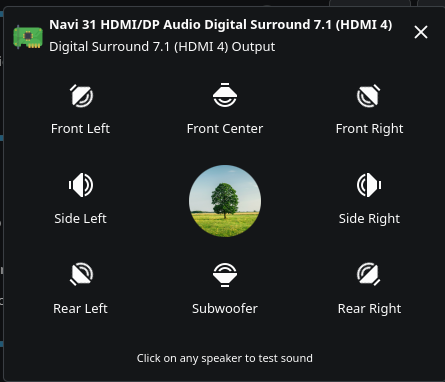
Again, I am sorry to hear this. What have you tried to overcome this challenge?
“Best” (or worse) sound is highly subjective. I will note that, despite the subjective nature, I think almost everyone will agree that stereo sound is simply better, by default (not something that has to remain in worse state), in Windows than Linux and I wish I knew why. There are software packages, such as EasyEffects or JamesDSP that can significantly improve stereo sound on Linux. However, surround sound is a different beast. I know EasyEffects or JamesDSP don’t support 7.1 sound, but that isn’t the same as Linux at large. Are you using those (or another program), which could be your struggle?
Surround sound setups often include configuration options within themselves to ensure you can tune them to whatever you think is best, including options to save settings for different scnearios (e.g. music vs movie settings). Because I tune the sound system itself, I have no problems with better or worse sound on Windows vs Linux, at least within my ear’s capabilities (you may have better sound discrimination than I do, so I can’t definitively say there isn’t a problem with worse sound).
Re: HDR and modding - I am not a “hardcore” gamer, so I may not be a good enough authority here, but I’ve had no issues. For example, I find modding Morrowind much easier on Linux, though that is just one instance. I haven’t tried the games you called out, but I will note that if you try to mod Morrowind the same way on Linux that I see pushed on Windows, you will find it to be much tougher. Once I learned the Linux options, I found myself cursing Windows for making the process so much more difficult.
I haven’t had any HDR issues with movies, but I don’t think I have any games that natively support it to compare. Someone else may need to address this, but I am skeptical that HDR performs better on Windows without it coming down to a configuration problem.
I think this is the core issue. Linux is a different system than Windows and you can’t treat it as Windows. Not everything is going to be the same, which is a good thing. There is only so much programmers can do to ease the transition, so it can’t be a finger snap. I am amazed at how much folks have eased the transition already, and we should always try to improve further, but it can never be just a simple finger snap complexity to the change. This isn’t unique to Linux vs Windows either, as I’ll comment on further a bit later.
However, I think the reason kindofabuzz suggested making the move is that many of your problems seem like something that can be overcome once you have learned the new system. The best way to learn a new system (or language, sports game, etc.) is often jumping in fully. When you keep the old program, system, etc. as a crutch and go back there anytime a new challenge arises, you inhibit your ability to learn the new stuff and see how awesome it is in the long run.
Returning to this not being unique in Linux vs Windows (or Apple, etc.) I saw the same thing professionally involving programs that were both for Windows anyway. Rather than folks learning the new and better way on newer software the company just spent millions to billions of dollars on, many folks complained about things not being “possible’ when the root problem was really it wasn’t done the same way they were used to doing it with their old software. Everything, and more, was actually possible, often in an easier way after they learned the new system. Similarly there, we found much better success when software transition policies removed the crutch. When users weren’t allowed to go back to the old system and effectively forced to learn the new one, complaints actually decreased and a lot more was discovered with additional positive feedback being received on the easier methods and new features the users discovered.