Games stuttering in intervals

As you can see, my games have been stuttering in intervals for pretty much no reason that I can see atleast. I just started using linux a couple of days ago, im using cachyos with kde plasma. This happens on all games imjust using no mans sky as an example. audio also bugs out like when im in vc on discord or listening to music but this video doesnt capture that ill record that eventually https://youtu.be/zIaMhU4CZvg

I have an nvidia rtx 2060, 12 x core intel i5-10400f cpu @ 2.90 ghz, and 16 gb of ram

video with audio: https://youtu.be/nbHt5Eyf13U

That’s a very regular interval. Except at the beginning of the second video. Fascinating.

Does the audio glitch happen even when no game is running? Have you tried closing all other applications (especially browsers) when running the game, and does it behave the same? Same interval in all games?

Thoughts on what it could be, in no particular order:

  • Temperature throttling on CPU
  • RAM swapping? Unlikely, due to being so regular and you’re just sitting in start menu.
  • Background process hogging/spiking CPU periodically
    • Perhaps due to a repeated error or crash of something
    • I’ve once seen something similar where having a USB device plugged caused spikes like this, because it kept disconnecting and reconnecting constantly
  • ananicy-cpp and/or CPU scheduler in use is not a good fit for your hardware
    • Are you using gamemoderun? If so, this may be the problem, it’s not compatible with ananicy-cpp, which is enabled by default. Simply not using gamemoderun might fix it.

Your Mangohud is configured to show very little; missing RAM, VRAM, and temperatures in particular. You could use Goverlay to configure it to include them.

You could also run btop in a terminal for some more info. q to quit, Esc for menu. Hit - a few times to have a faster update interval. Hit 5 to enable GPU, 3 to disable network, i to show IO graphs. Then see if you can observe any pattern that matches with the stuttering, e.g. temperature peaking out at roughly the same interval, or some process spiking CPU periodically.

You could use sudo journalctl -f to watch system logs, or sudo dmesg -w to watch kernel logs (Ctrl-C to exit for both). See if anything keeps happening, in sync with the stutter.

Next thing to try would be disabling ananicy if it’s running:

# to check if active:
systemctl status ananicy-cpp
# to disable if active:
sudo systemctl disable --now ananicy-cpp

(Alternatively, run CachyOs Hello, go to Apps/Tweaks, uncheck ananicy)

Reboot to be sure. Try gaming again. Any difference?

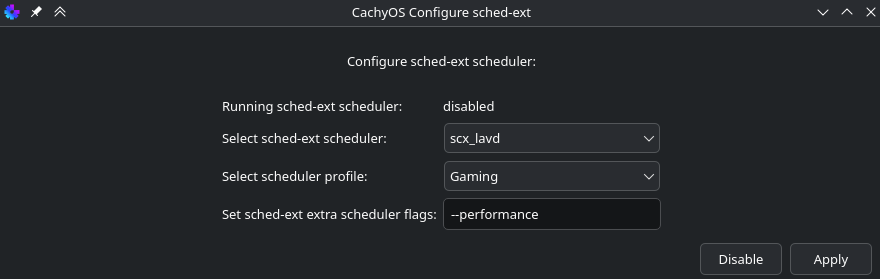
If no difference, you could try a different CPU scheduler. Ananicy must be disabled for this. Easiest way would be to run “SchedExt GUI Manager”. For example, try scx_lavd with Gaming profile, hit Apply:

Any difference? See wiki for more info: sched-ext Tutorial | CachyOS
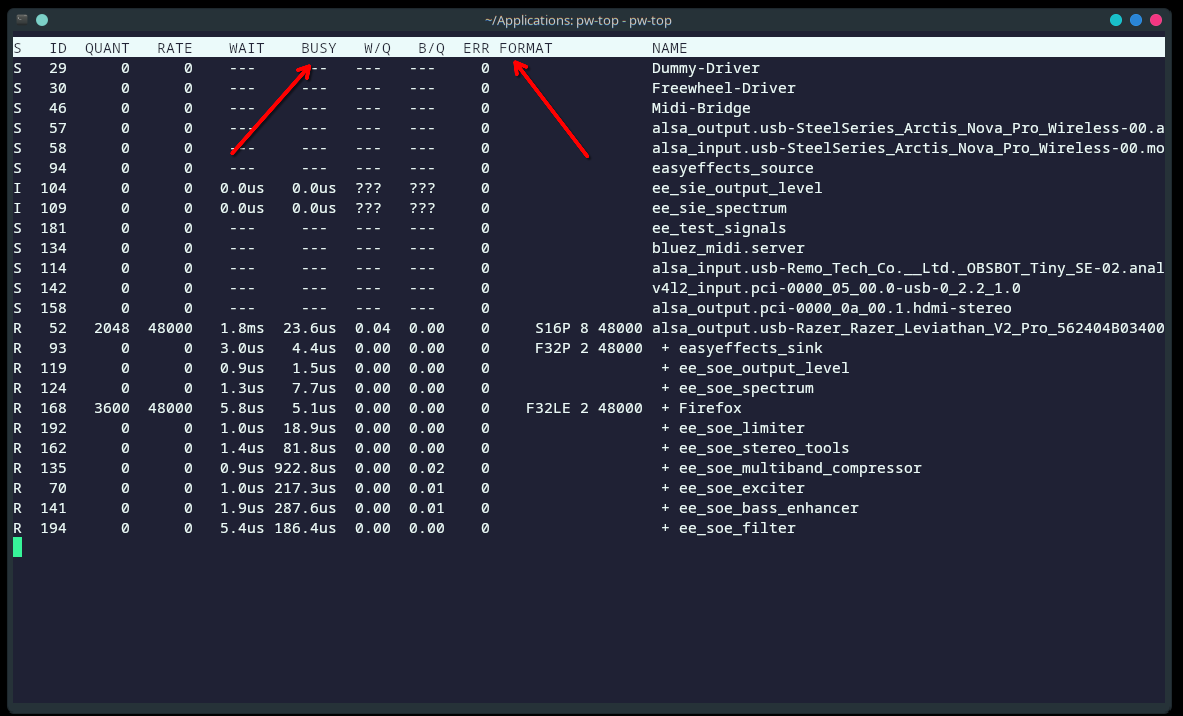
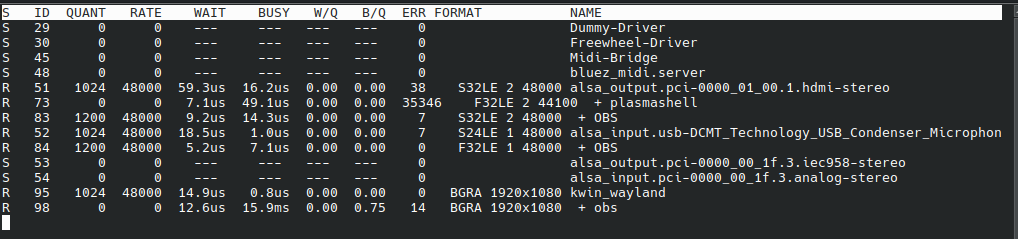
If you run pw-top (presuming you are on pipewire) you can sometimes see audio delay audio / errors

Open a terminal and run this:

pw-top

alright so this is what shows up in pw top, the largest number (obviously the 35k) increases as the lag spike hits, it also just increases when im not even in a game

Interesting that the main errors appear where you are uniquely sampling 44100. Might be worth setting that to 48000 like everything else and testing.

how do i do that?

This creates two simple commands:

  • pipewire-48k-on

  • pipewire-48k-off

The “on” command forces 48kHz.
The “off” command removes the override and restores default behaviour.


Open a terminal and paste this:

mkdir -p ~/.local/bin ~/.config/pipewire/pipewire.conf.d

# ON
printf '%s\n' \
'#!/usr/bin/env fish' \
'mkdir -p ~/.config/pipewire/pipewire.conf.d' \
'printf "%s\n" \
"context.properties = {" \
"    default.clock.rate          = 48000" \
"    default.clock.allowed-rates = [ 48000 ]" \
"    default.clock.quantum       = 1024" \
"    default.clock.min-quantum   = 512" \
"    default.clock.max-quantum   = 2048" \
"}" \
> ~/.config/pipewire/pipewire.conf.d/10-48000.conf' \
'systemctl --user restart pipewire pipewire-pulse wireplumber' \
'echo "PipeWire forced to 48kHz"' \
> ~/.local/bin/pipewire-48k-on

# OFF
printf '%s\n' \
'#!/usr/bin/env fish' \
'rm -f ~/.config/pipewire/pipewire.conf.d/10-48000.conf' \
'systemctl --user restart pipewire pipewire-pulse wireplumber' \
'echo "PipeWire reverted to default settings"' \
> ~/.local/bin/pipewire-48k-off

chmod +x ~/.local/bin/pipewire-48k-on ~/.local/bin/pipewire-48k-off

echo "Commands created:"
ls ~/.local/bin/pipewire-48k-*


To enable 48kHz:

pipewire-48k-on

To revert to defaults:

pipewire-48k-off


If for some reason anything craps its pants, just run the off command and PipeWire goes back to stock behaviour.

Works fine for me with fish shell. If ~/.local/bin isn’t in your PATH, you may need to add it.

Try with it on and then run pw-top again and see if errors are still created.

holy shit thank you this fixed it, ill keep testing games to see if anythings still wrong though

No problem mate, might be worth marking it as a solution in case someone else has the same issue. Glad it worked :slight_smile:

so the rhythmic stutter is fixed but now a new problem arises, i was testing on re7 and now theres just insane stutters just periodically, i cant upload a video as my wifi is out rn, i also noticed when the script is enabled when i play no mans sky my fps tanks but that couldve been a game bug

Turning off my computer’s Bluetooth solved my problem. I hope it helps you.

did you reboot after turning it off?

Yo I also been having these issues as of late too with the stutter ever 2 or 3 seconds. Seems to be very inconsistent for my case. Sometimes an update to CachyOS will make the issue go away completely and then sometimes another update will reintroduce the issue. And then sometimes after maybe an hour or two of playing games it will come back.