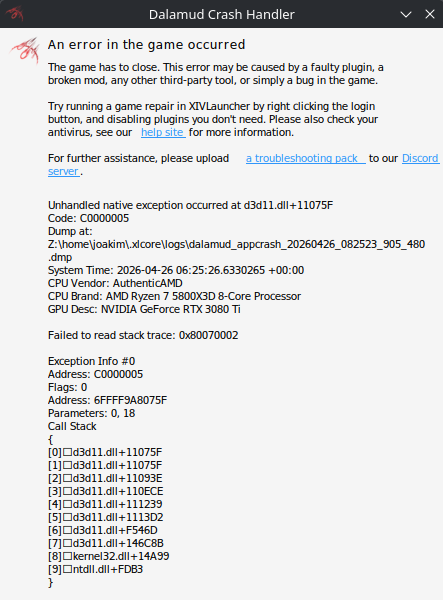
I’ve been having issues getting Final Fantasy XIV to work the last couple of days.
Yesterday (25.04.2026), I got one error message like the ones shown, restarted the game and it worked just fine.
Today, however, I get the shown error message upon the game loading in to click Login or upon picking my character to log-in. Sometimes it goes as far as to getting to the loading screen after selecting my character. But it always crashes.
I could not find a way to get it to launch with DirectX12, although I am using the XLcore[XLM] compatible XIVLauncher, it is set to DXVK Stable.
I’ve tried without XLcore as well, with ProtonGE_Latest but it still happens. Tried to install it to a different drive as well, no dice.
My system is fully updated, I tried with different snapshots as well but not sure if it does much since the game is installed on a different drive than the OS itself (new to Linux).
There really should be a sticky-thread for Nvidia users on this forum. Explaining why and how x11 or xlibre is way way better for gaming on Nvidia. Unfortunately many distro have or try to disable, even entirely remove the option for an xorg option. But fortunately it can be re-installed in many cases and usually justworksTM on Nvidia compared to wayland.
If you’ve narrowed this down to being a Wayland+Nvidia issue would you kindly post the methodology used to draw that conclusion. It would be of great assistance in troubleshooting the OP’s issue which is, after all, the point of this thread.
I might have figured it out, gotta do a bit more testing but for now the game just works as intended.
I thought I made no changes but I did end up unplugging my PS5 controller from the PC and with that unplugged, there’s no errors anymore. I can log in just fine and play.
Thank you for the replies, I hope this can be helpful to someone else too. C:
Edit: Did a quick test, plugged the controller back in and tried launching the game, it crashed pretty quickly. Unplugged it and no problems. All figured out!