Dolphin network share permission problem

Hi,

I have a NAS where I keep backups, movies and everything I don’t want to throw away and I want to access it from my CachyOS desktop.

I can see the NAS samba share from Dolphin, I can access and open any files, but I cannot delete or modify them. If I try I get an error: (file doesn’t exist).

Since server side permissions are ok (777), my guess it’s a permission problem on the client side (CachyOS). Unfortunately I tried everything but I don’t see any place where I can put the correct credentials in: Dolphin doesn’t ask me for a user/password, I just put in the server address (smb://192.168.1.50) and it just works without asking me anything. Nor can I enter user/password information on KDE System Settings.

Where can I put the credential informations, so that I can have full access to my files?

Thank you in advance!
Have you tried

smb://username:password@192.168.1.50/share_name

or if you have multiple shares

smb://username:password@192.168.1.50

or you can permanently save credentials in kde wallet

  1. Open Dolphin and try to access the share normally (smb://192.168.1.50).

  2. Right-click the share/folder → PropertiesPermissions tab (or just try to create a test file so it triggers the auth).

  3. It should now pop up a password dialog asking for username/password for the SMB server.

  4. Enter your NAS username and password.

  5. Check “Save password” (it will store it in KDE Wallet).

  6. Done — from now on it will use the correct credentials automatically without guest access.

If the dialog still doesn’t appear (common bug), force it by using the URL from logging in once via dolphin from the 1st 2 examples directly in dolphin. Then it should remember your credentials.

This doesn’t work. It does connect to the share, but it’s exactly as it was before: I can read any file or even write a new one (it’s a 777 directory afterall), but it doesn’t let me delete a file.

And nothing asks for my credential, even writing a file.

I guess it’s because it sees me as a guest and not a user (on the server the file I created is from nobody).

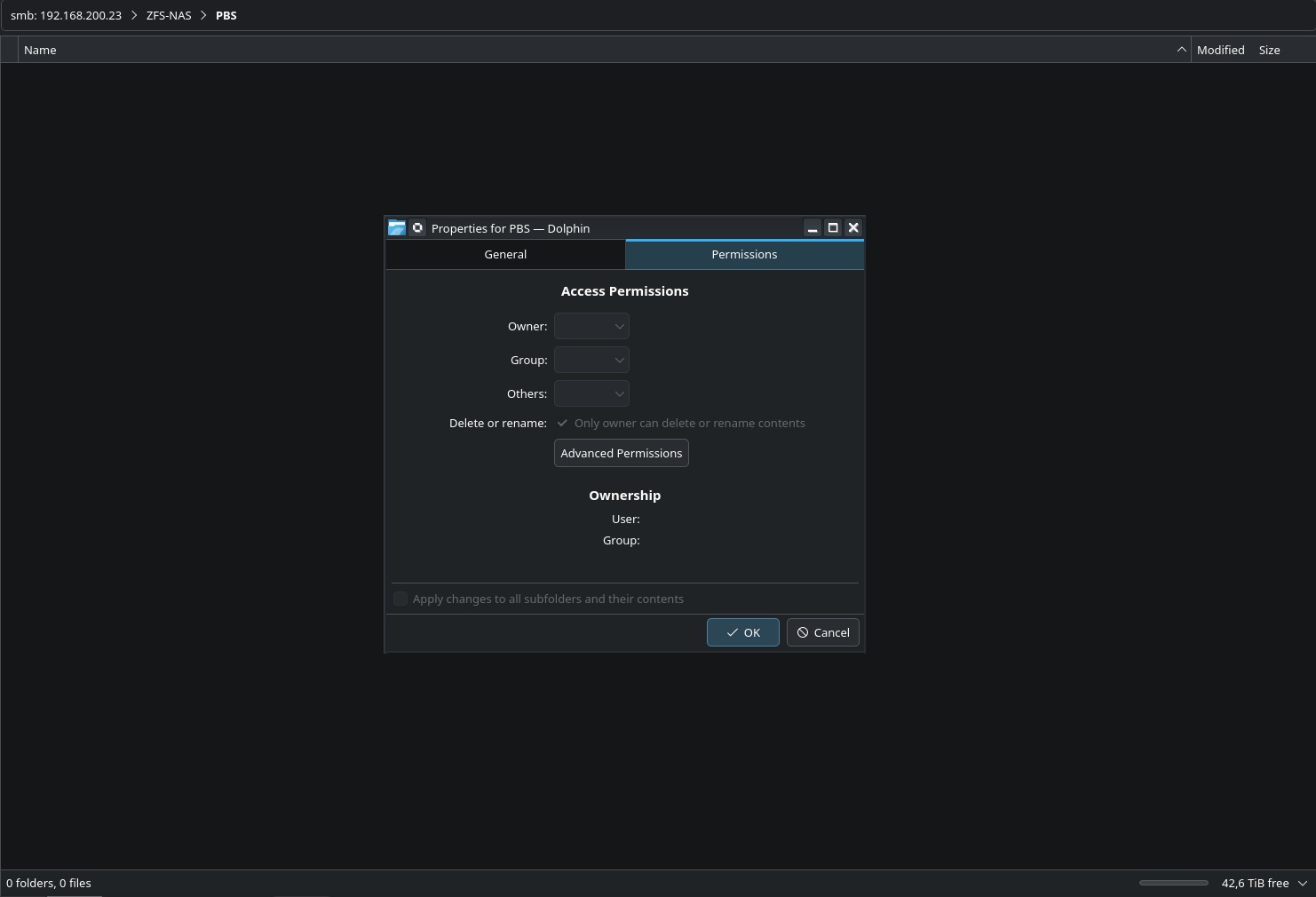
It doesn’t work either. I even tried to change the IP address (now it’s 192.168.200.23), but everything on Permission tab is grayed out - I’ll post a screenshot.

What you’re saying makes perfect sense, but somehow I don’t seem to be able to input my username/password anywhere.

Is there somewhere else I can manually input my credentials? Like some KDE config file (I would like to avoid to mount the share using fstab, since I don’t use the NAS often)

And btw thank you for your help!

As you can see it’s grayed out

I saw nothing wrong with @Steeledpick reply, so maybe back to the begining and forgive if this is already done but good to check.

I will create the required directory and group:

sudo mkdir /var/lib/samba/usershares
sudo groupadd -r sambashare
sudo chown root:sambashare /var/lib/samba/usershares
sudo chmod 1770 /var/lib/samba/usershares

Next, update /etc/samba/smb.conf with the following global settings:

[global]
  usershare path = /var/lib/samba/usershares
  usershare max shares = 100
  usershare allow guests = yes
  usershare owner only = yes

After making these changes, add your user to the sambashare group:

sudo gpasswd sambashare -a your_username

Restart the Samba services and log out and back in to apply the changes:

sudo systemctl restart smb.service
sudo systemctl restart nmb.service

Once completed, the “Share” tab in Dolphin should function correctly.

Ah I was correct but I assumed he already setup the shares. Thanks for the assist ChillZone.

First of all, thank you all for the help.

I tried all the instructions you wrote and there’s been some progress but still no solution: following ChillZone suggestion I can finally put username and password and the permission tab works.

Unfortunately this does not solve the writing issue on the samba share.

Let me recap, so I might be more precise.

On the server side (FreeBSD) samba has 0777 permission so that (theoretically) a user could write or delete anything. Both files and directories are 777 to avoid any problems.

Now when I enter the folder from Dolphin I can create a file (so copy to the NAS does work) and I can delete the file I just created, but I cannot delete any other file that’s there .

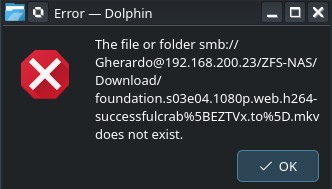
I took an episode I wanted to delete, I pressed delete, but it gives me error (attached image) saying the file does not exist. Which is odd because I can click on it and play it just fine.

SSHing into the server, with the same credentials, I can clearly do anything I want, but I checked and the file was 777 so it’s not a permission problem, but some weird implementation of it.

I also tried from Windows10 and the samba share works just fine: it asks for my usename and password and, after that, I can do pretty much anything that I want on that folder (which is ironic because Win took about 5 seconds to set up and I’ve been struggling with a samba share for days here.

Anyway, hope it helps finding a solution.

For now I’m struggling with creating new files from Dolphin and removing files via ssh, but this isn’t viable long term.

I’ve had a similar issue with my nas (TrueNAS in my case), not found a proper solution, but for me at least it’s workable. Basically any file which is added to the share in a folder from a windows PC (dragging and dropping a folder and it’s contents) will have some permission on it that prevents me from deleting on one of my linux computers. Adding files from windows is no problem, it’s only when a folder is created or added.

I can either open the folder as root which gives me all the permission, but is a bit of a pain. Or I’ve found that going into TrueNAS and redoing the ACL recursively for the share sets it back to normal. I mostly try not to add files from windows now though, and if i do i just go straight into TrueNAS and reset the ACL for the share.

That is a problem that has been out for years. Tried a bunch of distros with KDE and Dolphin, and SMB shares always have that error. I wish I was good enough to fix it :frowning:. Never got it to work, once in a while I give it a go to see if it got fixed. As of today: nope. In Konsole, I see the shares, but not in Dolphin. Still get this : The file or folder smb://[redacted]/share does not exist.