Hi so whenever I am on the brave browser whenever I interact with this box in any way basically my computer basically restarts with screen going black and everything I had open being closed and it then says KDED Device Connected or something like that
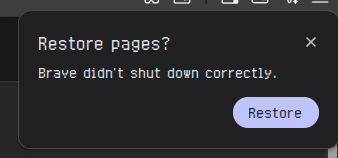
Same thing append to me today.
i launched
brave --disable-gpu
command from console to check is it hardware acceleration and it stopped. So i turned off hardware acceleration in Brave and problem stopped. I hope it helps.
About “Brave didn’t shut down properly” after reboot: it’s too slow to keep up with the system reboot process. Disabling “Continue running in the background after closing Brave” helps a bit, but not always.
My workaround is: pkill brave; systemctl reboot instead of systemctl reboot, bound to the reboot shortcut I use.
The proper solution is to close everything before doing a reboot, everything that you know will simply crash if forced closed by the system. The only thing sitting on one f my desktops is Dolphin. Though even that can be closed cause it will launch on reboot anyway.
Oh wow. A browser that needs extra handling for a system shutdown.
Progress, fuck yeah.
Brave handle fingerprinting extremely well. But my primary problem is that on most of browsers after certain amount of time YT videos start loading extremely slow, apparently it have something to do with my monitor setup 1 3440x1440 240hz 2 1080p 100hz. With research and tests i found that chromium based browsers handle it better
chrome is no go, opera wont let you pick search engine apart of shortcuts and preset engines, ungoogled chromium and mullvad are very good but wont let you sync. I would love to use Firefox or fork but i spend weeks trying to make it work and i failed so here we are.
Is it really the browser or a combination of factors, maybe bad hardware, bad configuration, and/or a weird bug that’s triggered only under specific circumstances?
I have been using Brave (although recently mainly Brave Origin) as my main browser, I have graphic acceleration enabled (nvidia GPU), and I have never experienced the problem.
Edit:
Btw I have added both brave and brave-origin to psd, so that might play a role, and maybe work around the bug, but I’m speculating. I don’t see a reason why would it. I also didn’t disable “Continue running in the background” in Brave Origin, but for whatever reason I did disable it in Brave (which I barely use, but until recently I was using it as my main browser without any issues)
CachyOS and Debian may terminate the user session before Brave has a chance to shut down cleanly.
EDIT: doesn’t work properly 
Gentle solution:
mkdir -p ~/.config/systemd/user
cat > ~/.config/systemd/user/brave-cleanup.service <<'EOF'
[Unit]
Description=Graceful Brave shutdown

[Service]
Type=oneshot
RemainAfterExit=yes
ExecStart=/usr/bin/true
ExecStop=/usr/bin/bash -c 'pkill -TERM brave; timeout 5 bash -c "while pgrep brave >/dev/null; do sleep 0.1; done"'

[Install]
WantedBy=default.target
EOF

systemctl --user daemon-reload
systemctl --user enable --now brave-cleanup.service
Then why not give Vivaldi a try? In my opinion, it often gets a bad rap—unfairly so—simply because it isn’t fully open source. You can find out more in the “About” section of the website and will see that Vivaldi is one of the good ones. I’ve been using it for years and don’t need any add-ons, since so much is already built-in (like tracker and ad blocking).
It gets a bad rap because it’s partly proprietary. But over half of those that call Vivaldi out are actually trying to push other browsers. I myself use Vivaldi as my main browsers because I believe it to be more privacy centric on top of being so customizable than Chrome or Brave.