Tried everything I could find online but to no avail, might as well take my shot here
I recently installed Vesktop, a custom Discord client, and everything seemed fine, except I noticed I couldn’t share my screen during voice calls for some reason. Running the app through the terminal I got this message when trying to share my screen:
(node:58190) UnhandledPromiseRejectionWarning: TypeError: Video was requested, but no video stream was provided at VesktopMain:97:5954 (Use `vesktop --trace-warnings …` to show where the warning was created) (node:58190) UnhandledPromiseRejectionWarning: Unhandled promise rejection. This error originated either by throwing inside of an as ync function without a catch block, or by rejecting a promise which was not handled with .catch(). To terminate the node process on unhandled promise rejection, use the CLI flag `–unhandled-rejections=strict` (see Command-line API | Node.js v25.9.0 Documentation ections_mode). (rejection id: 2)
Looking it up on their wiki, it says it’s related to xdg-desktop-portal not working properly, but this package doesn’t seem to have anything wrong with it. Not to mention the official Discord client’s screen share works with no problems.
Tried multiple installations of Vesktop. First, I installed it through pacman, then tried vesktop-git through yay after reading a possible solution online, then regular version also through yay, then vesktop-bin through yay as well. None of them worked.
Then I kind of gave up and gave Webcord a try. Tried screensharing there and nothing either! That’s when I realized it might not be as simple as it looks.
TL;DR, I can’t share my screen on Vesktop and Webcord, but I can do it on the official Discord client. What the hell is going on?!
That’s definitely odd, since improved screenshare is one of the primary reasons to use Vesktop in the first place.
I think there being a missing optional dependency somewhere sounds like the most likely culprit. When installing Vesktop, do you also install xdg-utils? And even that package has its own list of optional dependencies that may be relevant to the matter.
❯ pacman -Si xdg-utils
Repository      : extra
Name            : xdg-utils
Version         : 1.2.1-2
Description     : Command line tools that assist applications with a variety of desktop integration tasks
Architecture    : any
URL             : https://gitlab.freedesktop.org/xdg/xdg-utils
Licenses        : MIT
Groups          : None
Provides        : None
Depends On      : sh  file
Optional Deps   : kde-cli-tools: for KDE Plasma5 support in xdg-open
                  exo: for Xfce support in xdg-open
                  pcmanfm: for LXDE support in xdg-open
                  perl-file-mimeinfo: for generic support in xdg-open
                  perl-net-dbus: Perl extension to dbus used in xdg-screensaver
                  perl-x11-protocol: Perl X11 protocol used in xdg-screensaver
                  xorg-xset: for X11 support in xdg-screensaver
                  xorg-xprop: for X11 support in xdg-screensaver
However, those are not named as dependencies in the package that I use, vesktop-bin, which is a more system integrated version since it doesn’t ship with an internal version of Electron. I know you said you’d tried vesktop and vesktop-git from the AUR, but maybe giving the -bin version from the CachyOS repo might yield different results since it’s built differently.
For your issue with vesktop, their suggestion that something is up with xdg-desktop is probably on the mark, so it’d be helpful to know what your desktop environment is to check and see if you have the relevant packages installed to support screenshare with alternate clients that rely more of the system.
Right, I forgot to mention my DE, I’m on Plasma 6.6. I checked it here and I indeed have xdg-utils installed as well. Just tried vesktop-bin through pacman and it didn’t work either
I’m also using Vesktop on KDE Plasma Version 6.6.4 and had screen sharing not working for a about a week now. Doing a Vesktop or full system update did not fix it.
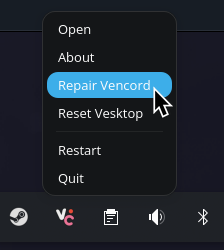
What did fix it for me though, was the “Repair Vencord” option in the System Tray.