When I first installed CachyOS about 3 weeks ago, I was able to pair my Keychron M6 mouse via Bluetooth without issue. However, after a recent system update (including newer kernel), I can no longer connect or pair any devices via Bluetooth. The devices show up in the Bluetooth list in CachyOS when I set them to be discoverable, yet when I select the pairing button I get the “failed to pair device” error message. This happens with both the Keychron M6 mouse and the RK M87 keyboard. Is this a bug with the kernel or with something else in CachyOS, and are there any solutions other than reverting to a previous kernel (I have not tried this yet, but I read this has fixed the Bluetooth connection issue for others)?
In CachyOS I’m running kernel “Linux 6.18.2-3-cachyos” and KDE Plasma 6.5.4 with Wayland as the desktop environment. Both Bluetooth devices connect properly on a different laptop that is running Linux Mint using Cinnamon DE on X11, so I know they are functioning properly.
Here’s what I’ve tried thus far in CachyOS:
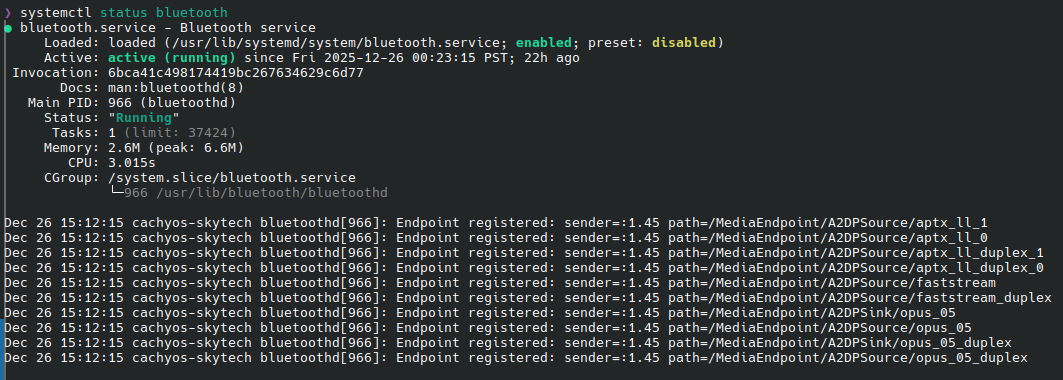
- verified that Bluetooth service is running by entering
systemctl status bluetoothin Konsole:
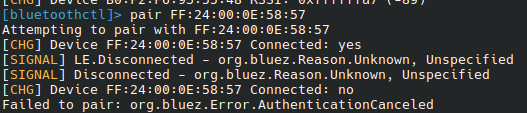
- used
bluetoothctlin Konsole to attempt to scan, pair, and connect to devices:
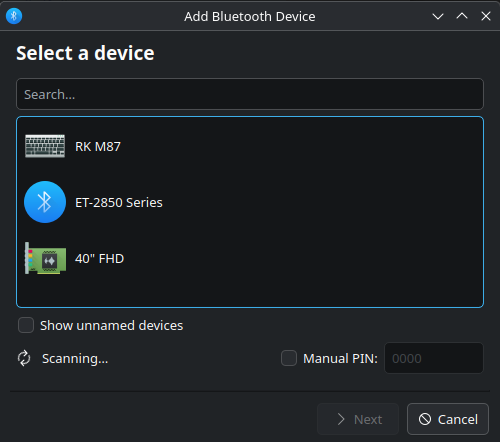
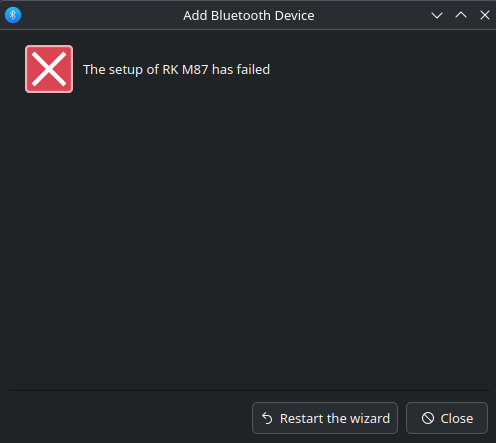
- used the KDE Bluetooth GUI to scan and attempt to pair with devices (this method worked previously before recent system/kernel update):
- installed Blueman application which also failed to pair or connect
Any other suggestions? I am at a loss of what to try. I’ve thoroughly searched through both the Arch wiki and the CachyOS forums, yet none of the solutions posted seem to fix the problem.
Thanks for the assistance!