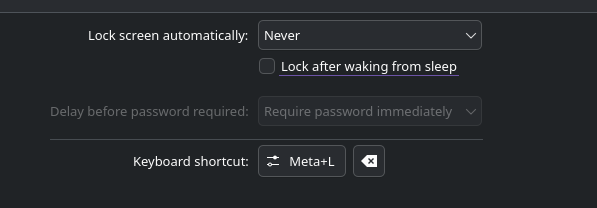
Summary: Cannot disable automatic screen lock on CachyOS with KDE Plasma 6.6.5
Product: kscreenlocker
Version: 6.6.5
Platform: CachyOS Linux
Description of Problem:
On a clean install of CachyOS with KDE Plasma 6, the “Lock screen automatically after” toggle in System Settings (Workspace Behavior ➜ Screen Locking) does not function as expected. The system continues to lock the screen after the specified timeout despite the toggle being off.
Steps to Reproduce:
- Open
System Settings ➜ Workspace Behavior ➜ Screen Locking. - Uncheck the box for “Lock screen automatically after”.
- Click “Apply”.
- Wait for the standard timeout period (e.g., 5-10 minutes) without user input.
Expected Results:
The screen should remain unlocked after the timeout period.
Observed Results:
The screen locks automatically after the timeout period.
Additional Context:
The same behavior persists after disabling “Lock after waking from sleep” in Power Management. Toggling the “Manually Block Sleep and Screen Locking” feature in the system tray has no effect, and changing the system’s Global Theme does not resolve the issue.
System Information:
- Operating System: CachyOS Linux
- KDE Plasma Version: 6.6.5
- KDE Frameworks Version: 6.26.0
- Qt Version: 6.11.1
- Kernel Version: 6.18.32-1-cachyos-lts (64-bit)
- Graphics Platform: X11
- Graphics Processor: NVIDIA GeForce GTX 1050 Ti