hello,
I try to make one library for steam, using it under linux and windows at the same time.
installing game under linux,
launch it: working
going on windows( with WinBtrfs v1.9) : working.
going back to linux: get error : “an error occured while launching this game: missing file privileges”
tested on 2 computers and get same error.
tried following git winbtrfs wiki the mapping and fast boot add in regedit, this does not help.
making a chown $user on my steam folder grant acces to steam.
this is clearly a window side probleme, but I think this remain interesting for CachyOS
wanted to say HI to this great little not so niche forum!
Cachy OS Jo!
Topic: i dont have seen any problems on steam os or some clones and so there were no probs with cachy and ntfs
i am still a hard and stupid learning lin noob. could i have misstaken steam’s pesky valids and reinstalls of 15Gb Workshop mods because of just external drive not beeing connected?
shouldn’t mean a linux-ntfs-weakness it happens with ext4 and btrfs too.
even clonezilla can run off ntfs on usb-stick done by rufus in win10.
Yes, when Windows touches files, it has an indexing algorithm that changes file headers, and Linux doesn’t like that. It’s a dual-booter’s problem for decades, and unless Windows suddenly stops touching every directory and file all the time, it’s going to be a problem.
Only way to remedy is to keep a second copy of the game for Windows to touch, and leave the Linux versions on its own partition, preferably only to send save games to and from.
I disagree. I’m running dual boot with btrfs as the filesystem for both Windows and Linux. The only problem I’ve had is with Civilization VII, because there’s native Linux and Windows binaries, so it redownloads the entire game each time I reboot into the other system.
Otherwise, once I was able to properly set the registry key entry to map my user between Linux and Windows, everything is fine. I do not need to keep two copies of games.
Until recently, I was using EndeavourOS, but I switched to CachyOS. The whole thing runs in dual boot with Windows 10 and CachyOS.
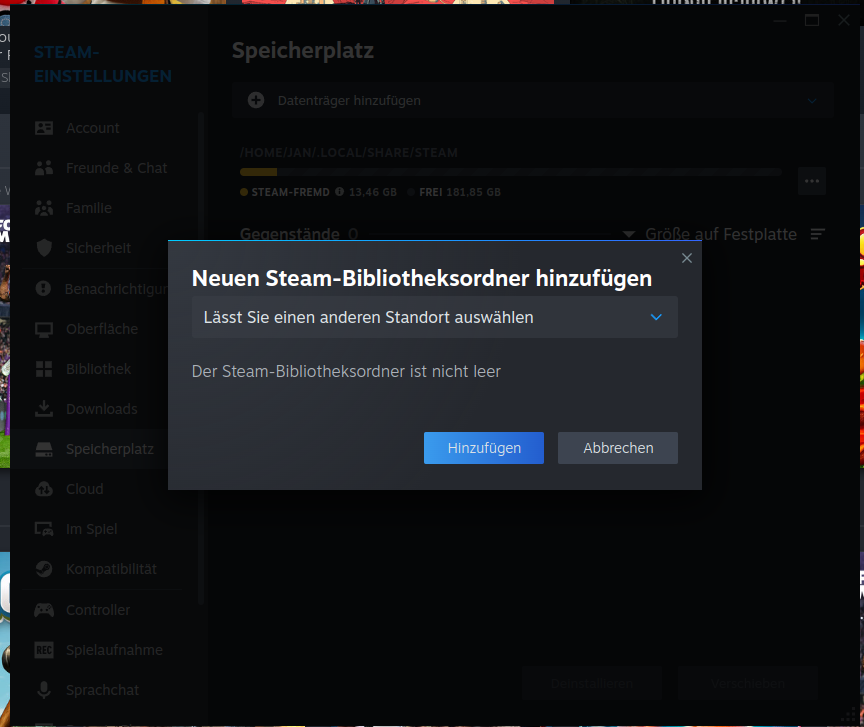
My problem now is that Steam can no longer find my library. It is located on my second hard drive so that I can use the library on both operating systems. Under EndeavourOS, I was able to integrate it without any problems.
Under CachyOS, I automatically integrated the hard drive and want to add the library under Steam. Here, I always get the messages:
“The Steam library folder cannot be found” or “The Steam library folder is not empty.”
I have gained quite a bit of experience with Linux and basically love it, but in this case, I can’t find a solution.
the solution for me was removing the compression on the btrfs filesystem. i did
sudo btrfs filesystem defragment -r -v /path/to/mounted/btrfs/root(this can take some hours) and then removed the compress=zstd option from /etc/fstab for the btrfs partition, then restart. Maybe i just got lucky. Maybe you can confirm if this helped you!
I think you have same issue that I had, but on ntfs. I had link files in compatdata from previous distro and they could’t be opened or deleted. I managed to move the broken files into different folder using console but to this day I haven’t been able to delete them. It did fix the steam issue but the now I have a folder that I can’t delete.