Btrfs Assistant: Timeline snapshots cannot be activated. I can enable them with the checkbox and then click Apply systemd-changes, but this has no effect. Restarting Btrfs Assistant also deactivates everything again. I’ve been using Btrfs Assistant on another OS for several years, and there, clicking Apply systemd-changes was all it took.
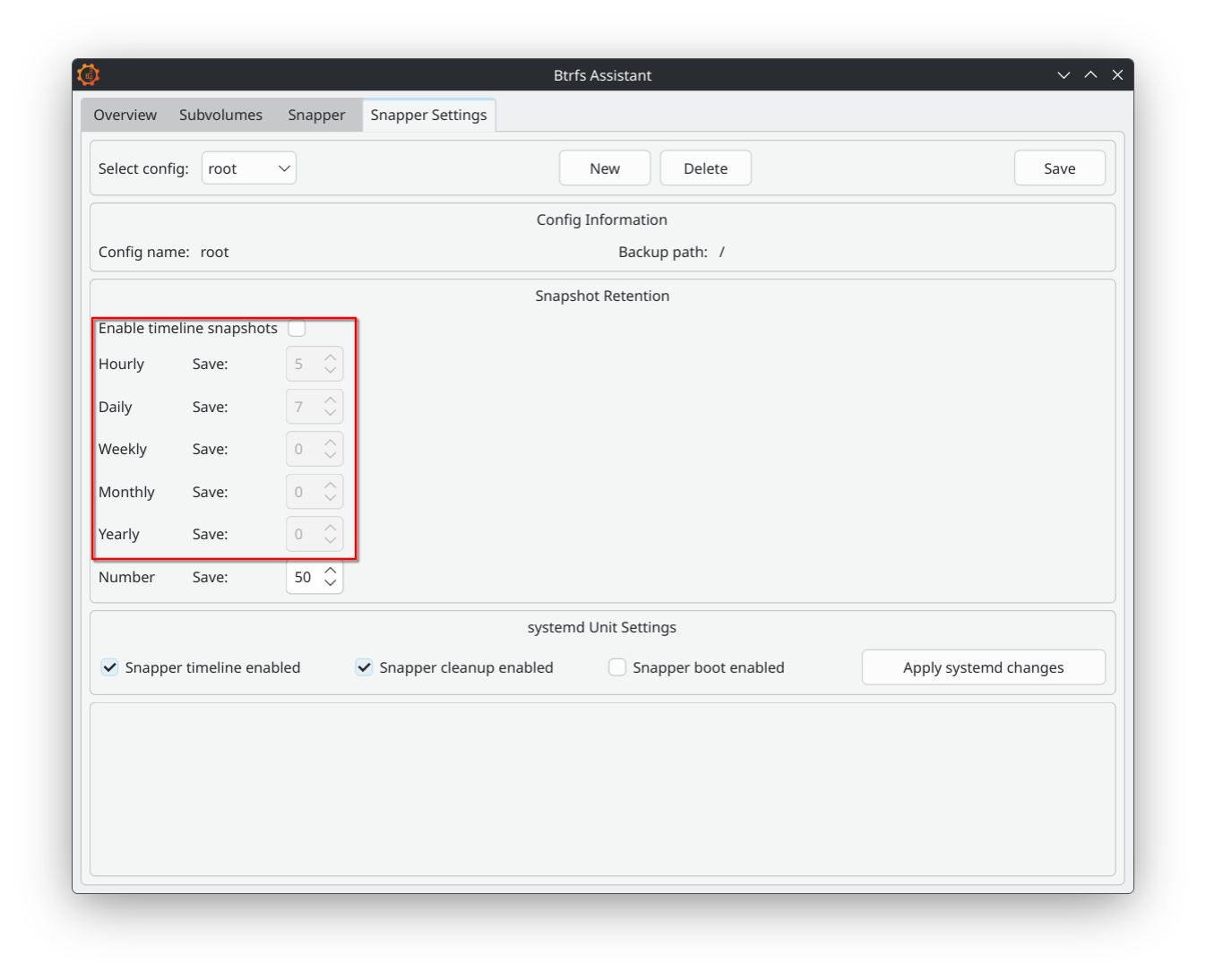
Maybe check the “Enable timeline snapshots” first?
Edit: oh, that looks disabled, too. Sorry.
Edit2: it sounds stupid but maybe try a pacman -Syu followed by a reboot.
BTRFS Assistant needs an existing Snapper config to manage timelines. If it’s absent or misconfigured, enabling in the GUI won’t stick.
Check existing configs:
snapper list-configs
If empty or no “root” config, create one:
snapper -c root create-config /
This creates /etc/snapper/configs/root and a /.snapshots subvolume
If using the default CachyOS BTRFS layout (e.g., @ subvolume for root), adjust the path:
snapper -c root create-config / -t default
After this, relaunch BTRFS Assistant (btrfs-assistant), go to the Snapper tab, enable the timeline checkbox, set your retention (e.g., 10 hourly, 7 daily), and SAVE
Check and Manually Enable Timeline in Config File
The GUI might not be writing TIMELINE_CREATE=“yes” properly. Force it manually.
Edit the config (replace root if your config has a different name):
nano /etc/snapper/configs/root
Ensure these lines are set:
TIMELINE_CREATE="yes"
TIMELINE_CLEANUP="yes"
TIMELINE_MIN_AGE="1800"  # 30 minutes; adjust as needed
TIMELINE_LIMIT_HOURLY="10"
TIMELINE_LIMIT_DAILY="7"
TIMELINE_LIMIT_WEEKLY="0"
TIMELINE_LIMIT_MONTHLY="0"
TIMELINE_LIMIT_YEARLY="0"
Save and exit
Verify the change:
snapper -c root get-config
Look for TIMELINE_CREATE yes and TIMELINE_CLEANUP yes
Timeline snapshots rely on systemd timers (CachyOS/Arch prefers these over cron to avoid duplicates). If they’re not running, no snapshots create, and settings feel “inactive.”
Enable and start the timers:
systemctl enable --now snapper-timeline.timer snapper-cleanup.timer
This creates hourly snapshots (default) and cleans up old ones daily.
Check status:
systemctl status snapper-timeline.timer
systemctl status snapper-cleanup.timer
Look for “active (waiting)” and no errors. If failed, check logs: journalctl -u snapper-timeline.timer -e.
Restart BTRFS Assistant after this, enable the checkbox again, SAVE, and test persistence by closing/reopening the app.
many thanks @Steeledpick 
At least everything is still activated in the Btrfs Assistant after I restarted it. Let’s wait and see what happens…
Update one hour later: it works so, thank yuu 
Hi @Steeledpick !
Had the exact same problem, but thx to your advice, I was able to set up the timeline snapshots as I want them!
Editing the …/configs/root and adjusting the the values did the trick!
Sweet a 2 for 1 deal !!!