sboc
October 4, 2025, 3:15pm
1
I have a fresh install of CachyOS. I just installed it by wiping the existing OS - using the entire drive. After installing the disk is no longer recognized as bootable.
The motherboard is Asus X870 MAX Gaming.
In BIOS under secure boot I have set OS Type to Other and Secore Boot Mode to custom (it cannot be set to disabled). And I cleared all the keys under key management.
I enabled CSM and tried both UEFI and Legacy Only. None works.
When I boot up the system it automatically enters BIOS because it could not find any bootable devices.
If I insert a Windows USB (just an installer) I get the CachyOS boot menu and can launch CachyOS from the installed SSD.
Does anybody have a fix for this?
Hey sboc,
you should set the BIOS to UEFI mode.
Here you can see the settings for Secure Boot on your Asus board.
| OS Type | > Other OS > Standard |
This is not really a clear description, but this should deactivate Secure Boot on your device.
Check if the boot order selects every USB Options first.
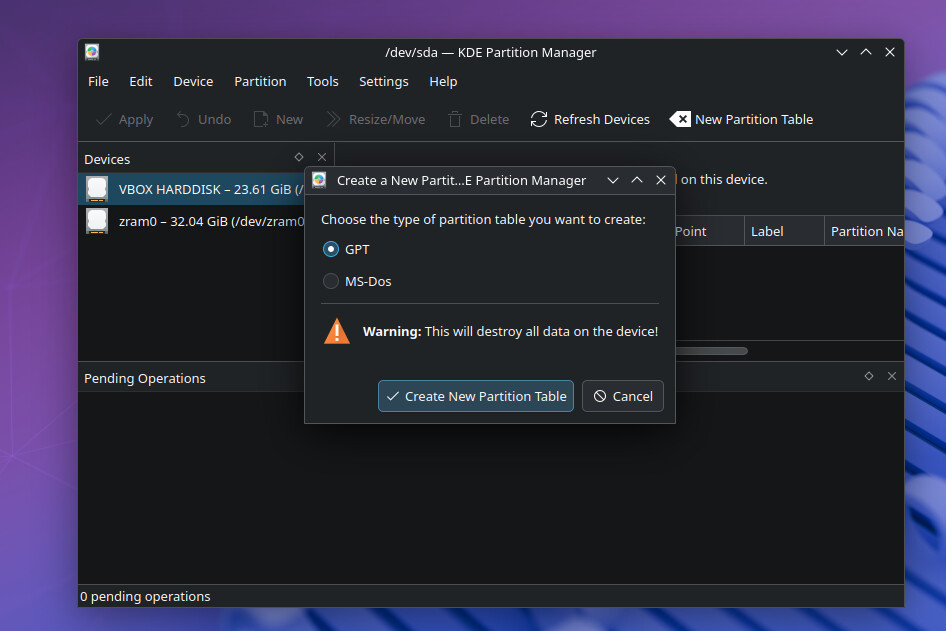
Inside CachyOS Live System, open KDE Partition Manager, check if your wanted drive is completely wiped.
Then follow the wiki:
Important:
“Avoid using the “Install alongside” option in Calamares, as it can lead to complications and is not recommended.”
So select:
“The “Erase Disk” Option in Calamares will wipe the selected disk and install CachyOS to the target.”
___
After the installation and the Prompt “Finish”.
Select “Shutdown” (to get some time).
Remove the USB drive.
Go into your Bios again, and check your Boot Order.
If everything worked, select the new CachyOS boot loader as your first option.
If you still got problems, i would recommend a BIOS update.
Good Luck!
sboc
October 4, 2025, 5:23pm
3
So this is a strange error - reinstalled a few times but it’s the same thing.
First the BIOS setting. I cannot boot from the USB unless I enabled CSM. If I disabled it the only thing that shows up in my boot menu a network boot option.
For some reason the disk I installed CachyOS on doesn’t show up as an option. Again - when I installed I just chose to erase the existing disk. I didn’t change settings - just rand with defaults.
I can also boot CachyOS - but only I have a Windows isntallation USB connected which is VERY weird. In BIOS the USB device is the only option under bootable devices.
From the entry screen I can see the SSD just fine. I just don’t have it as a bootable options.
sboc
October 4, 2025, 7:19pm
5
System:
Kernel: 6.17.0-4-cachyos arch: x86_64 bits: 64 compiler: clang v: 20.1.8
clocksource: tsc avail: hpet,acpi_pm parameters: quiet nowatchdog splash rw
rootflags=subvol=/@ root=UUID=7cb7dfa1-fc7b-433e-91bb-9237c07cad90
Desktop: KDE Plasma v: 6.4.5 tk: Qt v: N/A info: frameworks v: 6.18.0
wm: kwin_wayland vt: 2 dm: SDDM Distro: CachyOS base: Arch Linux
Machine:
Type: Desktop System: MM Vision product: X870-MAX-GAMING-WIFI7-1002 v: N/A
serial: <superuser required>
Mobo: ASUSTeK model: X870 MAX GAMING WIFI7 v: Rev 1.xx
serial: <superuser required> part-nu: SKU uuid: <superuser required>
BIOS: American Megatrends v: 1078 date: 07/14/2025
Battery:
ID-1: hidpp_battery_0 charge: 100% condition: N/A volts: 4.23 min: N/A
model: Logitech G502 LIGHTSPEED Wireless Gaming Mouse type: N/A
serial: <filter> charging: status: full cycles: N/A
CPU:
Info: model: AMD Ryzen 7 9800X3D bits: 64 type: MT MCP arch: Zen 5 gen: 5
level: v4 note: check built: 2024+ process: TSMC n4 (4nm) family: 0x1A (26)
model-id: 0x44 (68) stepping: 0 microcode: 0xB404032
Topology: cpus: 1x dies: 1 clusters: 1 cores: 8 threads: 16 tpc: 2
smt: enabled cache: L1: 640 KiB desc: d-8x48 KiB; i-8x32 KiB L2: 8 MiB
desc: 8x1024 KiB L3: 96 MiB desc: 1x96 MiB
Speed (MHz): avg: 5221 min/max: 603/5272 boost: enabled scaling:
driver: amd-pstate-epp governor: powersave cores: 1: 5221 2: 5221 3: 5221
4: 5221 5: 5221 6: 5221 7: 5221 8: 5221 9: 5221 10: 5221 11: 5221 12: 5221
13: 5221 14: 5221 15: 5221 16: 5221 bogomips: 150397
Flags-basic: avx avx2 ht lm nx pae sse sse2 sse3 sse4_1 sse4_2 sse4a
ssse3 svm
Vulnerabilities:
Type: gather_data_sampling status: Not affected
Type: ghostwrite status: Not affected
Type: indirect_target_selection status: Not affected
Type: itlb_multihit status: Not affected
Type: l1tf status: Not affected
Type: mds status: Not affected
Type: meltdown status: Not affected
Type: mmio_stale_data status: Not affected
Type: old_microcode status: Not affected
Type: reg_file_data_sampling status: Not affected
Type: retbleed status: Not affected
Type: spec_rstack_overflow mitigation: IBPB on VMEXIT only
Type: spec_store_bypass mitigation: Speculative Store Bypass disabled via
prctl
Type: spectre_v1 mitigation: usercopy/swapgs barriers and __user pointer
sanitization
Type: spectre_v2 mitigation: Enhanced / Automatic IBRS; IBPB:
conditional; STIBP: always-on; PBRSB-eIBRS: Not affected; BHI: Not
affected
Type: srbds status: Not affected
Type: tsa status: Not affected
Type: tsx_async_abort status: Not affected
Type: vmscape mitigation: IBPB on VMEXIT
Graphics:
Device-1: Advanced Micro Devices [AMD/ATI] Navi 48 [Radeon RX 9070/9070
XT/9070 GRE] vendor: ASUSTeK driver: amdgpu v: kernel arch: RDNA-4
code: Navi-4x process: TSMC n4 (4nm) built: 2025+ pcie: gen: 5
speed: 32 GT/s lanes: 16 ports: active: DP-1 empty: DP-2, DP-3, HDMI-A-1,
Writeback-1 bus-ID: 03:00.0 chip-ID: 1002:7550 class-ID: 0300
Display: wayland server: X.org v: 1.21.1.18 with: Xwayland v: 24.1.8
compositor: kwin_wayland driver: gpu: amdgpu display-ID: 0
Monitor-1: DP-1 model: ASUS VG34V serial: <filter> built: 2021 res:
mode: 3440x1440 hz: 165 scale: 100% (1) dpi: 110 gamma: 1.2
size: 797x334mm (31.38x13.15") diag: 864mm (34") modes: max: 3440x1440
min: 720x400
API: EGL v: 1.5 hw: drv: amd radeonsi platforms: device: 0 drv: radeonsi
device: 1 drv: swrast gbm: drv: kms_swrast surfaceless: drv: radeonsi
wayland: drv: radeonsi x11: drv: radeonsi
API: OpenGL v: 4.6 compat-v: 4.5 vendor: amd mesa v: 25.2.4-cachyos1.2
glx-v: 1.4 direct-render: yes renderer: AMD Radeon RX 9070 XT (radeonsi
gfx1201 LLVM 20.1.8 DRM 3.64 6.17.0-4-cachyos) device-ID: 1002:7550
memory: 15.62 GiB unified: no display-ID: :0.0
API: Vulkan v: 1.4.321 layers: 9 device: 0 type: discrete-gpu name: AMD
Radeon RX 9070 XT (RADV GFX1201) driver: mesa radv v: 25.2.4-cachyos1.2
device-ID: 1002:7550 surfaces: N/A
Info: Tools: api: clinfo, eglinfo, glxinfo, vulkaninfo
de: kscreen-console,kscreen-doctor wl: wayland-info
x11: xdpyinfo, xprop, xrandr
Audio:
Device-1: Advanced Micro Devices [AMD/ATI] Navi 48 HDMI/DP Audio
driver: snd_hda_intel v: kernel pcie: gen: 5 speed: 32 GT/s lanes: 16
bus-ID: 03:00.1 chip-ID: 1002:ab40 class-ID: 0403
Device-2: Advanced Micro Devices [AMD] Family 17h/19h/1ah HD Audio
vendor: ASUSTeK driver: snd_hda_intel v: kernel pcie: gen: 4 speed: 16 GT/s
lanes: 16 bus-ID: 76:00.6 chip-ID: 1022:15e3 class-ID: 0403
Device-3: Razer USA Barracuda X driver: hid-generic,snd-usb-audio,usbhid
type: USB rev: 1.1 speed: 12 Mb/s lanes: 1 mode: 1.1 bus-ID: 3-1:2
chip-ID: 1532:0536 class-ID: 0300
Device-4: Razer USA Nommo Chroma driver: hid-generic,snd-usb-audio,usbhid
type: USB rev: 2.0 speed: 12 Mb/s lanes: 1 mode: 1.1 bus-ID: 9-1:2
chip-ID: 1532:0517 class-ID: 0102
API: ALSA v: k6.17.0-4-cachyos status: kernel-api
tools: alsactl,alsamixer,amixer
Server-1: JACK v: 1.9.22 status: off tools: N/A
Server-2: PipeWire v: 1.4.8 status: active with: 1: pipewire-pulse
status: active 2: wireplumber status: active 3: pipewire-alsa type: plugin
tools: pactl,pw-cat,pw-cli,wpctl
Network:
Device-1: Realtek RTL8125 2.5GbE vendor: ASUSTeK driver: r8169 v: kernel
pcie: gen: 2 speed: 5 GT/s lanes: 1 port: e000 bus-ID: 0a:00.0
chip-ID: 10ec:8125 class-ID: 0200
IF: enp10s0 state: down mac: <filter>
Device-2: Realtek RTL8922AE 802.11be PCIe Wireless Network Adapter
vendor: AzureWave driver: rtw89_8922ae v: kernel pcie: gen: 2 speed: 5 GT/s
lanes: 1 port: d000 bus-ID: 0b:00.0 chip-ID: 10ec:8922 class-ID: 0280
IF: wlan0 state: up mac: <filter>
Info: services: NetworkManager, systemd-timesyncd, wpa_supplicant
Bluetooth:
Device-1: IMC Networks Bluetooth Radio driver: btusb v: 0.8 type: USB
rev: 1.0 speed: 12 Mb/s lanes: 1 mode: 1.1 bus-ID: 1-11:5 chip-ID: 13d3:3617
class-ID: e001 serial: <filter>
Report: btmgmt ID: hci0 rfk-id: 0 state: up address: <filter> bt-v: 5.3
lmp-v: 12 status: discoverable: no pairing: no class-ID: 6c0104
Drives:
Local Storage: total: 1.86 TiB used: 153.46 GiB (8.0%)
SMART Message: Unable to run smartctl. Root privileges required.
ID-1: /dev/nvme0n1 maj-min: 259:0 vendor: Kingston model: SFYR2S2T0
size: 1.86 TiB block-size: physical: 512 B logical: 512 B speed: 126 Gb/s
lanes: 4 tech: SSD serial: <filter> fw-rev: SGW00110 temp: 39.9 C
scheme: MBR
Partition:
ID-1: / raw-size: 1.86 TiB size: 1.86 TiB (100.00%) used: 152.97 GiB (8.0%)
fs: btrfs dev: /dev/nvme0n1p3 maj-min: 259:3
ID-2: /boot raw-size: 2 GiB size: 2 GiB (99.80%) used: 504.3 MiB (24.7%)
fs: vfat dev: /dev/nvme0n1p1 maj-min: 259:1
ID-3: /home raw-size: 1.86 TiB size: 1.86 TiB (100.00%)
used: 152.97 GiB (8.0%) fs: btrfs dev: /dev/nvme0n1p3 maj-min: 259:3
ID-4: /var/log raw-size: 1.86 TiB size: 1.86 TiB (100.00%)
used: 152.97 GiB (8.0%) fs: btrfs dev: /dev/nvme0n1p3 maj-min: 259:3
ID-5: /var/tmp raw-size: 1.86 TiB size: 1.86 TiB (100.00%)
used: 152.97 GiB (8.0%) fs: btrfs dev: /dev/nvme0n1p3 maj-min: 259:3
Swap:
Kernel: swappiness: 150 (default 60) cache-pressure: 50 (default 100)
zswap: no
ID-1: swap-1 type: zram size: 62.45 GiB used: 1.4 MiB (0.0%) priority: 100
comp: zstd avail: lzo-rle,lzo,lz4,lz4hc,deflate,842 dev: /dev/zram0
Sensors:
System Temperatures: cpu: 54.6 C mobo: 42.8 C gpu: amdgpu temp: 52.0 C
mem: 54.0 C
Fan Speeds (rpm): N/A gpu: amdgpu fan: 0
Info:
Memory: total: 64 GiB available: 62.45 GiB used: 5.59 GiB (9.0%)
Processes: 378 Power: uptime: 1h 20m states: freeze,mem,disk suspend: deep
avail: s2idle wakeups: 0 hibernate: platform avail: shutdown, reboot,
suspend, test_resume image: 24.96 GiB services: org_kde_powerdevil,
power-profiles-daemon, upowerd Init: systemd v: 258 default: graphical
tool: systemctl
Packages: pm: pacman pkgs: 1349 libs: 443 tools: octopi,paru Compilers:
clang: 20.1.8 gcc: 15.2.1 Shell: Zsh v: 5.9 running-in: konsole inxi: 3.3.39
~ test -d /sys/firmware/efi && echo efi || echo bios ✔ 21:17:22
bios
~ sudo efibootmgr -v ✔ 21:17:47
[sudo] password for sboc:
EFI variables are not supported on this system.
error trace:
~ sudo parted -l 2 ✘ 21:18:06
Model: KINGSTON SFYR2S2T0 (nvme)
Disk /dev/nvme0n1: 2048GB
Sector size (logical/physical): 512B/512B
Partition Table: msdos
Disk Flags:
Number Start End Size Type File system Flags
1 1049kB 2149MB 2147MB primary fat32 lba
3 2157MB 2048GB 2046GB primary btrfs boot
Model: Unknown (unknown)
Disk /dev/zram0: 67,1GB
Sector size (logical/physical): 4096B/4096B
Partition Table: loop
Disk Flags:
Number Start End Size File system Flags
1 0,00B 67,1GB 67,1GB linux-swap(v1)
~
Also checked CSM and fast boot. All disabled.
how did you create the USB iso ?
sboc
October 4, 2025, 9:30pm
7
The USB iso I used to install CachyOS was just created with Etcher. The USB I use to boot into the installed CachyOS is actually a windows installation USB. I created that with dd.
dd if=windows-installer.iso of=/dev/sda bs=4M conv=fdatasync status=progress
Partition Table: msdos
Somehow your Partition Table is set to MBR.
But you should use GPT.
It seems that something - at some point - set the Partition Table to msdos/MBR.
I thought Calamares (the installation tool) would set a new Partition Table, but i just read that this is not always the case.
So please go into a live system, and use a partition tool.
For example KDE Partition Manager.
Right Click on your drive.
Select New Partition Table
And select GPT.
At least, “Apply” top left.
Install again.
Hope this will solve the Boot Problem.
_______
I just read in your log:
test -d /sys/firmware/efi && echo efi || echo bios ✔ 21:17:22
bios
So the system you made the log with is still in Legacy Mode (CSM).
Did you reset or updated your bios?
As @stephane mentions, maybe you board is falling back on CSM somehow.
sboc
October 5, 2025, 10:04am
9
Thanks a bunch for the help. The main problem was that the USBs I created for some reason required CSM to be enabled to be able to boot.
This is most likely because they were created on a computer with CSM enabled. I downloaded a fresh ISO and used my son’s computer and Rufus to force write it with GPT.
I could now disable CSM and boot that USB to install CachyOS. Everything works perfectly now.
Thanks again!