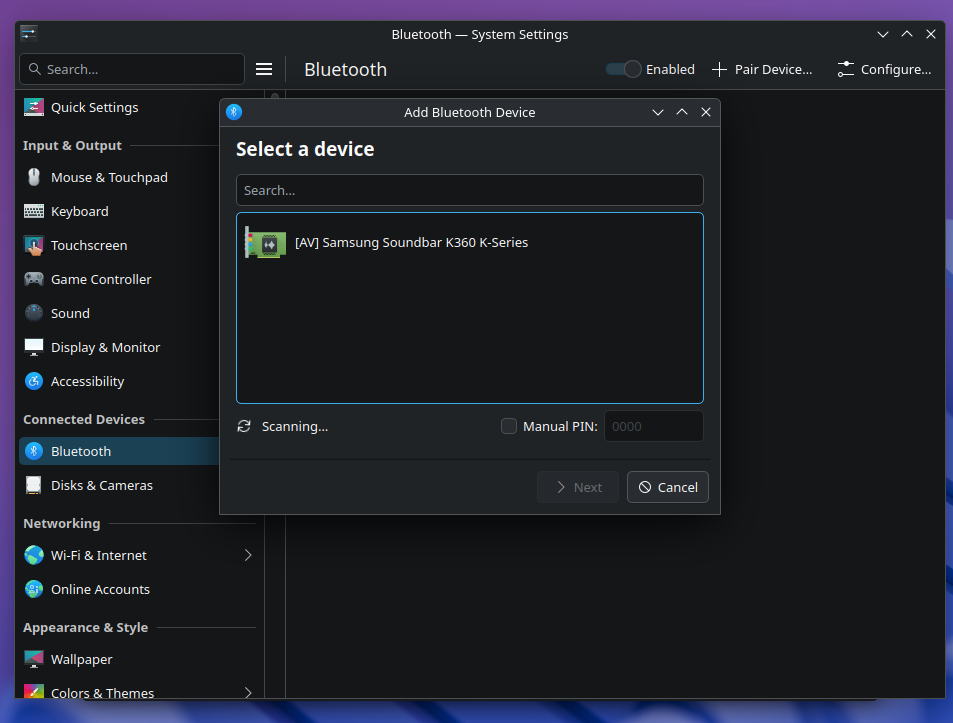
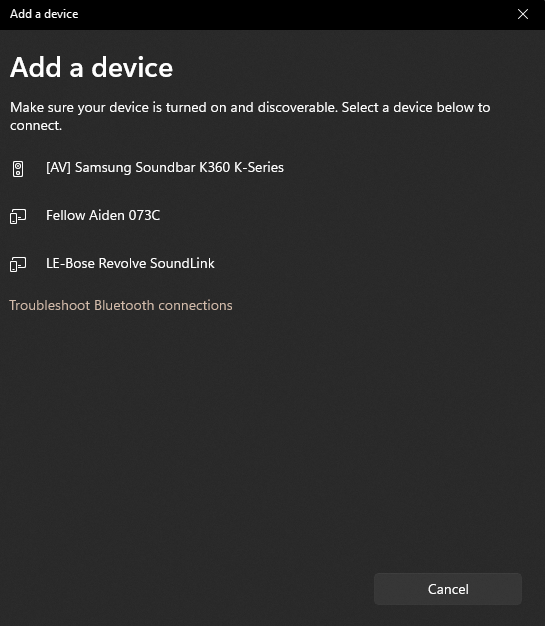
I am using KDE Plasma as my DE. I found I had an issue with CachyOS not showing all my bluetooth devices when attempting to connect my Xbox Series controller to my PC
Tried everything I could think of to try and get the controller to show in pairing menu as I though it was just an issue with the controller because my headphones were found and connected with no issues(updating controller firmware on WIndows, xpadneo, fiddling around with Bluetooth configs, etc)
It wasn’t until I ended up looking at what devices I can pair in Windows and noticed that the Plasma pairing menu was only showing me one device and one device only and wouldn’t find any other devices.
Below are a couple screenshots to show what is happening, no matter how long I search for devices when using Cachy I cannot see any other devices. I am using the built in WIFI/Bluetooth on my B550 Gigabyte motherboard(AMD/Mediatek controller)
Does anyone else have this same type of issue? Is it something with support for the WIFI/Bluetooth controller on Linux or is there a package that CachyOS doesn’t install automatically?
I have also tried Fedora and it has the same issue but shocking Guarda Linux had no issues finding other nearby bluetooth devices.
Hopefully someone can give me a hint as to what might be going on
My guess is that it is a firmware problem. Maybe on Garuda they added a newer Firmware that supports newer Bluetooth Versions and stuff like Bluetooth LE.
Can you please check which hardware is used with
inxi -E
and please check that the mediatek firmware is installed
Thank you for your reply and my apologizes for just now getting back to you
I confirmed that linux-firmware-mediatek, linux-firmware, and linux-firmware-realtek are installed. Still am not able to see all the bluetooth devices located near me
Can you please check which mediatek device it is exactly? I remember I had to install a driver from the AUR to get WLAN & Bluetooth working with a mediatek device long time ago. The mediatek driver support isnt very good.
That’s the thing, I’m testing now on vanilla Arch and doesn’t work either. I can get my bluetooth headphones to connect with no issues so not sure if that says something about the module for my motherboard or what and what it is that Garuda installs
It looks like BLE Audio devices are disabled in the setting on Arch and CachyOS. I can see a device of a neighboor that I can’t see with the dafult settings when I add the following lines to /etc/bluetooth/main.conf:
Sorry for the late reply. Hmm interesting .. I’ll have to give that a try
I also was looking around the mediatek packages on the AUR and came across this one mt76-dkms-git. In the event that adding those options to the bluetooth conf don’t work, do you think that will?
Currently testing with linux-lts to see if it’s a kernel regression. Has anyone found a working fix for the RTL8852CU specifically on newer CachyOS kernels?